NetDisk User Manual Network Direct Attached Storage / NDAS
—————————————————————————————————————————————
Cable Installation
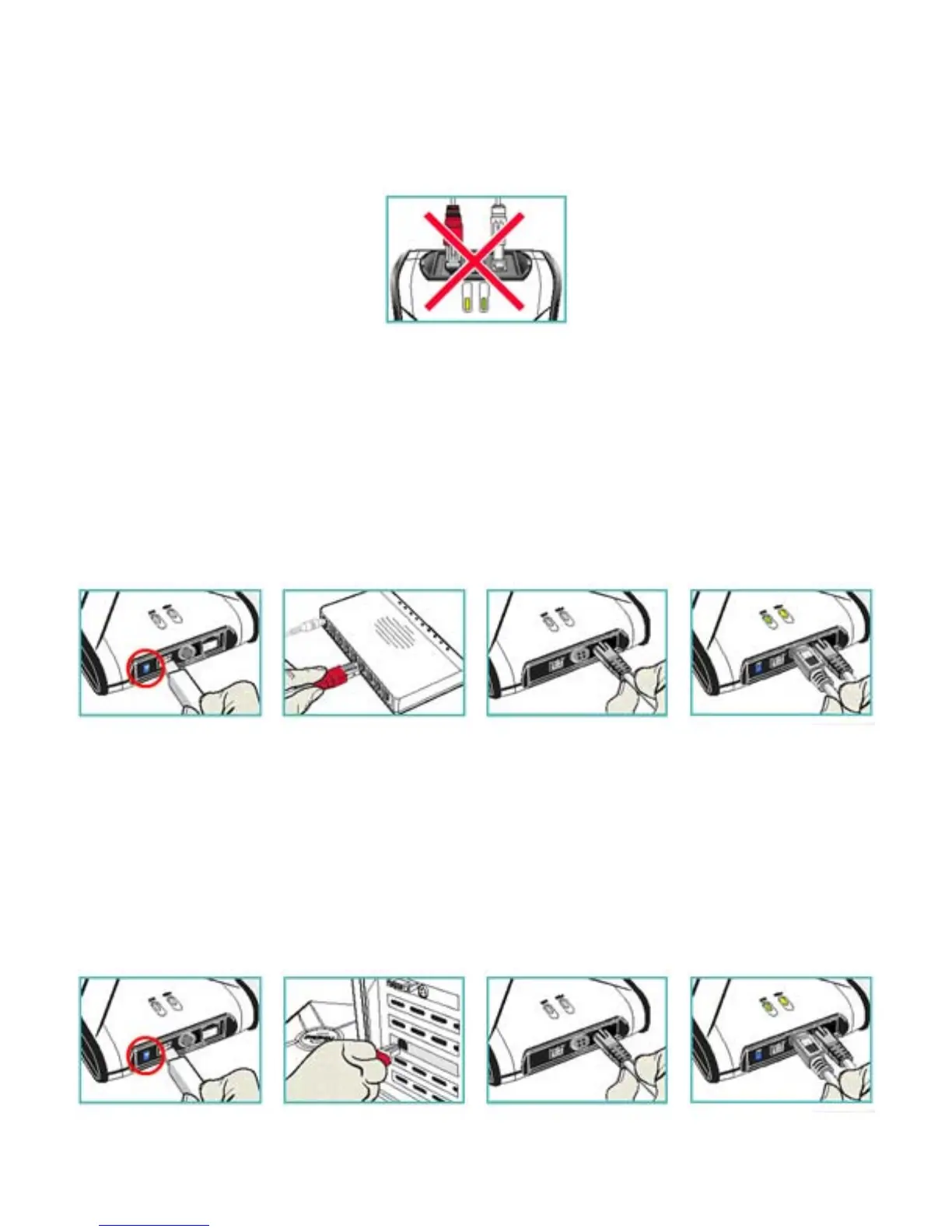
Warning
Do not connect USB cable and Ethernet cable at the same time. •
• Newer NetDisk does not have dip switches on them. However, NetDisk has the capability of
automatically recognizing NetDisk Mode without the dip switch. In such case, please skip step 1 (dip
switch setting) from the NetDisk Cable Installation below.
NetDisk Cable Installation
NDAS Mode
1
2
3
4
(1) Flip both dip switches down for NDAS Mode.
(2, 3) Connect NetDisk to a switch (100 Base-T) with included Ethernet cable (straight through).
Wireless users: Connect NetDisk to your wireless router or access point with included cable.
(4) Make sure the power connector is connected firmly.
Ethernet Mode
1
2
3
4
www.XIMETA.de
—————————————————————————————————————————————
8



 To Next Page