EasyManua.ls Logo

Xorcom XP0100 - User Interface

Xorcom XP0100
71 pages
Print Icon
To Next Page IconTo Next Page
To Previous Page IconTo Previous Page
Loading...
XP0100 Enterprise IP Phone Overview
Xorcom Ltd. 10 www.xorcom.com
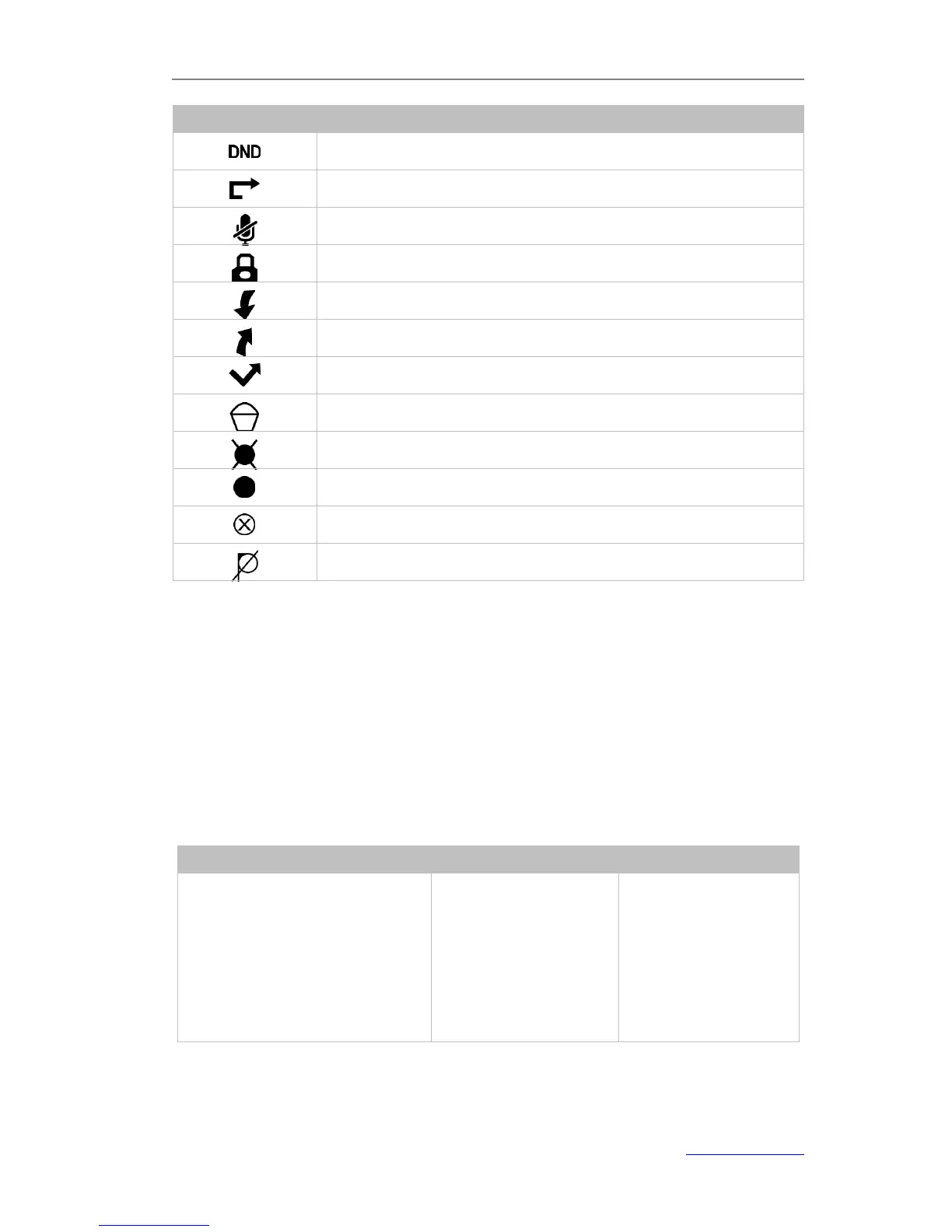
Icon
Description
Do Not Disturb
Call Forward
Call Mute
Keypad Lock
Received Calls
Dialed Calls
Missed Calls
Recording box is full
A call cannot be recorded
Recording starts successfully
Recording cannot be started
Recording cannot be stopped
User Interface
There are two ways to customize specific options on your phones:
1. Using keypad and display on the phone.
2. Using web user interface in an Internet browser from your PC. Refer to
Configuration and Registration to access the web user interface.
In many instances, it is possible to use both the user interfaces to operate the phone
and change settings. However, are only possible via a phone or web user interface.
Please refer to the following table for differences:

Phone Options
Phone UI
Web UI
Status
--IP
--MAC
--Firmware
--Network
--Phone
--Accounts

Table of Contents

Other manuals for Xorcom XP0100

Related product manuals