1
2
3
4
5
6
7
8
9
10
11
51
2. Pre-Use Preparation (Interior Equipment)
Exterior Lights
Equipped with automatic sensing headlights, this vehicle
can automatically turn on/off the position light and the high
beam by detecting the ambient light condition with the light
sensors. You can also control the lights manually with the CID,
switch, etc.
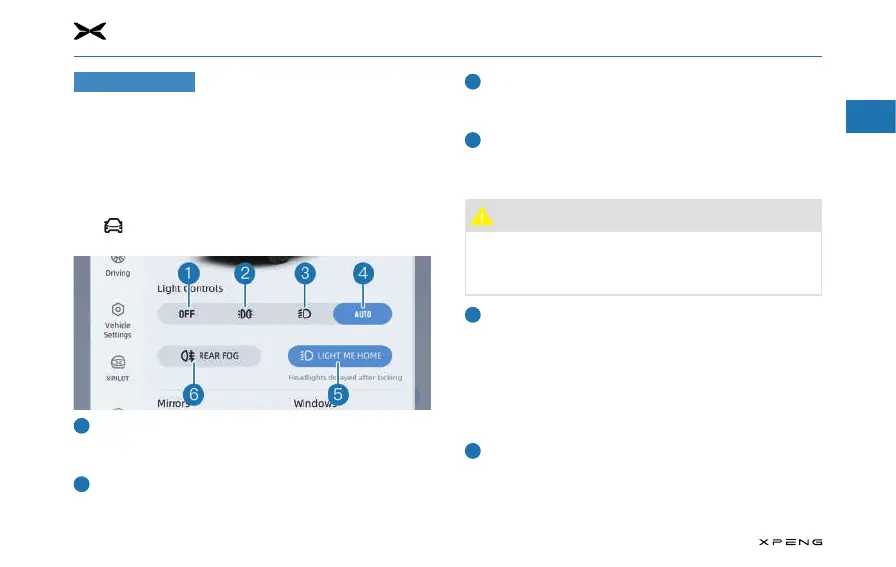
Control with CID
Tap
"
→
Quick Controls
"
on the CID to enter the light control
interface, and tap light buttons to control corresponding lights.
Turn off all exterior lights
─
Tap this button to turn off all exterior lights; tap light
buttons to turn on corresponding lights.
Position light
─
Tap this button to turn on/off position lights, license plate
lights, etc.
Low beam
─
When the position lights are not on, tap this button to
turn on/off the position lights, low beam, etc.
Automatic control
─
Tap this button to activate/deactivate the automatic
control.
Caution
●
The automatic control function may be limited by the
external environment. If it does not work properly,
please turn on the lights manually in time if necessary.
Light Me Home function
─
Tap to deactivate the Light Me Home function.
─
With this function activated, when you park the vehicle in
a dark environment, the high beam and position light will
be on for 30s and then go off after the vehicle is powered
off. Within 30s, if you execute the locking and setting
operation, the high beam and position lights will be on
for 10s and then go out.
Rear fog lights
─
When the low beam is on, tap this button to turn on/off
the rear fog lights.
─
When the position lights are off, the rear fog lights will
go off.


 To Next Page