VESDA VLC Product Guide VESDA by Xtralis
38 www.xtralis.com
12.1 Opening and Closing the detector
12.1.1 Opening the detector
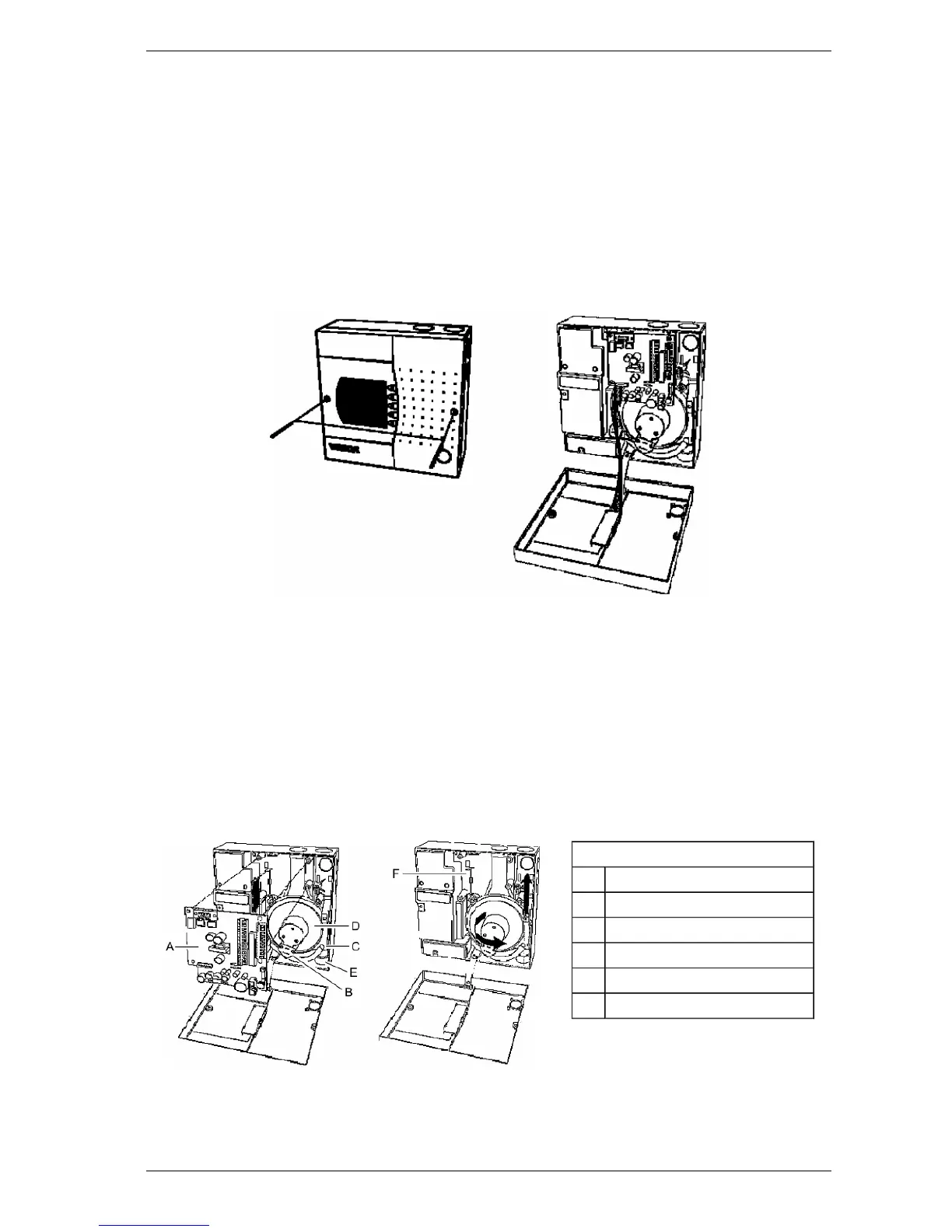
1. Undo the two screws on front cover
2. Open the front cover and allow cover to hang by the attached plastic strap
12.1.2 Closing the Detector
1. Replace the front cover over detector enclosure ensuring the plastic strap and cable loom are
not wedged between the cover and enclosure
2. Tighten the two screw
Figure 12-1: Opening and closing a VLC detector
12.2 Replacing the Aspirator
1. Remove the 4 screws securing the termination card (A)
2. Disconnect the wires on the aspirator (B)
3. Gently pull out termination card (A) from the interface card (You can’t see the interface card, it
is connected to the back of the termination card). Leave the termination card suspended by its
wires.
4. Pull off the air hose from aspirator pipe (C)
5. Undo the (captive) screws securing aspirator (D)
6. Lift the aspirator out
Legend
A Terminal Card
B Aspirator Wire Loom
C Aspirator Air Hose
D Aspirator
E Pipe Network Port
F Interface Card Slot
Figure 12-2: Illustration for replacing the aspirator













 To Next Page