en – Original instructions
30
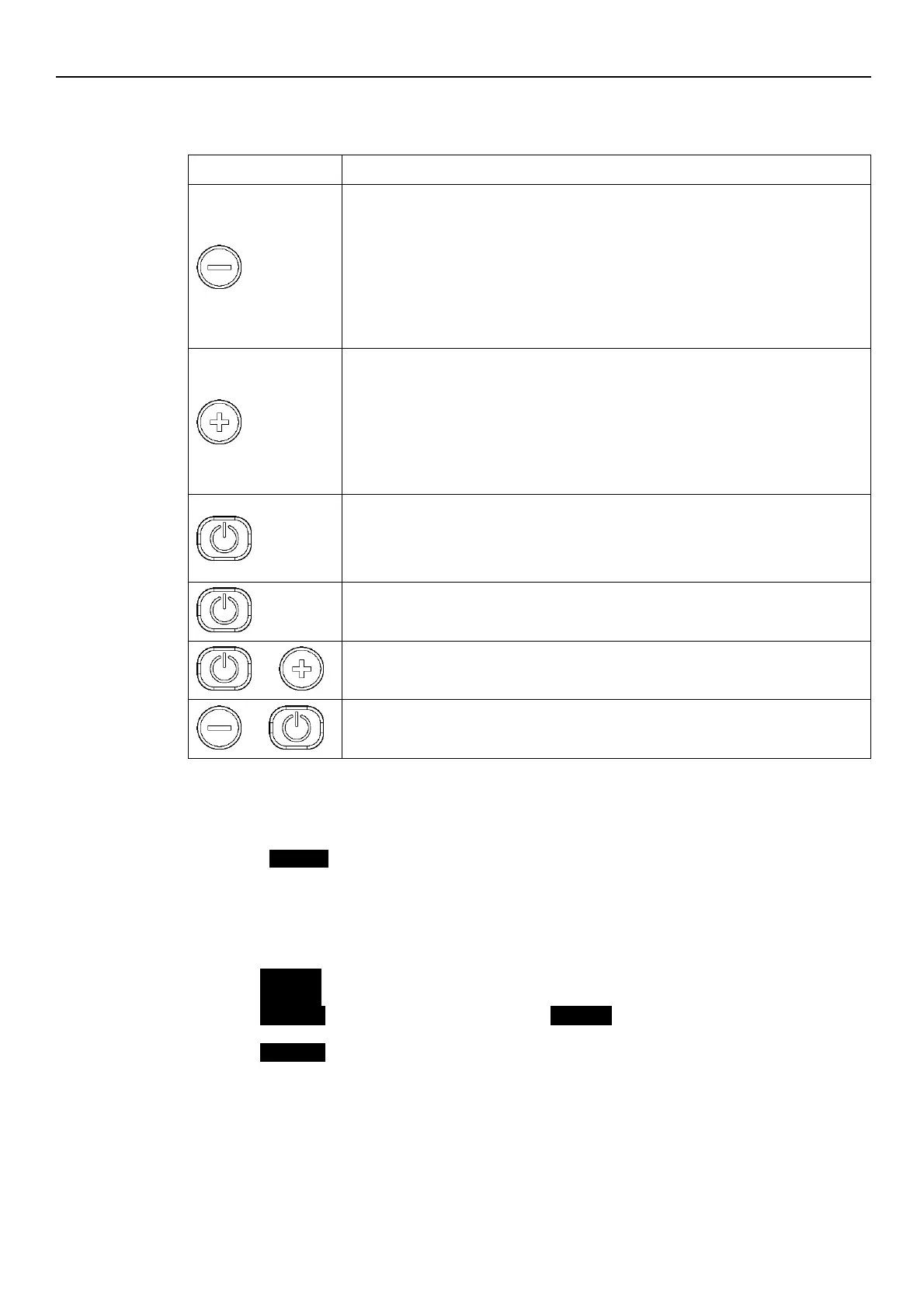
7.2 Functions of push buttons
Table 14: Functions of push buttons
1.
Main Visualization (see par. 7.4.1): decrease the required value related to the
selected control mode.
2.
Parameters Menu Visualization (see par. 7.4.2): decrease the parameter index
visualized.
3.
Parameters Editing/Visualization (see par. 7.4.2): decrease the displayed parameter
value.
4.
Zero Pressure Autocalibration (see par. 7.5, P44): perform autocalibration of pressure
sensor.
1.
Main Visualization (see par. 7.4.1): increase the required value related to the selected
control mode
2.
Parameters Menu Visualization (see par. 7.4.2): increase the displayed parameter
index.
3.
Parameters Editing/Visualization (see par. 7.4.2): increase the parameter value.
4.
Zero Pressure Autocalibration (see par. 7.5, P44): perform autocalibration of pressure
sensor.
1.
Main Visualization (see par. 7.4.1): START/STOP the pump
2.
Parameters Menu Visualization (see par. 7.4.2): switch to Parameters Edit
Visualization.
3.
Parameters Edit Visualization (see par. 7.4.2): save the parameter value.
Main Visualization (see par. 7.4.2): switches to Parameter Selection.
Parameters Menu Visualization: switches to Main Visualization
Main Visualization: switch between units of measure Speed and Head (see par. 7.4.1).
Main Visualization: switch between units of measure Speed and Head (see par. 7.4.1).
7.3 LEDs description
7.3.1 Power LED
When the POWER (green) LED is lit, the pump is supplied with power and the electronic devices
are operative.
7.3.2 Status LED
If the STATUS LED is not lit, then the pump is stopped or disabled (the pump motor is not
running).
If the STATUS (green) LED is lit, then the pump is running
If the STATUS (orange) LED is lit a non-blocking alarm is detected while the pump is stopped.
If the STATUS (orange) LED is lit alternate with STATUS (green), a non-blocking alarm is
detected while the pump is running.
If the STATUS (red) LED is lit, a blocking error is detected and the pump is stopped (the pump
motor is not running).




 To Next Page