Home
Xylem
Measuring Instruments
OMNI sensus C2
Page 38
Xylem OMNI sensus C2 - Page 38
41 pages
Manual
Save Page as PDF
To Next Page
To Next Page
To Previous Page
To Previous Page
Loading...
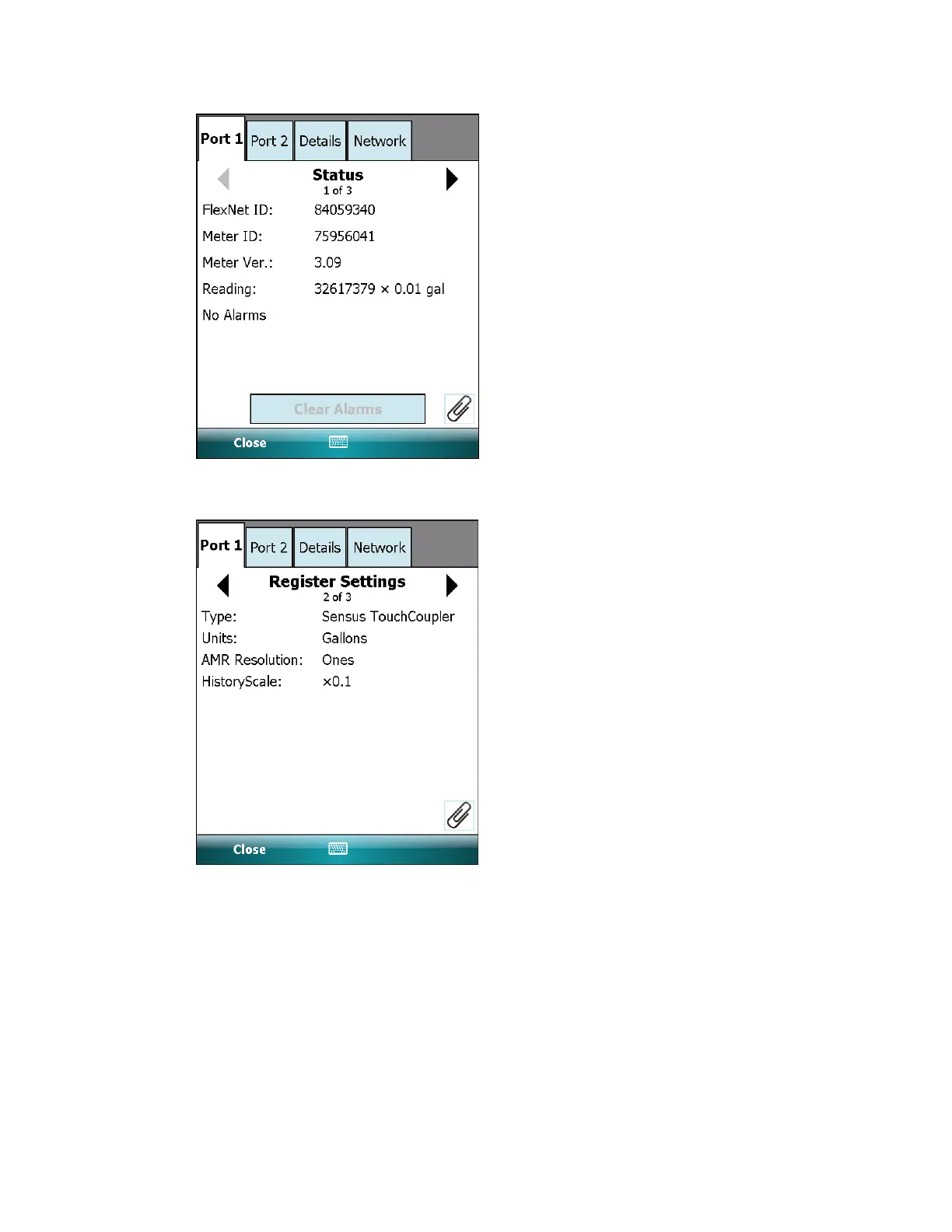
The Register Settings page displays the settings for the register type, units, AMR
resolution, and history scale.
The Alarm Settings page displays backflow, broken pipe and leak detection
threshold settings.
6 Two-way SmartPoint modules | 38
37
39
Table of Contents
Main Page
Table of Contents
3
OMNI™ Meter Overview
4
OMNI™+ Register
4
Alarms
4
Data Logging
4
OMNI Meter Specifications
4
LCD Display
6
Segment Test View
6
Totalizer View
7
Flow Direction Indicator
8
Notification View
8
Smart Mode and Normal Mode
8
Notification Icons
9
Battery Icon
9
Dead Battery Read
9
Signal Connections
13
Electrical Connection Configuration Options
13
OMNI Installation
16
Measuring Chamber
18
Remove the Measuring Chamber
19
Disassemble the Measuring Chamber
19
Exchange the Measuring Insert
23
Two-Way Smartpoint Modules
24
Activate Two-Way Smartpoint Modules
24
Fieldlogic Errors
28
Enable an Unused Port
32
Change Two-Way Smartpoint Module Configuration
32
Get Interval Data from Two-Way Smartpoint Modules
35
View Two-Way Smartpoint Module Details
37
Deactivate a Two-Way Smartpoint Module
40
Related product manuals
Xylem Sensus iPERL
10 pages
Xylem Sensus HRI-Mei
6 pages
Xylem Sensus MD 1770
26 pages
Xylem sensus AutoRead
161 pages
Xylem Sensus 412 Series
13 pages
Xylem Sensus Modbus RTU
6 pages
Xylem sensus 620 Series
25 pages
Xylem Sensus PolluTherm F
170 pages
Xylem SENSUS Act-Pak 1100D
7 pages
Xylem Sensus Cordonel DN 40
12 pages
SENSUS PolluTherm Integrator
14 pages
WTW OxiTop-IDS Multi 3630 IDS
40 pages











 To Next Page