Memory Recall
1. While operating in the VFO mode, press the [ V/M] key to enter the Mem-
ory mode.
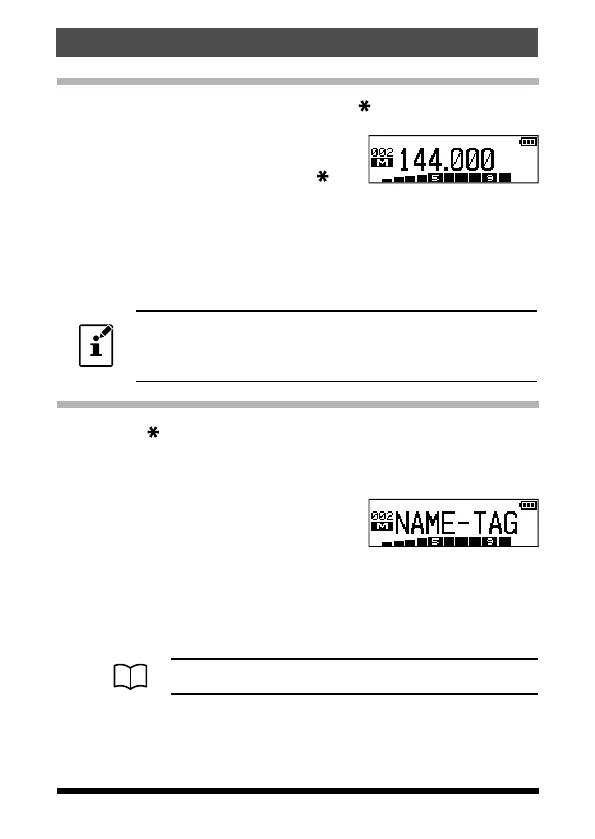
2. Press the [▲] or [▼] key to select the desired
memory channel.
3. To return to the VFO mode, press the
[
V/M]
key.
When the transceiver is already set to the Memory mode, an easy way to
recall a memory channel is to enter the memory channel number using the
numeric keypad.
For example: in the Memory Mode to recall memory channel #002, press
the [2] key.
To recall Memory Channel #200, enter “200”. To recall Pro-
grammable Memory channels “L1/U1” through “L10/U10”
enter “201/202” through “210/220”.
Changing the memory label (tag) name
1. Press the [ V/M] key to recall the memory channel that you wish to label
or rename.
2. Press and hold the F key to enter the Set Mode.
3. Press the [▲] or [▼] key to select Set Mode item “20 NAME TAG”.
4. Press the F key to enter (or edit) the channel
name tag.
“NAME
-
TAG” message will appear.
5. Press the Alphabet / Numeric keys to enter the characters or symbols for
the memory channel “Tag” (label).
• To move the cursor to the next character, press the [▲] key.
• To correct a mistake, press the [▼] key repeatedly until the cursor returns
to the character position.
For more details on character/symbol input, see page 38.
6. Press the PTT switch to save the new setting and return to the memory
channel.
31
Memory Mode
FT-65R/FT-65E Operating Manual



 To Next Page