HOME Channel Memory Recall
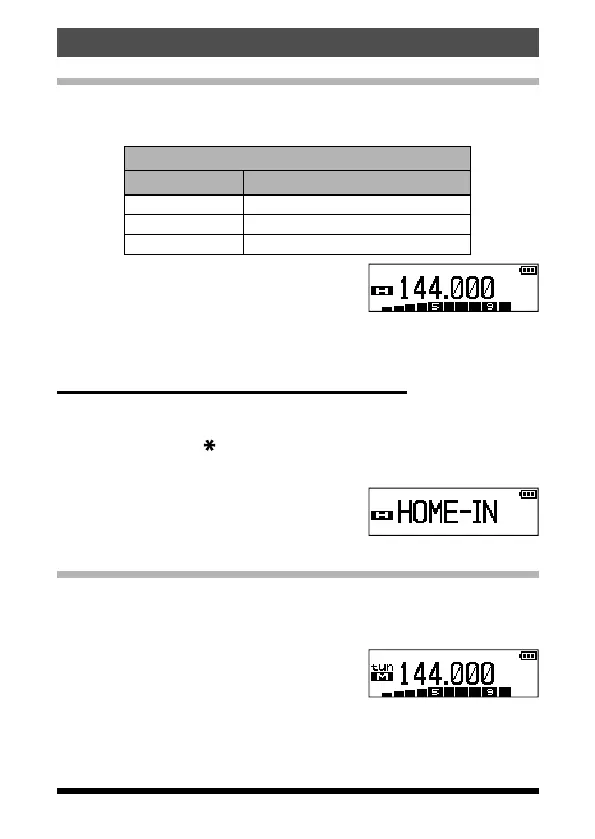
A “HOME” channel memory is provided for each operating band, to allow
quick recall of a favorite operating frequency on each band. The default
home channels are below:
Default Home Channels
Band Frequency
144 MHz Band 144.000 MHz
430 MHz Band 430.000 MHz
FM Radio Band 95.000 MHz
1. Press the F key, then press the
[
P1] key.
The default home channel, as listed above,
is displayed.
2. Press the F key, then press the [P1] key to exit to normal operation.
Repeat this process to recall the HOME channel on any operating band.
Changing the Home Channel Frequency
The home channel frequencies may be changed from the default settings.
1. While operating in the VFO mode, select the desired frequency.
2. Press and hold the [
V/M] key.
A blank memory channel will be displayed.
3. Press the [P1] key.
• “HOME-IN” will be displayed, and then exit
to normal operation.
• The home channel frequency is changed and overwriting is complete.
Memory Offset Tuning
Once a particular memory channel is recalled, it is easy to tune off that chan-
nel, as though you were in the “VFO” mode.
1. Recall the memory channel.
2. Press the [#BAND] key to activate the “Mem-
ory Channel Tuning” feature.
The Memory Channel number on the LCD
display will be replaced by “tun”.
32
Memory Mode
FT-65R/FT-65E Operating Manual



 To Next Page