Instrument operation
49
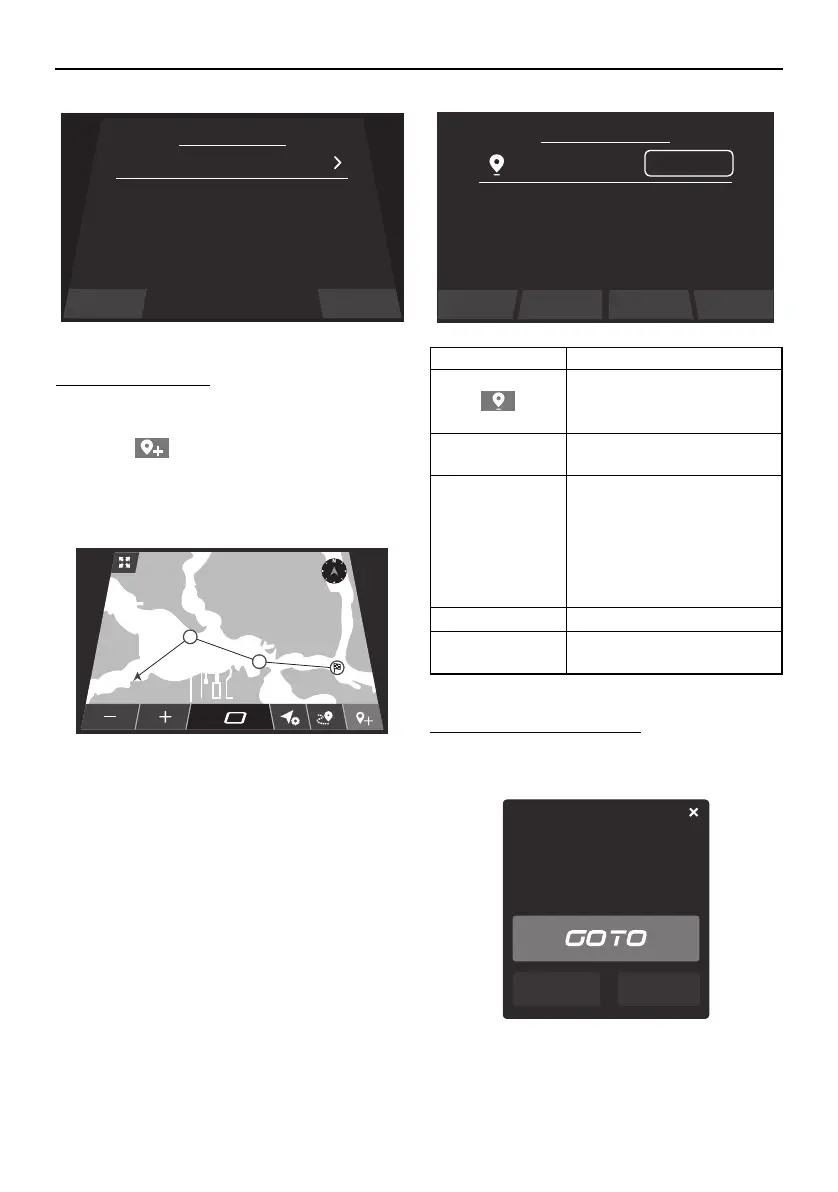
To add a Waypoint:
(1) Display the location you want to attach a
waypoint to on the map.
(2) Tap “ ”.
(3) Switch to the “Add Waypoint” screen,
and select any letters.
(4) Tap “Save”.
When the waypoint is set, “Waypoint Manag-
er” is displayed, and the latitude and longi-
tude of the set waypoint are displayed along
with the distance from the current location.
Cruising to the destination:
(1) Select the waypoint created on the map.
(2) Tap “GOTO”.
Close Add Waypoit
Waypoint Manager
GR8
MPH
REC
1
2
NEXT WAYPOINT
1.7 km
29°
Item Function
Changes the color of the
waypoint.
View Views the waypoint on the
map.
GoTo Provides the distance to the
waypoint, along with the
latitude and longitude. It
also tells when you have ar-
rived at the waypoint and
asks if you would like to
stop the navigation.
Delete Deletes the waypoint.
EDIT Changes the name of the
waypoint.
Waypoint Manager
GR8
Lat:
Close Delete View GoTo
Lon:
Distance:
26.9484
-80.0968
204.39
m
EDIT
Delete Edit
Distance:
12.06
BAY
Lat: 45.28001
Lon: -92.97718
SportsBoat_F5K10.book Page 49 Tuesday, September 8, 2020 11:29 AM
Downloaded from ManualsNet.com search engine




 To Next Page