Instrument operation
55
To change the radio station frequency:
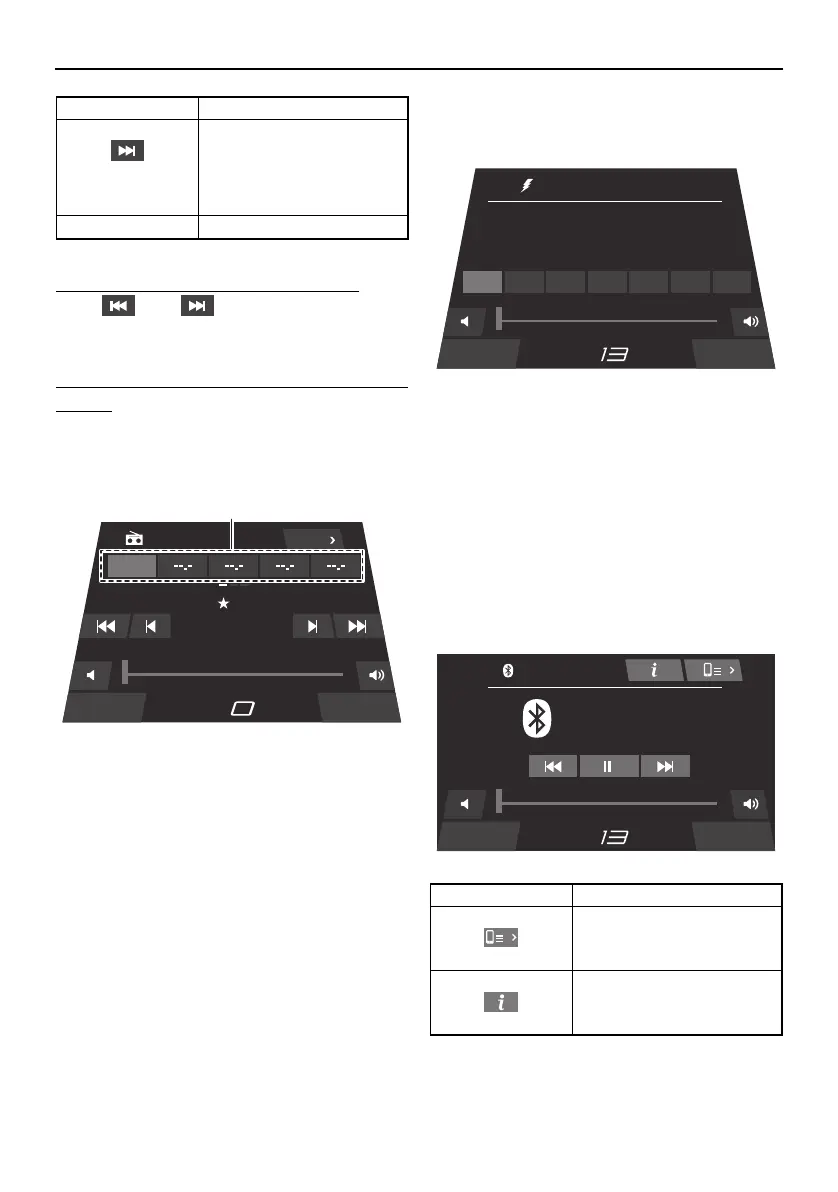
Tap “ ” or “ ” to tune to a receivable
frequency.
To save a radio station frequency to a preset
button:
Tune the radio to the desired radio station,
and then touch and hold the desired preset
button for several seconds.
1 Preset button
Weather screen
You can receive a weather broadcast.
To change the radio station, tap a preset but-
ton.
Bluetooth screen
Smartphones and other external devices that
are compatible with Bluetooth can be con-
nected wirelessly to the audio system to lis-
ten to the audio tracks stored on the devices
through the audio system’s speakers.
Increases the radio station
frequency. Touch and hold
this button to automatically
seek the next available ra-
dio station.
Source Displays the media screen.
Item Function
Source Zone Control
AM Radio
1710
1710
kHz
P1
1
2 3 4 5
AM-1
MPH
1
Item Function
Displays the external de-
vice management screen.
Displays information about
the current audio track.
Source Zone Control
kHz
CH 1
-0.000
MPH
1 2 3 4 5 6 7
NOAA National Weather
Bluetooth
Source Zone Control
Best Of You
In Your Honor
Foo Fighters
MPH
SportsBoat_F5K10.book Page 55 Tuesday, September 8, 2020 11:29 AM
Downloaded from ManualsNet.com search engine




 To Next Page