14
CD-C600
CD-C600
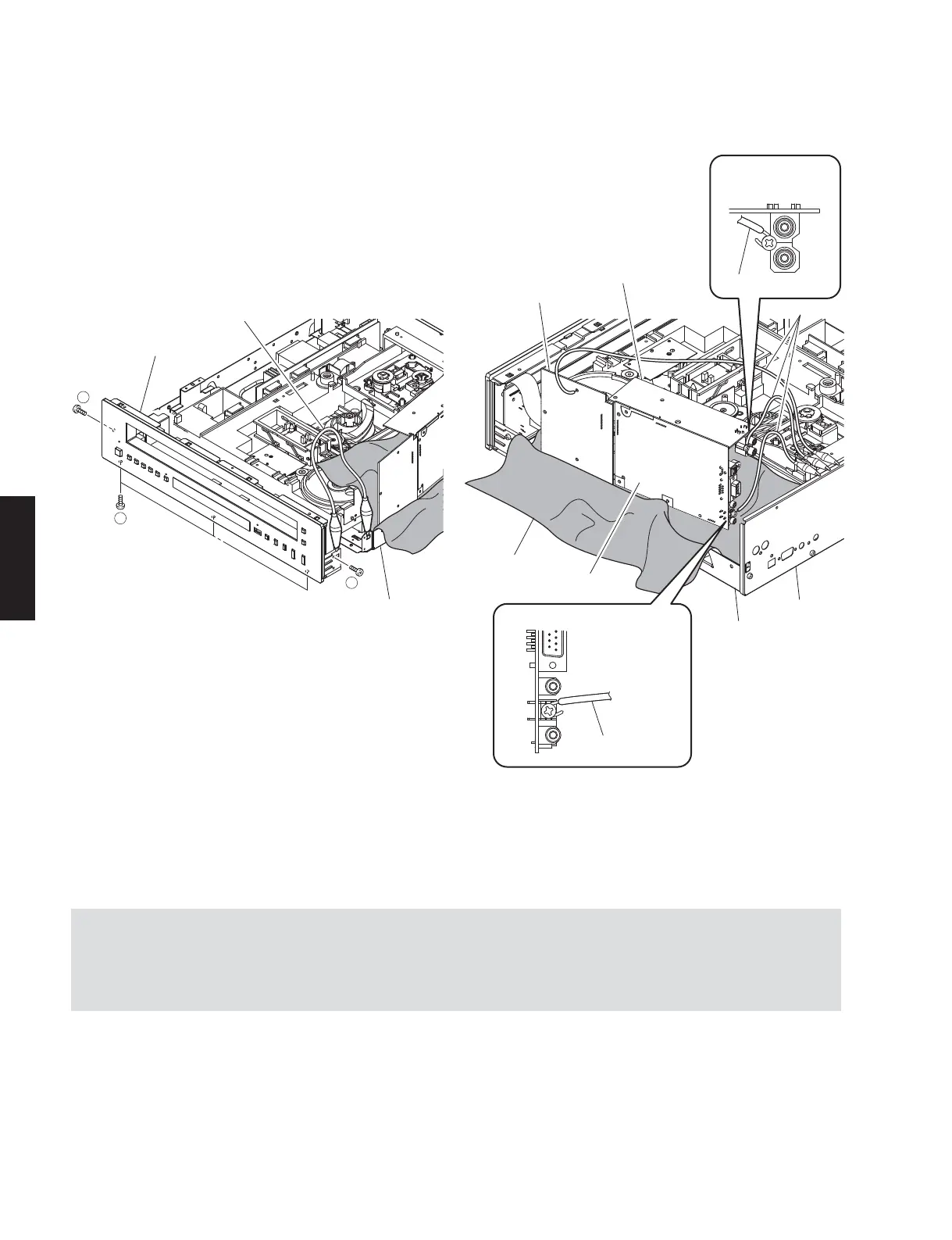
Ground lead
Ground point (PJ601)
Ground lead
Ground point (ST301)
Ground lead
MAIN P.C.B.
Rear panel
Chassis
Cloth
G801
OPERATION (11) P.C.B.
OPERATION (9) P.C.B.
Fig. 2
Front panel unit
Chassis
5
6
5
Ground lead
Fig. 3
• Connect the ground points of the front panel unit to the chassis and MAIN P.C.B. (ST301), OPERATION (9) P.C.B.
(PJ601) and OPERATION (11) P.C.B. (G801) to the rear panel with a ground lead or the like. (Fig. 3)
• When connecting the flexible flat cable, be careful with polarity.
• Reconnect all cables (connectors) that have been disconnected.
g. Spread a cloth over the chassis. (Fig. 2)
h. Put the MAIN, OPERATION (9) and (11) P.C.B.s on end. (Fig. 2)
i. Remove 2 screws (
⑤
) and 3 screws (
⑥
). (Fig. 3)
j. Remove the front panel unit from the chassis.



 To Next Page