18
CD-C600
CD-C600
■ FACTORY MODE
● Starting Factory Mode
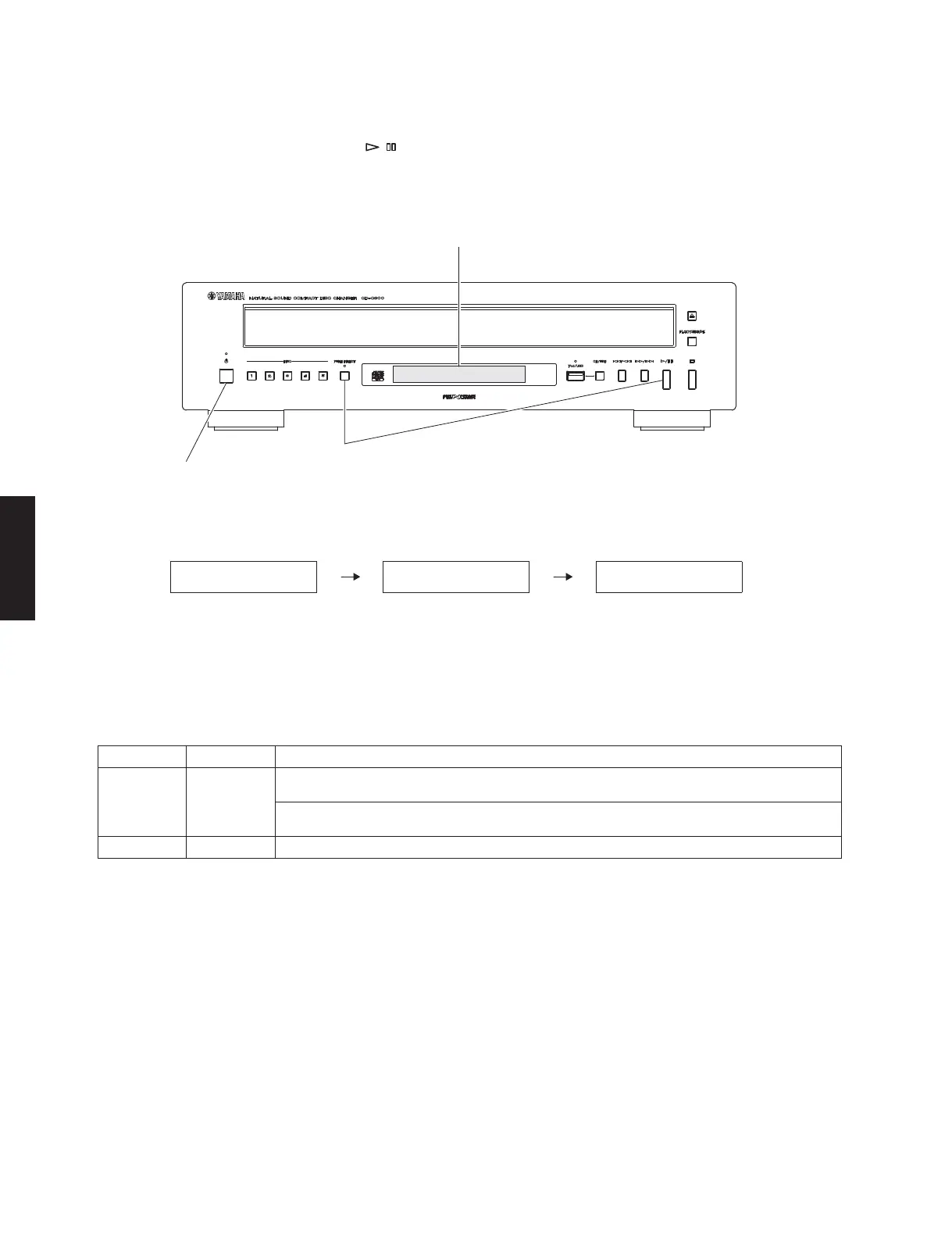
While pressing the “PURE DIRECT” and “ / ” (Play/Pause) keys of this unit as shown in the figure below, press the
“POWER ON/OFF” switch to turn on the power.
The Factory Mode is activated.
Display provided when factory mode started
● Canceling Factory Mode
Press the “POWER ON/OFF” switch of this unit to turn off the power.
● Operation Procedure of Factory Mode
Function list of remote control keys
FL display
"POWER ON/OFF" switch
While pressing these keys, press the “POWER ON/OFF” switch to turn on the power.
FL display
LOADINGFACTORY NODISC
Key Key code Function
DISPLAY 79-0A
Firmware version of the microprocessor
(IC305 of the MAIN P.C.B.) is displayed.
* Press the “CD/USB” key to select the CD mode
Firmware version of the USB IC
(IC7 of the MAIN P.C.B.) is displayed.
* Press the “CD/USB” key to select the USB mode
CLEAR 79-0D EEPROM (IC304 of the MAIN P.C.B.) is initialized.



 To Next Page