17
CD-C600
CD-C600
■ TEST MODE
FL display
● Starting Test Mode
When starting the test mode, check the FL display and indicators for display/indication condition.
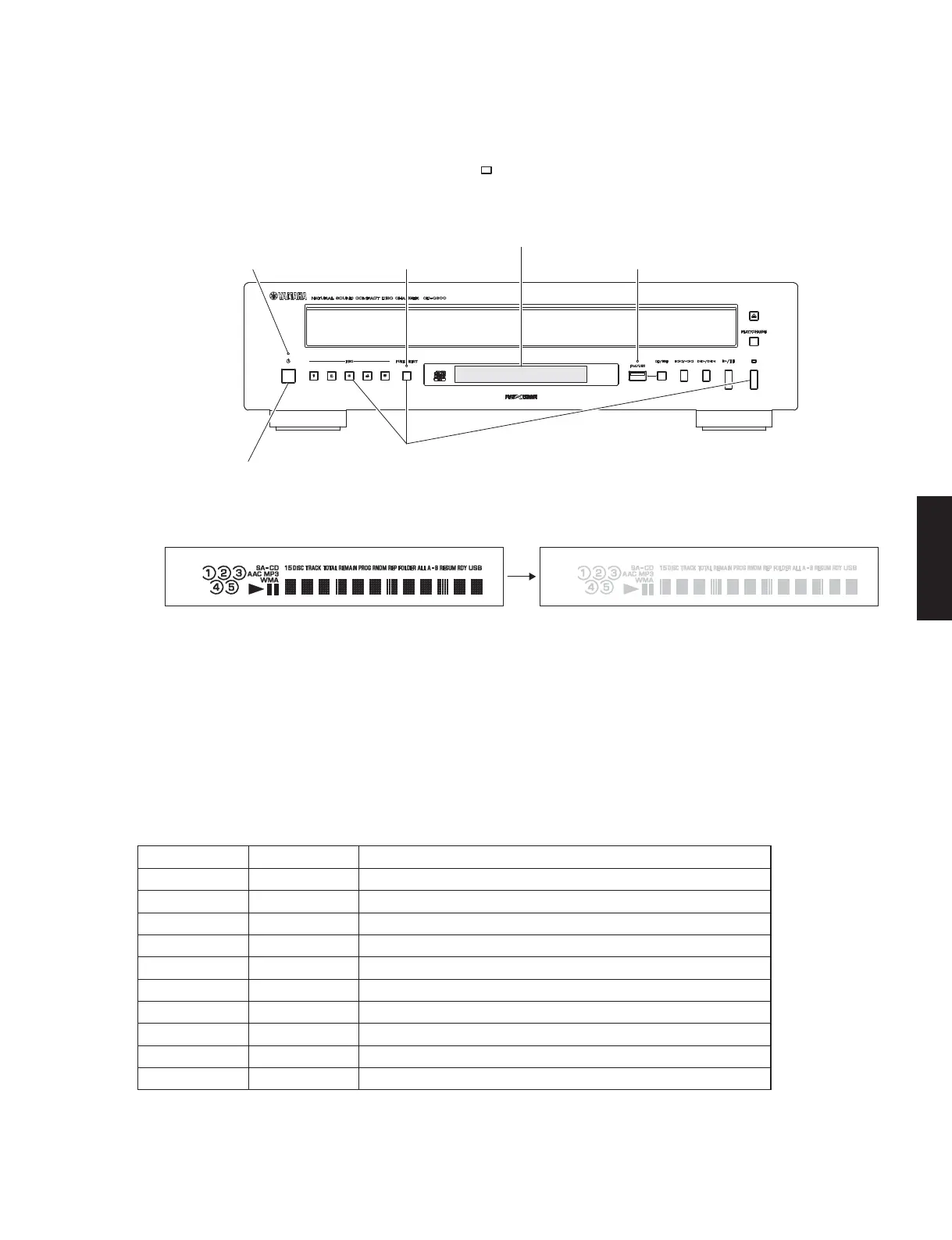
1. While pressing the “DISC 3”, “PURE DIRECT” and “
” (Stop) keys of this unit as shown in the figure below, press the
“POWER ON/OFF” switch to turn on the power and keep pressing those 3 keys.
2. While keep pressing those 3 keys, check that all indicators (POWER, iPod/USB, PURE DIRECT) are lit. At the same
time, check that all segments of the FL display are lit.
3. Release those 3 keys. Then check that USB and PURE DIRECT indicators as well as all segments of the FL display
are turned off.
4. The Test Mode is activated.
● Operation Procedure of Test Mode
"POWER" indicator
"POWER ON/OFF" switch
"PURE DIRECT" indicator
While pressing these keys, press the “POWER ON/OFF” switch to turn on the power.
"iPod/USB" indicator
FL display
Release the keys
All segments ON All segments OFF
● Canceling Test Mode
Press the “POWER ON/OFF” switch of this unit to turn off the power.
Function list of remote control keys
Key Key code Function
OPEN/CLOSE 79-01 –
1 79-11 Laser on
2 79-12 Laser off
3 79-13 Focus operation
4 79-14 Traverse in * Press the “5” key to stop traverse.
5 79-15 Traverse stop
6 79-16 Traverse out * Press the “5” key to stop traverse.
7 79-17 Spindle reverse * Press the “8” key to stop spindle.
8 79-18 Spindle off
9 79-19 Spindle on * Press the “8” key to stop spindle.



 To Next Page