• Remote control
..
c:--------,
SA-COICD
PURE
DIRECT
OPENiCLOSE
,,~;
e
:.!i
l
I
DIMMER
DISPLAY
~)
,:1:
0
0
1!9)
1 2
3
@ @ @
4
5 6
@ @ @
7
8 9
@
@ @
0
ENTER
CLEAR
@
~
y)
REPEAT
PROGRAM
.i?)
;:~~
@
~
:j~~
·~4.l
:-6/
i~l
(6)
:7.';
\11
1
(.YAMAHA
10
En
CD
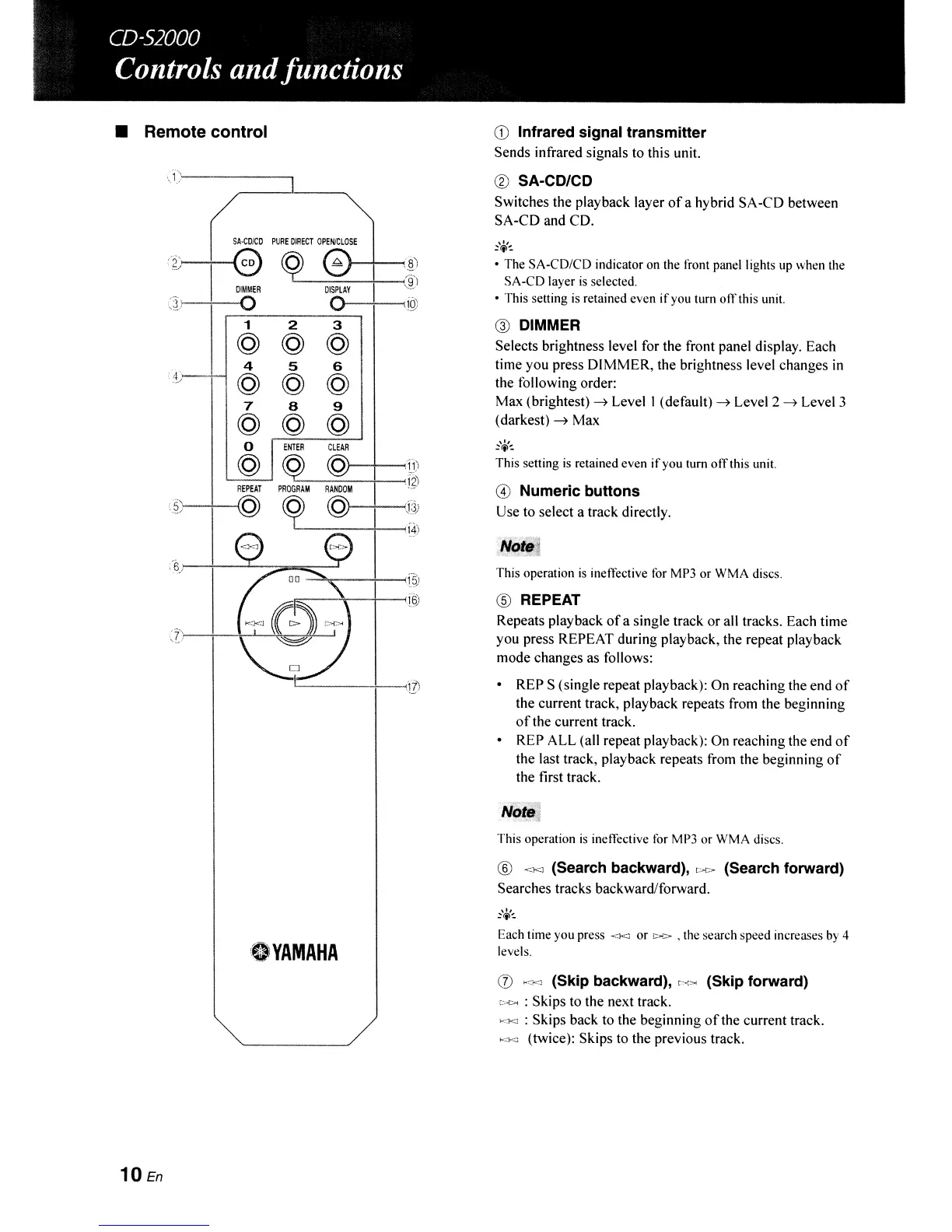
Infrared signal transmitter
Sends infrared signals to this unit.
® SA-CD/CD
Switches the playback layer
ofa
hybrid SA-CD between
SA-CD and CD.
,0,
:<i>~
• The SA-CD/CD indicator on the front panel lights up when the
SA-CD layer
is
selected.
• This setting is retained even
if
you turn
011'
this unit.
@ DIMMER
Selects brightness level for the front panel display. Each
time you press DIMMER, the brightness level changes
in
the following order:
Max (brightest)
~
Level I (default)
~
Level 2
~
Level 3
(darkest)
~
Max
,0,
:<i>~
This setting
is
retained even
if
you
tum
olTthis unit.
@ Numeric buttons
Use to select a track directly.
This operation
is
ineffective for MP3 or WMA discs.
® REPEAT
Repeats playback
of
a single track or all tracks. Each time
you press REPEAT during playback, the repeat playback
mode changes as follows:
• REP S (single repeat playback): On reaching the end
of
the current track, playback repeats from the beginning
of
the current track.
• REP ALL (all repeat playback): On reaching the end
of
the last track, playback repeats from the beginning
of
the first track.
This operation
is
ineffective for MP3 or WMA
discs_
®
<Kl
(Search backward),
t>t>
(Search forward)
Searches tracks backward/forward.
Each time you press
<l<J
or
!O>C>
• the search speed increases by 4
levels.
(J)
..
,;j<J
(Skip backward),
","""
(Skip forward)
[,>to... : Skips to the next track.
•
""'<;]
: Skips back to the beginning
of
the current track.
K,'-:J
(twice): Skips to the previous track.



 To Next Page