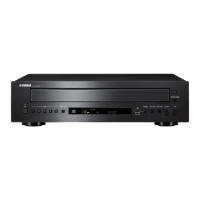
® OPEN/CLOSE
Opens
or
closes the disc tray.
® PURE DIRECT
Turns on the PURE DIRECT mode to improve audio
quality.
When this unit
is
in
the PURE DIRECT mode:
• The PURE DIRECT indicator above lights up.·
• The digital output
is
turned off.
• The front panel display
is
turned off.
,',
~<i>~
• The least indicators and messages are still displayed
in
the front
panel display.
• This setting
is
retained even
if
you tum
off
this unit.
@ DISPLAY
Switches the time display. Each time you press DISPLAY
during playback, the time display changes as follows:
• Elapsed time
of
the current track (default setting). The
TRACK indicator lights up
in
the front panel display.
• Remaining time
of
the current track. The TRACK and
REMAIN indicators light up
in
the front panel display.
• Total remaining time
of
the disc. The TOTAL and
REMAIN indicators light up
in
the front panel display.
@ CLEAR
Erases the last programmed track when this unit
is
in
the
program editing mode. See "Program playback" on this
page.
You
can erase all programmed tracks when the playback
is
stopped.
@ ENTER
Confirms a track number entered when you are
programming tracks.
@ RANDOM
Turns on or
off
the random playback mode.
Notes!
.
"t
• This operation
is
ineffective for MP3 or WMA discs.
• The random playback mode
is
canceled when playback
is
stopped or the disc
is
ejected.
@ PROGRAM
Turns on or
off
the program playback mode. See "Program
playback" on this page.
@
00
(Pause)
Pauses playback. Press
t>
or
00
to resume playback.
@
t>
(Play)
Starts playback.
@ 0 (Stop)
Stops playback.
See pages 20 for more information on MP3/WMA
playback.
• Program playback
In
the program playback mode, you can play back tracks
in
a programmed sequence.
iiqf,sj
• This operation
is
ineffective
for
MP3 or WMA discs.
• The programmed tracks are erased when the disc is ejected or
this unit
is
turned off.
1 Press PROGRAM while playback is stopped.
This unit
is
set to the program editing mode.
2 Select a track by using the numeric buttons
and ENTER.
3 Repeat step 2 to program the next track.
You
can program up to 24 tracks.
4 Press 1>.
Playback starts from the beginning
of
the
programmed sequence.
11
En
•



 To Next Page