• Front panel
(~YAMAHA
o
POWER
ON
o
OFF
SA·Co/CD
o
PUREOtRECT
o
o
\(1---------1
G)
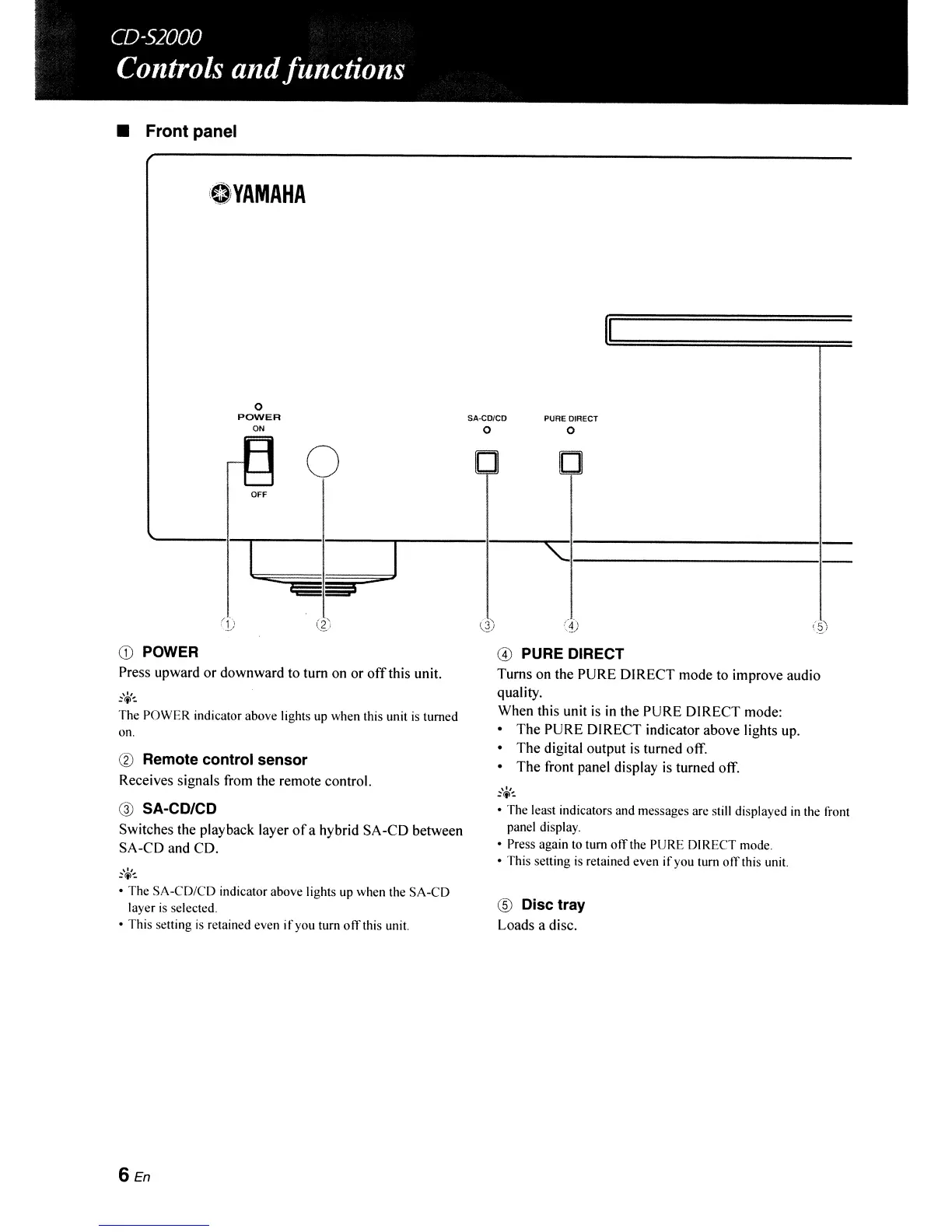
POWER
Press upward or downward to tum on or
off
this unit.
,0,
~tj)-:
The
POWER
indicator above lights up when this unit
is
turned
on.
® Remote control sensor
Receives signals from the remote control.
@ SA-CD/CD
Switches the playback layer
of
a hybrid SA-CD between
SA-CD and CD.
• The
SA-CD/CD
indicator above lights up when the
SA-CD
layer
is
selected.
• This setting
is
retained even
if
you turn ofTthis unit.
6En
@ PURE DIRECT
Turns on the PURE DIRECT mode to improve audio
quality.
When this unit
is
in
the PURE DIRECT mode:
• The PURE DIRECT indicator above lights up.
• The digital output is turned off.
• The front panel display
is
turned off.
~'\(,<-:
•
The
least indicators and messages are still displayed in the front
panel display.
• Press again to tum olTthe PURE DIRECT mode.
• This setting is retained even
if
you turn olTthis unit.
® Disc tray
Loads a disc.



 To Next Page