EasyManua.ls Logo

Yamaha DS55 - Page 22

Yamaha DS55
39 pages
Print Icon
To Next Page IconTo Next Page
To Previous Page IconTo Previous Page
Loading...
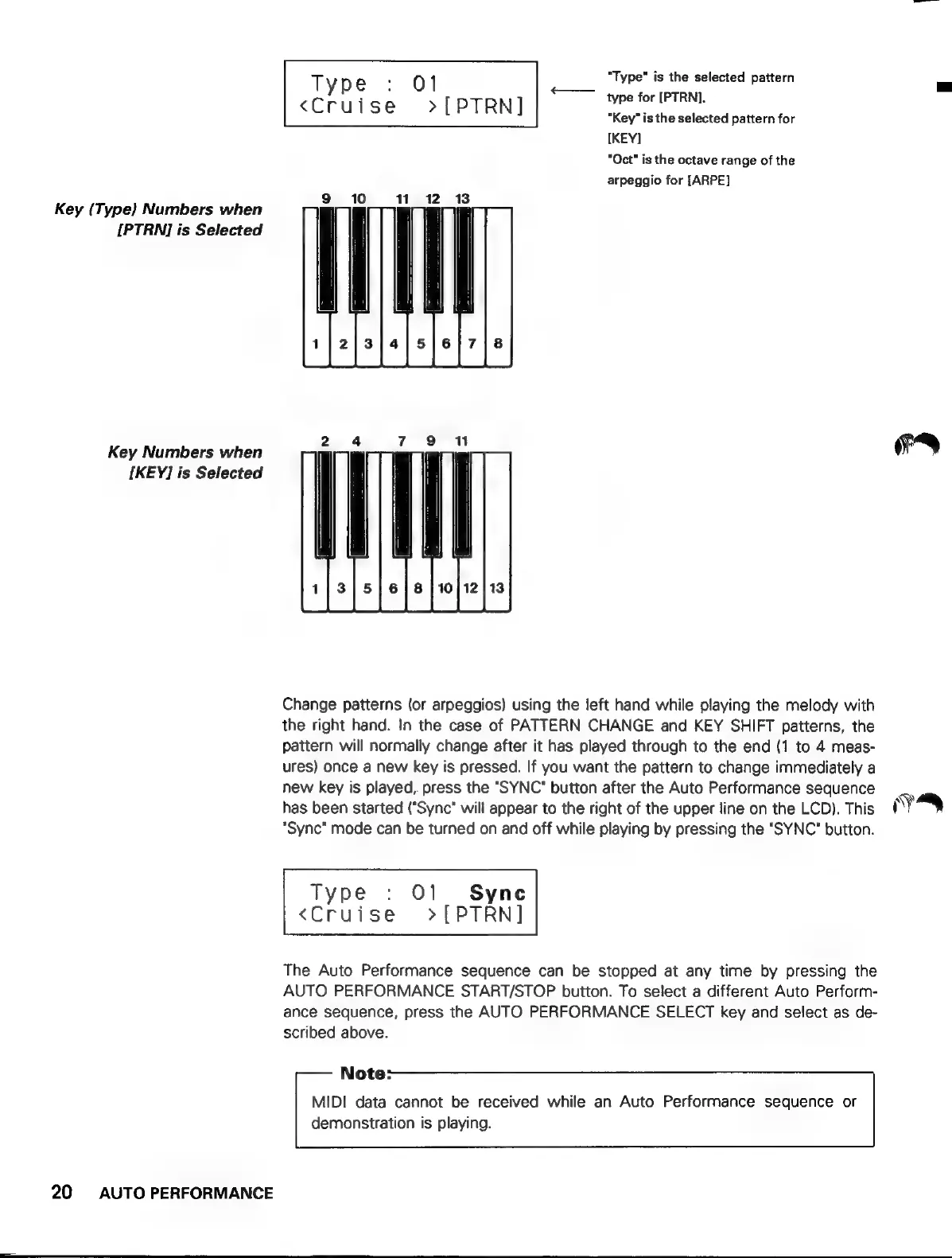
Key
(Type}
Numbers
when
IPTRNI
is
Selected
Key
Numbers
when
[KEY]
is
Selected
20
AUTO
PERFORMANCE
y
"Type"
is
the
selected
pattern
Type
:
01
<——
type
for
IPTRN].
<Cruise
»>[PTRN]
"Key"
is
the
selected
pattern
for
[KEY]
"Oct"
is
the
octave
range
of
the
arpeggio
for
[ARPE]
Change
patterns
(or
arpeggios)
using
the
left
hand
while
playing
the
melody
with
the
right
hand.
In
the
case
of
PATTERN
CHANGE
and
KEY
SHIFT
patterns,
the
pattern
will
normally
change
after
it
has
played
through
to
the
end
(1
to
4
meas-
ures)
once
a
new
key
is
pressed.
If
you
want
the
pattern
to
change
immediately
a
new
key
is
played,
press
the
"SYNC"
button
after
the
Auto
Performance
sequence
has
been
started
("Sync*
will
appear
to
the
right
of
the
upper
line
on
the
LCD).
This
"Sync"
mode
can
be
turned
on
and
off
while
playing
by
pressing
the
"SYNC*
button.
Type
:
O1
Syne
<Cruise
>[PTRN]
The
Auto
Performance
sequence
can
be
stopped
at
any
time
by
pressing
the
AUTO
PERFORMANCE
START/STOP
button.
To
select
a
different
Auto
Perform-
ance
sequence,
press
the
AUTO
PERFORMANCE
SELECT
key
and
select
as
de-
scribed
above.
Note:
MIDI
data
cannot
be
received
while
an
Auto
Performance
sequence
or
demonstration
is
playing.
FA
¡y