EasyManua.ls Logo

Yamaha DS55 - Receive Channel

Yamaha DS55
39 pages
Print Icon
To Next Page IconTo Next Page
To Previous Page IconTo Previous Page
Loading...
sw
Receive
Channel
Voice
Pan
Notes
You
can
now
select
any
of
the
8
available
instruments
—
<Inst1>
through
<Inst8>
—
in
sequence
by
pressing
the
MULTI
INST
button.
When
any
instrument
is
selected,
the
parameters
you
select
using
the
MULTI
ASSIGN
button
apply
to
the
currently
selected
instrument.
This
parameter
sets
the
MIDI
receive
channel
for
the
currently
selected
instru-
ment.
The
range
is
from
1
to
16,
and
“om”
for
the
omni
mode
(the
omni
mode
allows
reception
on
all
16
MIDI
channels).
Use
the
-1
and
+1
buttons,
or
the
number
buttons,
to
select
the
desired
channel.
This
parameter
assigns
one
of
the
DS55's
preset
or
user
voices
to
the
currently
selected
instrument.
With
the
Voice
parameter
selected,
simply
select
the
desired
voice
using
the
normal
voice
selection
procedure.
Pan
determines
whether
the
current
instrument
will
appear
to
the
left,
center
or
right
of
the
stereo
sound
field.
If
“left”
is
selected,
the
instrument
is
delivered
via
the
L/MONO
OUTPUT
jack
only.
If
“right”
is
selected
the
instrument
is
delivered
via
the
R
OUTPUT
jack
only.
If
“centr”
is
selected
the
instrument
is
delivered
via
both
OUTPUT
jacks.
Note:
If
you
are
using
the
DS55
with
a
monaural
sound
system
connected
to
the
DS55
L/MONO
OUTPUT
jack,
the
Pan
parameter
will
have
no
effect.
Determines
the
maximum
number
of
notes
that
can
be
played
simultaneously
by
the
currently
selected
instrument.
The
maximum
number
of
notes
assignable
to
ail
instruments
used
is
8.
So
if
you
use
all
8
instruments,
each
can
only
play
1
note.
If
you
only
use
4
of
the
8
available
instruments,
however,
a
number
of
Notes
assign-
ment
possibilities
are
available.
For
example:
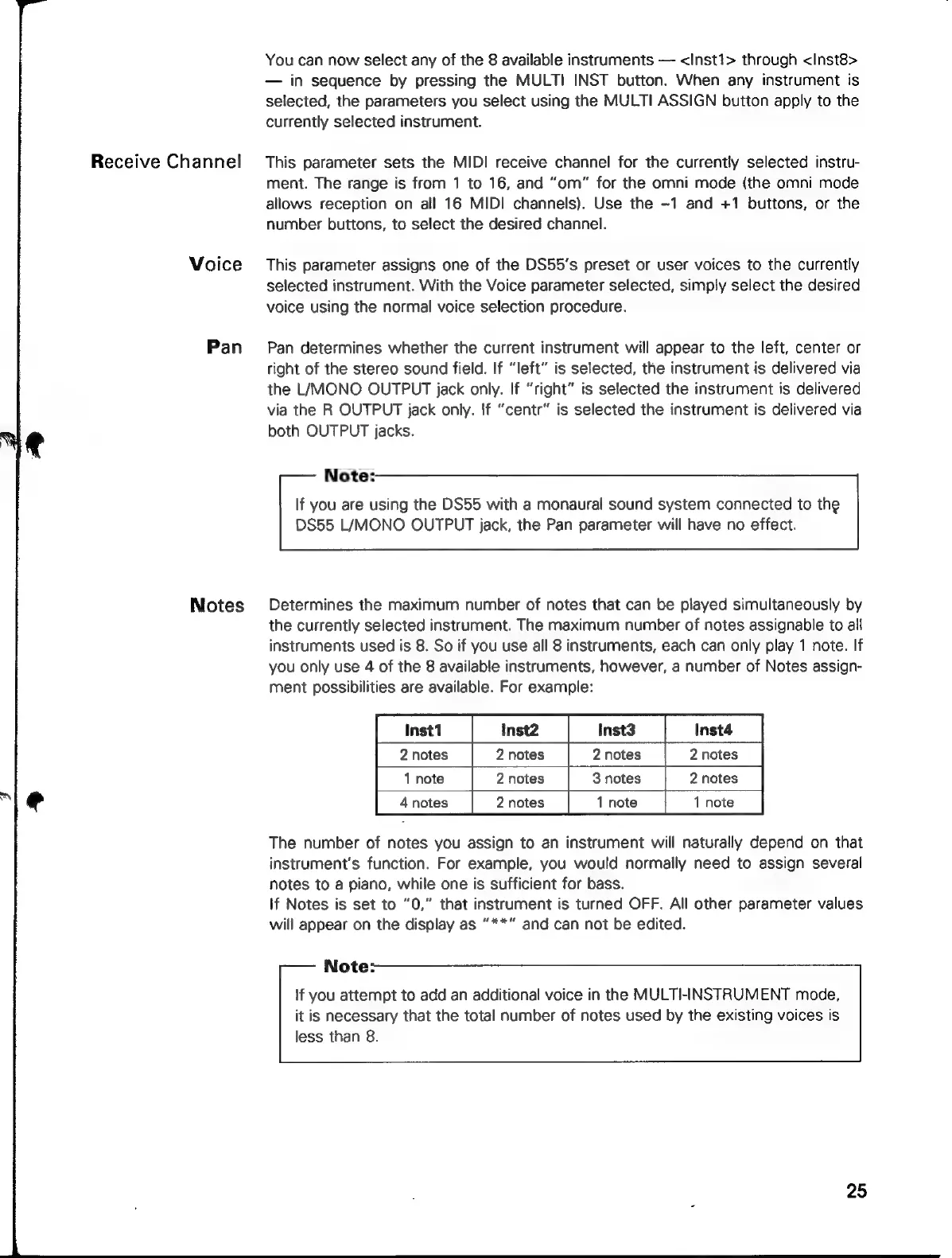
Inst1
Inst2
Inst3
Inst4
2
notes
2
notes
|
2
notes
|
2
notes
1 note
2
notes
|
3
notes
|
2
notes
4
notes
2
notes
1
note
1
note
The
number
of
notes
you
assign
to
an
instrument
will
naturally
depend
on
that
instrument's
function.
For
example,
you
would
normally
need
to
assign
several
notes
to
a
piano,
while
one
is
sufficient
for
bass.
if
Notes
is
set
to
“0,”
that
instrument
is
turned
OFF.
All
other
parameter
values
will
appear
on
the
display
as
“**”
and
can
not
be
edited.
Note:
lf
you
attempt
to
add
an
additional
voice
in
the
MULTI-INSTRUMENT
mode,
it
is
necessary
that
the
total
number
of
notes
used
by
the
existing
voices
is
less
than
8.