EasyManua.ls Logo

Yamaha DS55 - Page 28

Yamaha DS55
39 pages
Print Icon
To Next Page IconTo Next Page
To Previous Page IconTo Previous Page
Loading...
Level
AN
EXAMPLE
OF
MULTI-INSTRUMENT
MULTI-INSTRUMENT
26
MODE
USE
USING
THE
DS55
KEVBOARD
TO
PLAV
IN
THE
MODE
Level
sets
the
volume
level
for
the
currentiv
selected
instrument.
The
range
is
from
00
to
99.
A
setting
of
00
produces
no
output,
while
a
setting
of
99
produces
the
highest
volume
level
for
that
instrument.
The
Level
parameter
is
used
to
set
up
the
ideal
balance
between
all
instruments
used.
Here's
an
example
of
how
vou
can
use
the
Multi-Instrument
mode
with
a
MIDI
sequencer
such
as
the
YAMAHA
QX5FD.
Suppose
we
want
to
record
a
sequence
to
be
played
back
using
a
piano
voice,
bass,
and
a
brass
voice
for
the
melody
line.
We
could
begin
by
recording
the
piano
voice
on
the
sequencer
with
the
DS55
MIDI
channel
set
to
1.
When
the
piano
track
has
been
recorded,
the
next
step
would
be
to
record
the
bass
part
with
the
DS55
MIDI
channel
set
to
2.
Finally,
record
the
brass
part
with
the
MIDI
channel
set
to
3
(refer
to
your
sequencer's
operation
manual
for
recording
details).
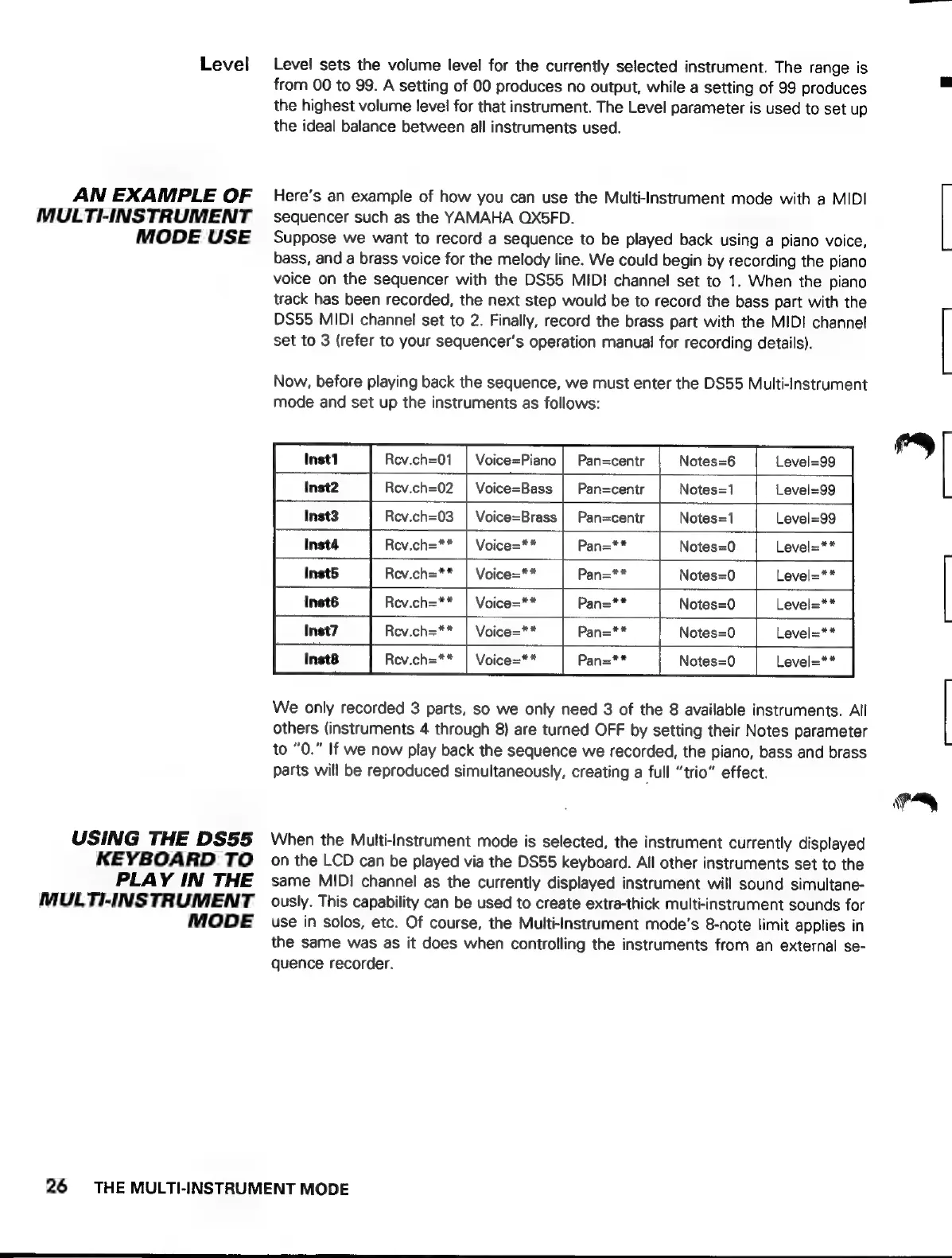
Now,
before
playing
back
the
sequence,
we
must
enter
the
DS55
Multi-Instrument
mode
and
set
up
the
instruments
as
follows:
Rev.ch=01
|
Voice=Piano
|
Pan=centr
Notes=6
Level=99
Rev.ch=02
|
Voice=Bass
|
Pan=centr
Notes=1
Level=99
Rev.ch=03
|
Voice=Brass
|
Pan=centr
Notes=1
Level=99
Rev.ch=**
Pan=**
Notes=0
Level=**
Rev.ch=**
Pan=**
Notes=0
Rev.ch=**
|
Voice=**
Notes=0
Notes=0
Notes=0
We
only
recorded
3
parts,
so
we
only
need
3
of
the
8
available
instruments.
All
others
(instruments
4
through
8)
are
turned
OFF
by
setting
their
Notes
parameter
to
“0.”
If
we
now
play
back
the
sequence
we
recorded,
the
piano,
bass
and
brass
parts
will
be
reproduced
simultaneously,
creating
a
full
“trio”
effect.
When
the
Multi-Instrument
mode
is
selected,
the
instrument
currently
displayed
on
the
LCD
can
be
played
via
the
DS55
keyboard.
All
other
instruments
set
to
the
same
MIDI
channel
as
the
currently
displayed
instrument
will
sound
simultane-
ously.
This
capability
can
be
used
to
create
extra-thick
multi-instrument
sounds
for
use
in
solos,
etc.
Of
course,
the
Multi-Instrument
mode’s
8-note
limit
applies
in
the
same
was
as
it
does
when
controlling
the
instruments
from
an
external
se-
quence
recorder.
THE
MULTI-INSTRUMENT
MODE
3
pos
|
=>7
f
1 (
1
f ]
a