EasyManua.ls Logo

Yamaha DS55 - Play Mode

Yamaha DS55
39 pages
Print Icon
To Next Page IconTo Next Page
To Previous Page IconTo Previous Page
Loading...
ao
and
all
other
information
you
need
for
smooth,
simple
operation.
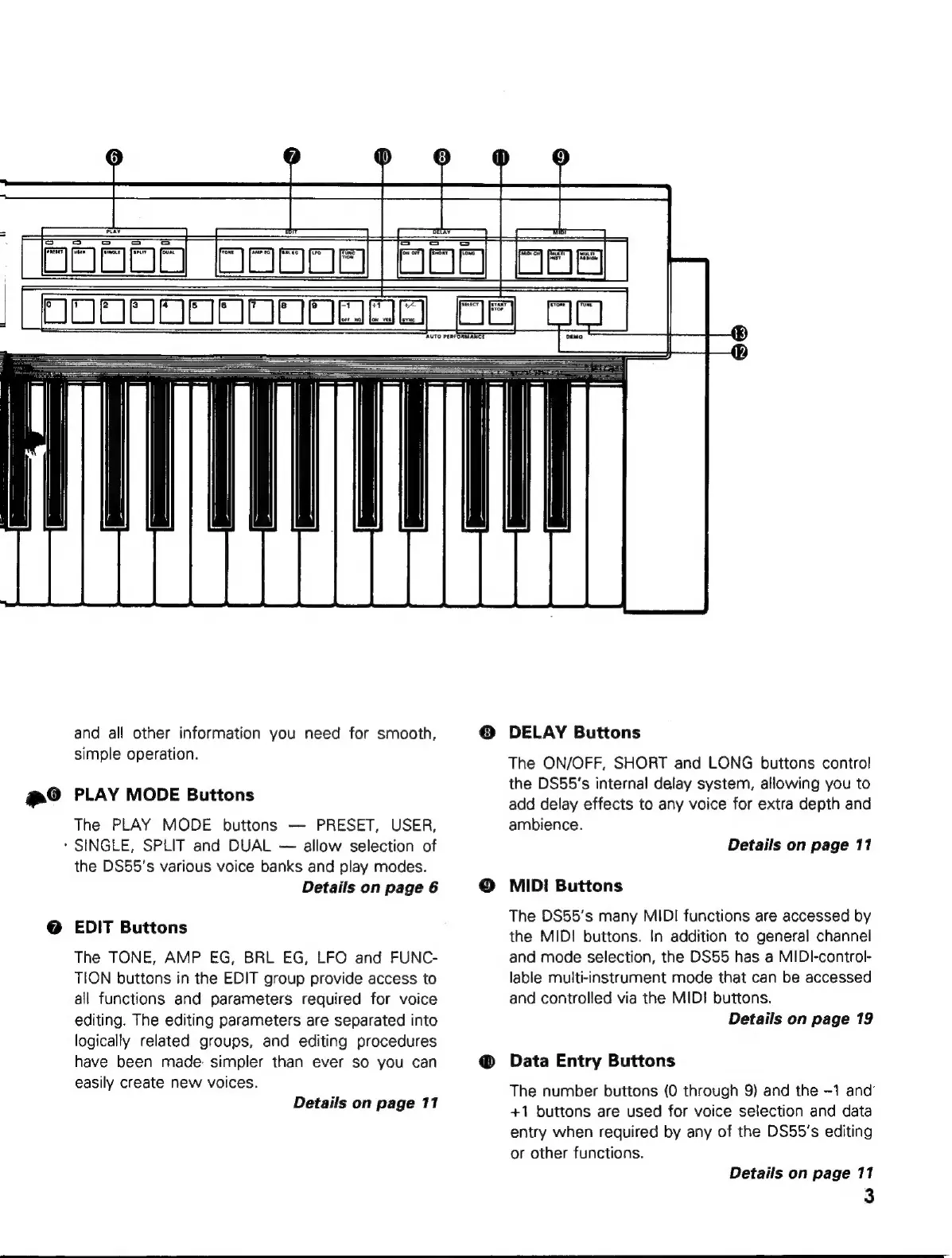
PLAY
MODE
Buttons
The
PLAY
MODE
buttons
PRESET,
USER,
'
SINGLE,
SPLIT
and
DUAL
allow
selection
of
the
DS55's
various
voice
banks
and
play
modes.
Details
on
page
6
EDIT
Buttons
The
TONE,
AMP
EG,
BRL
EG,
LFO
and
FUNC-
TION
buttons
in
the
EDIT
group
provide
access
to
all
functions
and
parameters
required
for
voice
editing.
The
editing
parameters
are
separated
into
logically
related
groups,
and
editing
procedures
have
been
made:
simpler
than
ever
so
you
can
easily
create
new
voices.
Details
on
page
11
O
DELAY
Buttons
The
ON/OFF,
SHORT
and
LONG
buttons
control
the
DS55's
internal
delay
system,
allowing
you
to
add
delay
effects
to
any
voice
for
extra
depth
and
ambience.
Details
on
page
11
MIDI
Buttons
The
DS55's
many
MIDI
functions
are
accessed
by
the
MIDI
buttons.
In
addition
to
general
channel
and
mode
selection,
the
DS55
has
a
MIDl-control-
lable
multi-instrument
mode
that
can
be
accessed
and
controlled
via
the
MID!
buttons.
Details
on
page
19
Data
Entry
Buttons
The
number
buttons
(0
through
9)
and
the
-1
and’
+1
buttons
are
used
for
voice
selection
and
data
entry
when
required
by
any
of
the
DS55's
editing
or
other
functions.
Details
on
page
11
3