EasyManua.ls Logo

Yamaha DS55 - Control Panel

Yamaha DS55
39 pages
Print Icon
To Next Page IconTo Next Page
To Previous Page IconTo Previous Page
Loading...
DS55
CONTROLS
AND
CONNECTORS
BREATH
CONT
PHONES
vv
CONTROL
PANEL
PP
NN
NN
cr
O
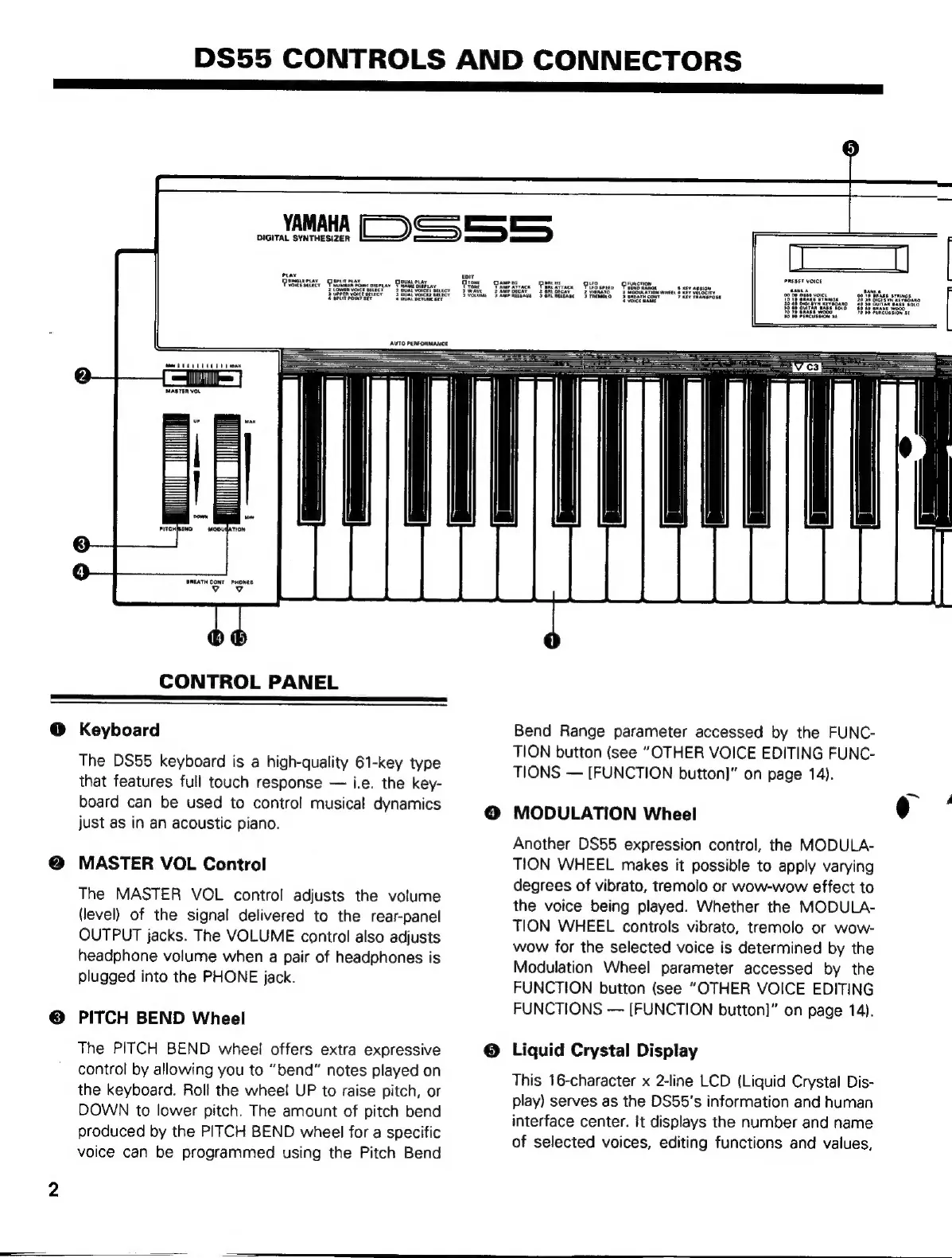
Keyboard
The
DS55
keyboard
is
a
high-quality
61-key
type
that
features
full
touch
response
i.e.
the
key-
board
can
be
used
to
control
musical
dynamics
just
as
in
an
acoustic
piano.
MASTER
VOL
Control
The
MASTER
VOL
control
adjusts
the
volume
(level)
of
the
signal
delivered
to
the
rear-panel
OUTPUT
jacks.
The
VOLUME
control
also
adjusts
headphone
volume
when
a
pair
of
headphones
is
plugged
into
the
PHONE
jack.
PITCH
BEND
Wheel
The
PITCH
BEND
wheel
offers
extra
expressive
control
by
allowing
you
to
“bend”
notes
played
on
the
keyboard.
Roll
the
wheel
UP
to
raise
pitch,
or
DOWN
to
lower
pitch.
The
amount
of
pitch
bend
produced
by
the
PITCH
BEND
wheel
for
a
specific
voice
can
be
programmed
using
the
Pitch
Bend
Bend
Range
parameter
accessed
by
the
FUNC-
TION
button
(see
“OTHER
VOICE
EDITING
FUNC-
TIONS
[FUNCTION
button)”
on
page
14).
O
MODULATION
Wheel
Another
DS55
expression
control,
the
MODULA-
TION
WHEEL
makes
it
possible
to
apply
varying
degrees
of
vibrato,
tremolo
or
wow-wow
effect
to
the
voice
being
played.
Whether
the
MODULA-
TION
WHEEL
controls
vibrato,
tremolo
or
wow-
wow
for
the
selected
voice
is
determined
by
the
Modulation
Wheel
parameter
accessed
by
the
FUNCTION
button
(see
“OTHER
VOICE
EDITING
FUNCTIONS
[FUNCTION
button!"
on
page
14).
O
Liquid
Crystal
Display
This
16-character
x
2-line
LCD
(Liquid
Crystal
Dis-
play)
serves
as
the
DS55's
information
and
human
interface
center.
It
displays
the
number
and
name
of
selected
voices,
editing
functions
and
values,