EasyManua.ls Logo

Yamaha DS55 - Page 26

Yamaha DS55
39 pages
Print Icon
To Next Page IconTo Next Page
To Previous Page IconTo Previous Page
Loading...
RECEIVING
VOICE
DATA
FROM
EXTER-
NAL
EQUIPMENT
quence
is
played
back,
the
DS55
will
be
automatically
set
up
with
the
appropriate
voices
and
effect
settings,
etc.,
before
playback
of
the
performance
data
begins.
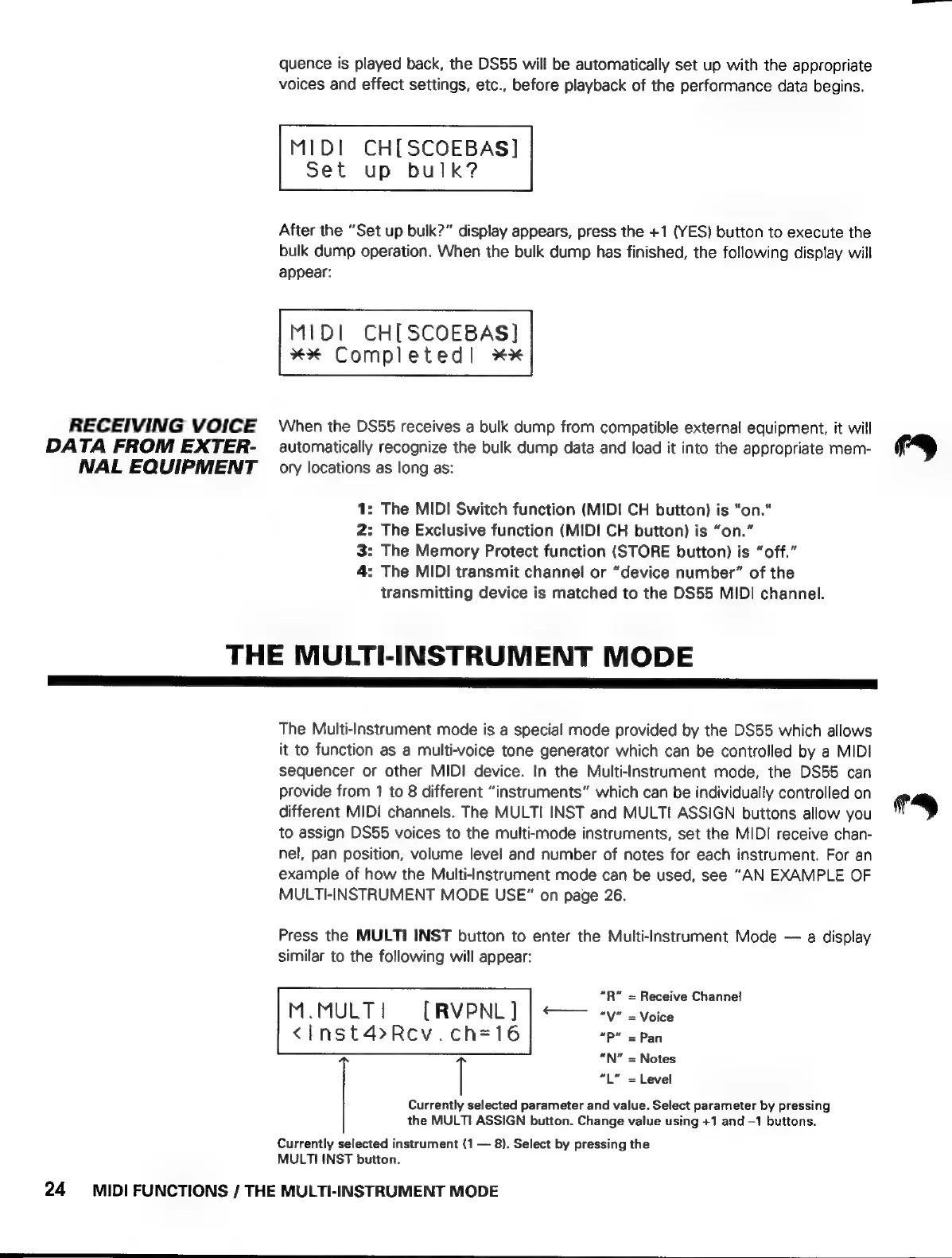
MIDI
CH[SCOEBAS]
Set
up
bulk?
After
the
“Set
up
bulk?”
display
appears,
press
the
+1
(YES)
button
to
execute
the
bulk
dump
operation.
When
the
bulk
dump
has
finished,
the
following
display
will
appear:
MIDI
CH[SCOEBAS]
XX
Completed!
XX
When
the
DS55
receives
a
bulk
dump
from
compatible
external
equipment,
it
will
automatically
recognize
the
bulk
dump
data
and
load
it
into
the
appropriate
mem-
ory
locations
as
long
as:
:
The
MIDI
Switch
function
(MIDI
CH
button)
is
"on."
:
The
Exclusive
function
(MIDI
CH
button)
is
“on.”
:
The
Memory
Protect
function
(STORE
button)
is
“off.”
:
The
MIDI
transmit
channel
or
“device
number”
of
the
transmitting
device
is
matched
to
the
DS55
MIDI
channel.
BON
=
THE
MULTI-INSTRUMENT
MODE
The
Multi-Instrument
mode
is
a
special
mode
provided
by
the
DS55
which
allows
it
to
function
as
a
multi-voice
tone
generator
which
can
be
controlled
by
a
MIDI
sequencer
or
other
MIDI
device.
In
the
Multi-Instrument
mode,
the
DS55
can
provide
from
1
to
8
different
“instruments”
which
can
be
individually
controlled
on
different
MIDI
channels.
The
MULTI
INST
and
MULTI
ASSIGN
buttons
allow
you
to
assign
DS55
voices
to
the
multi-mode
instruments,
set
the
MIDI
receive
chan-
nel,
pan
position,
volume
level
and
number
of
notes
for
each
instrument.
For
an
example
of
how
the
Multi-Instrument
mode
can
be
used,
see
“AN
EXAMPLE
OF
MULTI-INSTRUMENT
MODE
USE”
on
page
26.
Press
the
MULTI
INST
button
to
enter
the
Multi-Instrument
Mode
—
a
display
similar
to
the
following
will
appear:
“R”
=
Receive
Channel
M.MULT
|
[RVPNL
]
“y”
=
Voice
<inst4»Rev.ch=16
=P"
=
Pan
“N”
=
Notes
l
“L”
=
Level
Currently
selected
parameter
and
value.
Select
parameter
by
pressing
the
MULTI
ASSIGN
button.
Change
value
using
+1
and
-1
buttons.
Currently
selected
instrument
(1
—
8).
Select
by
pressing
the
MULTI
INST
button.
24
MIDI
FUNCTIONS
/
THE
MULTI-INSTRUMENT
MODE