IntroductionPreparationsBasic Operation
Advanced
Operation
Additional
Information
Appendix
44
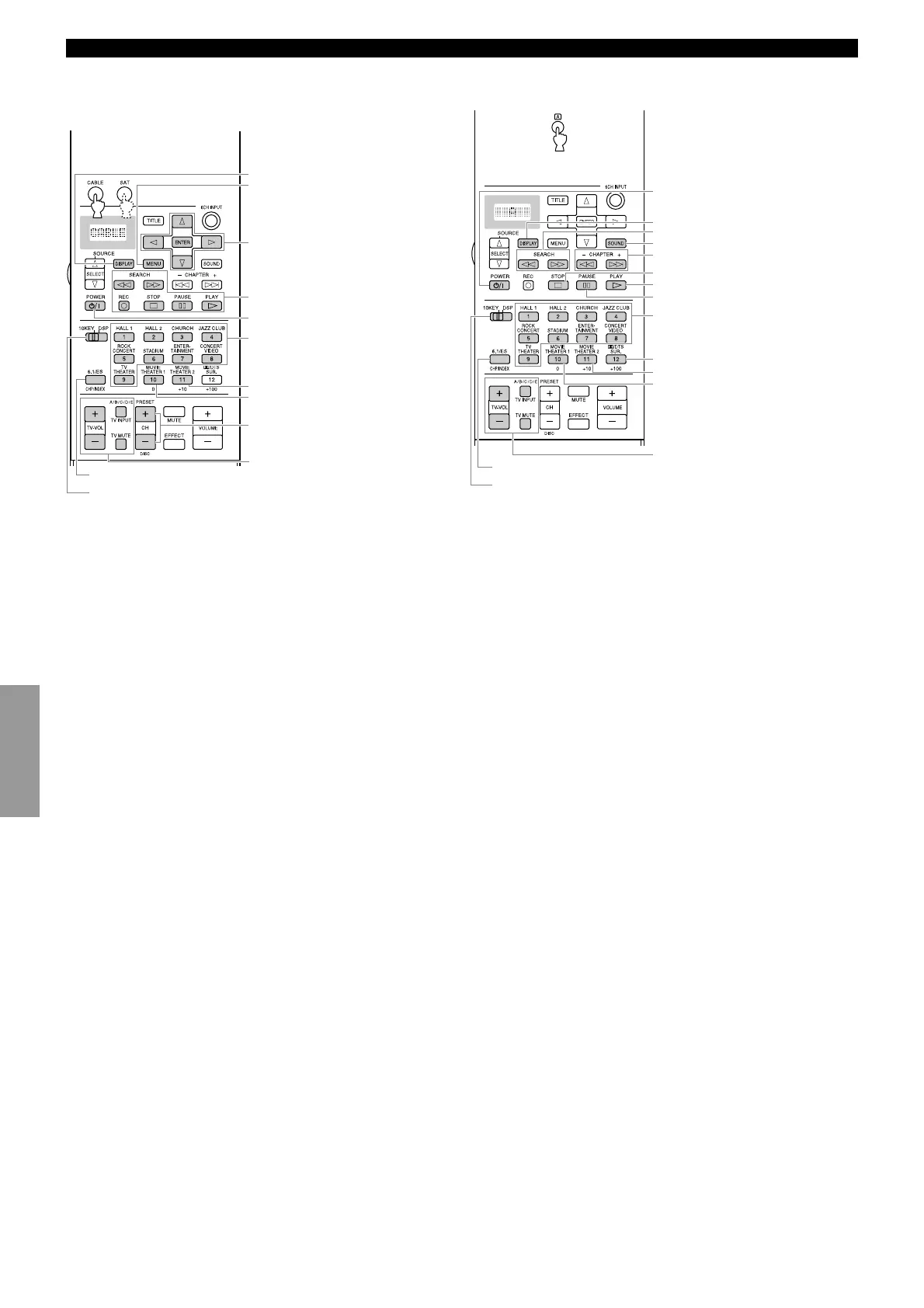
Remote Control Features
■ CABLE and SAT buttons (CABLE and
SAT areas*
5
)
*5 Set the manufacturer code for Cable TV Tuner and Satellite
Tuner before using the remote control.
POWER
MENU
DISPLAY
CH +/–
Menu cursor/ENTER
You can control your VCR, if you
have set up the code for VCR1.
Numeric buttons 1 to 9
Recall
Numeric button 0
Enter
TV VOL +/–, TV INPUT, and TV
MUTE function if you have set up
the manufacturer code for the TV
Area.
■ Å button (ex. LD area*
6
)
*6 You can control other components that are not connected to this
unit. (“Å” cannot be used as an Input selector.)
POWER
STOP
PLAY
PAUSE
CLEAR
DISPLAY
SEARCH
SOUND
CHAPTER +/– (Chapter Search)
Numeric buttons 1 to 9
Numeric button +10
Numeric button 0
TV VOL +/–, TV INPUT, and TV
MUTE function if you have set up
the manufacturer code for the TV
Area.
Chapter/Time
(Set 10KEY)
(Set 10KEY)


 To Next Page
 Loading...