EasyManua.ls Logo

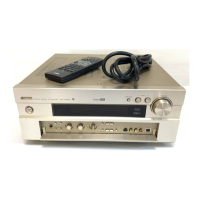
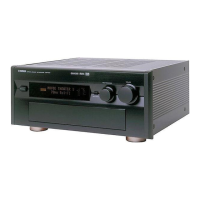
Yamaha DSP-AX620 - Service Manual

Yamaha DSP-AX620
82 pages
Print Icon
To Next Page IconTo Next Page
Loading...
AV AMPLIFIER
100763
This manual has been provided for the use of authorized YAMAHA Retailers and their service personnel.
It has been assumed that basic service procedures inherent to the industry, and more specifically YAMAHA Products, are already
known and understood by the users, and have therefore not been restated.
WARNING: Failure to follow appropriate service and safety procedures when servicing this product may result in personal
injury, destruction of expensive components, and failure of the product to perform as specified. For these
reasons, we advise all YAMAHA product owners that any service required should be performed by an
authorized YAMAHA Retailer or the appointed service representative.
IMPORTANT: The presentation or sale of this manual to any individual or firm does not constitute authorization, certification
or recognition of any applicable technical capabilities, or establish a principle-agent relationship of any
form.
The data provided is believed to be accurate and applicable to the unit(s) indicated on the cover. The research, engineering, and
service departments of YAMAHA are continually striving to improve YAMAHA products. Modifications are, therefore,
inevitable and specifications are subject to change without notice or obligation to retrofit. Should any discrepancy appear to exist,
please contact the distributor's Service Division.
WARNING: Static discharges can destroy expensive components. Discharge any static electricity your body may have
accumulated by grounding yourself to the ground buss in the unit (heavy gauge black wires connect to this
buss).
IMPORTANT: Turn the unit OFF during disassembly and part replacement. Recheck all work before you apply power to the
unit.
IMPORTANT NOTICE
DSP-AX620
SERVICE MANUAL
CONTENTS
TO SERVICE PERSONNEL ........................................... 1
FRONT PANEL ............................................................... 1
REAR PANELS ............................................................... 2
SPECIFICATIONS ..................................................... 3 – 5
INTERNAL VIEW ............................................................ 5
DISASSEMBLY PROCEDURES .............................. 6 – 8
SELF DIAGNOSIS FUNCTION............................... 9 – 27
AMP CHECK ................................................................. 28
IC DATA ................................................................29 – 36
DISPLAY DATA ....................................................37 – 38
PIN CONNECTION DIAGRAM ..................................... 39
BLOCK DIAGRAM ................................................ 40 – 43
PRINTED CIRCUIT BOARD ................................. 44 – 67
SCHEMATIC DIAGRAM .......................................68 – 73
PARTS LIST .......................................................... 74 – 92
REMOTE CONTROL TRANSMITTER.................. 93 – 95
DSP-AX620


Other manuals for Yamaha DSP-AX620

Questions and Answers

  • K
    Katie BarnesAug 18, 2025
    What to do if Yamaha DSP-AX620 Amplifier fails to turn on?
    • C
      christinejonesAug 18, 2025
      If your Yamaha Amplifier fails to turn on or enters standby mode shortly after being powered on, there are a few things to check. First, ensure the power cord is firmly connected to both the amplifier and the power outlet. Next, verify that the IMPEDANCE SELECTOR switch on the rear panel is fully set to either the left or right position while the unit is in standby mode. Finally, the protection circuitry might have been activated. In this case, ensure all speaker wire connections are secure and that no wires are touching anything other than their respective connections.
  • V
    vgonzalezAug 20, 2025
    How to fix Yamaha DSP-AX620 Amplifier remote control that does not work?
    • A
      Andrew SmithAug 21, 2025
      If the remote control for your Yamaha Amplifier isn't working, ensure you're within a 6-meter range and no more than 30 degrees off-axis from the front panel. Also, check the batteries and replace them with new ones if they are weak.
  • S
    Shirley GarciaAug 23, 2025
    What to do if Yamaha Amplifier has no sound from the subwoofer?
    • B
      Bobby SalazarAug 23, 2025
      If you're not getting any sound from the subwoofer connected to your Yamaha Amplifier, check the “1D LFE/BASS OUT” setting in the SET MENU. If it's set to MAIN while playing a Dolby Digital or DTS signal, change it to SWFR or BOTH. Conversely, if it’s set to SWFR or MAIN when playing a 2-channel source, set it to BOTH.
  • T
    Thomas SanchezAug 26, 2025
    Why Yamaha DSP-AX620 has no sound from the center speaker?
    • F
      fkingAug 26, 2025
      If there's no sound coming from the center speaker of your Yamaha Amplifier, first check if the output level of the center speaker is set to minimum and raise it if necessary. Also, verify that “1A CENTER SP” on the SET MENU is not set to NONE, and select the appropriate mode for your center speaker. Finally, if one of the Hi-Fi DSP programs (1 to 4) is selected, try selecting another DSP program.
  • A
    Amanda RobinsonAug 27, 2025
    Why Yamaha Amplifier has no sound from the rear speakers?
    • S
      Scott HoffmanAug 27, 2025
      If you're not getting any sound from the rear speakers of your Yamaha Amplifier, ensure that the output level of the rear speakers isn't set to minimum and increase it if needed. Also, if you're playing a monaural source with program 9 selected, try selecting another DSP program.
  • L
    Laura McdowellAug 30, 2025
    What to do if Yamaha DSP-AX620 Amplifier volume level cannot be increased?
    • A
      Andrew AlvarezAug 30, 2025
      If the volume level on your Yamaha Amplifier cannot be increased or the sound is distorted, check if the component connected to the REC OUT jacks of the unit is turned off. If it is, turn it on.
  • L
    Leslie SampsonSep 1, 2025
    How to fix Yamaha DSP-AX620 on-screen display not appearing?
    • N
      Natalie PriceSep 1, 2025
      If the on-screen display on your Yamaha Amplifier isn't showing, first check if the on-screen display setting is set to “DISPLAY OFF”. If it is, select either the full display or short display mode. Also, if the BLUE BACK setting under “9 DISPLAY SET” in the SET MENU is set to OFF and there's no video signal input, set BLUE BACK to AUTO to ensure the OSD is always visible.
  • A
    Alexander AlvarezSep 3, 2025
    How to fix Yamaha Amplifier with only one speaker working?
    • W
      wrightdanaSep 4, 2025
      If you're only hearing sound from one speaker connected to your Yamaha Amplifier, the issue might be due to incorrect cable connections. Double-check and properly connect the cables. If the problem continues, the cables themselves may be defective.
  • S
    Sara RodriguezSep 5, 2025
    How to improve poor bass reproduction on Yamaha Amplifier?
    • A
      Ashley AllenSep 6, 2025
      If you're experiencing poor bass reproduction with your Yamaha Amplifier, and “1D LFE/BASS OUT” in the SET MENU is set to SWFR or BOTH but you don't have a subwoofer, select MAIN. Also, ensure that the output mode for each speaker (main, center, or rear) in the SET MENU matches your speaker configuration, selecting the appropriate output mode based on the size of your speakers.
  • D
    Debbie MarshallSep 8, 2025
    How to fix Yamaha DSP-AX620 Amplifier picture that does not appear?
    • K
      Kim JonesSep 8, 2025
      If the picture isn't appearing on your Yamaha Amplifier, ensure that the output and input for the video are connected using the same type of jack. Use either composites, S-VIDEOs, or components consistently for both input and output connections.

Summary

Service Personnel Information

Critical Components Information

Information on critical components and replacement procedures.

Front Panel Overview

Rear Panel Connections

Model Variants and Connections

Illustrations detailing rear panel connections for R, T, B, and G models.

Specifications

Disassembly Procedures

Self Diagnosis Function

DIAG Menu and Operation

List of diagnostic menu items, sub-menu items, and remote control codes.

Protection Function History and Clearing

Information on protection function activation, display, and history clearing.

Amp Check

Idling Current Measurement

Details on test points, ratings, and notes for idling current measurement.

IC Data and Pin Connections

Parts Lists

Remote Control Transmitter

Yamaha DSP-AX620 Specifications

General IconGeneral
TypeAV Receiver
Total Harmonic Distortion (THD)0.06%
Frequency Response20Hz - 20kHz
Input Sensitivity200 mV
Signal-to-Noise Ratio100 dB
Surround SoundDolby Digital, DTS
Dimensions (W x H x D)435 x 151 x 391mm
Digital inputs1x Coaxial, 2x Optical
Video inputs3x Composite
Audio Inputs5 x RCA
Speaker Terminals5 pairs

Related product manuals