FUNCTIONAL OVERVIEW
9
INTRODUCTION
1
English
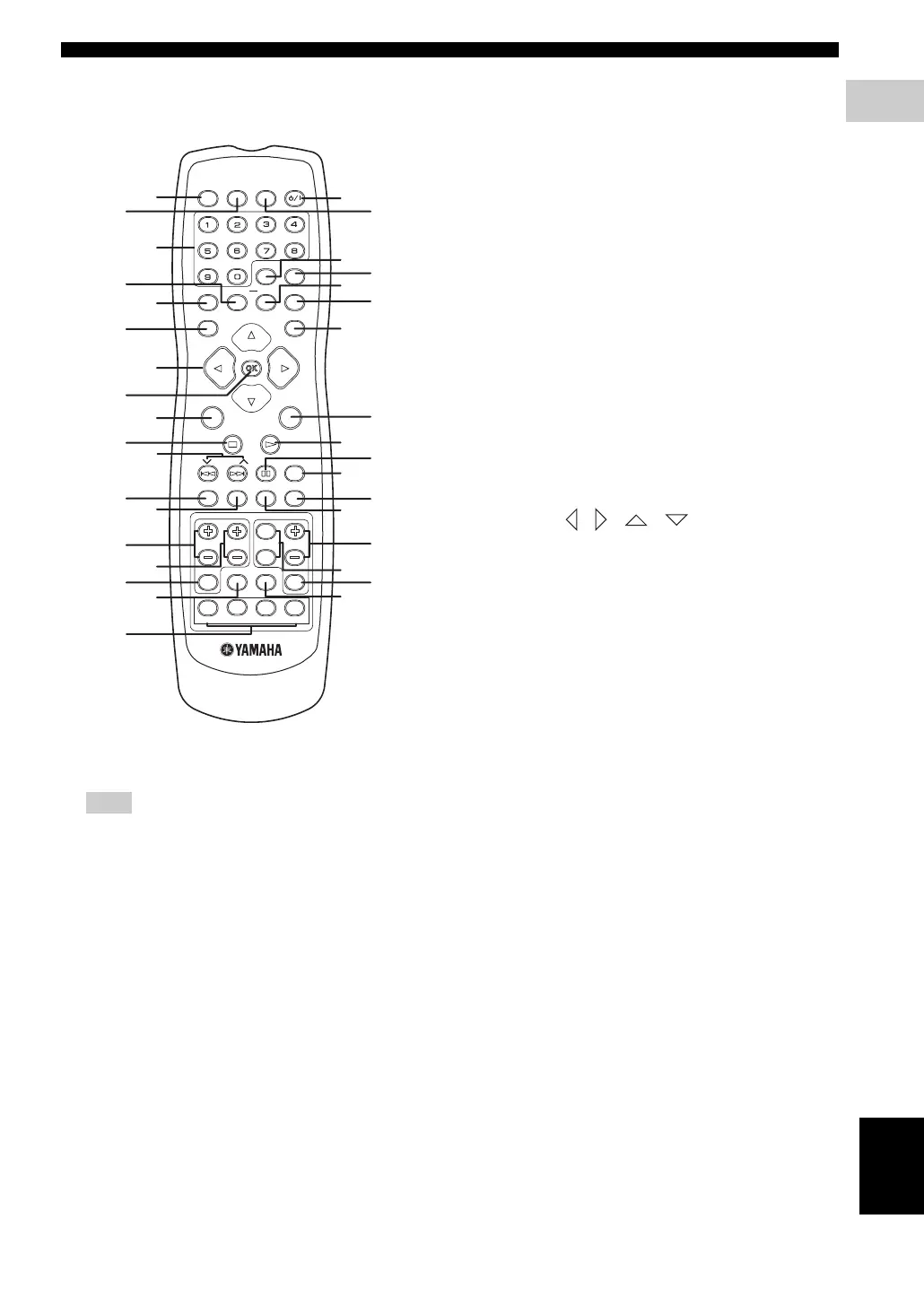
■ Remote control
(For DVR-S300)
For details on how to use the remote control, see page 23.
1 POWER (TV)
Turns on the TV, or sets it to the standby mode.
2 DIMMER
Selects different levels of brightness for the display
panel.
3 Numeric keypad (0 – 9)
Enters a track/title number of the disc.
Enters a number of a preset radio station.
4 REPEAT
Selects various repeat modes.
5 PROG
DVD/CD mode: starts programming.
TUNER mode: starts automatic/manual preset
programming if held for more than two seconds.
6 TOP MENU/RETURN
Returns to the previous menu.
Displays the top-level disc menu
(if available).
7 Cursors ( / / / )
Selects movement direction in the menu.
TUNER mode: press left or right to tune the radio
frequency.
TUNER mode: press up or down to select auto
tuning.
8 ENTER (OK)
Confirms a selection.
9 MENU
Enters or exits the disc contents menu.
For VCD version 2.0 only:
In stop mode, turns on/off playback control (PBC)
mode.
During playback, returns to the main menu.
0 s
Exits an operation.
DVD/CD mode: stops playback.
DVD/CD mode: holding down the button will open
and close the disc tray.
TUNER mode: erases a preset radio station if held
for more than two seconds.
A d PRESET u ( b / a )
DVD/CD mode: selects the previous/next track or
chapter. Press and hold to fast forward or fast
reverse.
TUNER mode: press to select a preset radio station.
B SUBTITLE
Selects a subtitle language.
Note
TV VOL TV CH
EFFECT SURR
VOL
TRE
MENU
SET UP
PRESET
SUBTITLE AUDIO ANGLE ZOOM
TV AUX TUNER DVD/CD
TV
INPUT
MUTE
BASS
ENTER
TOP MENU/RETURN
ON SCREEN
PROG
REPEAT A - B
SHUFFLE
SCAN
PAG E
DIMMER
POWER
POWER
SLEEP
NIGHT
TV
P
Q
R
S
t
U
V
W
X
Y
7
8
9
0
A
B
C
D
E
F
G
H
1
2
3
4
5
6
I
J
K
L
N
O
M




 To Next Page