Components
28
EMU41552
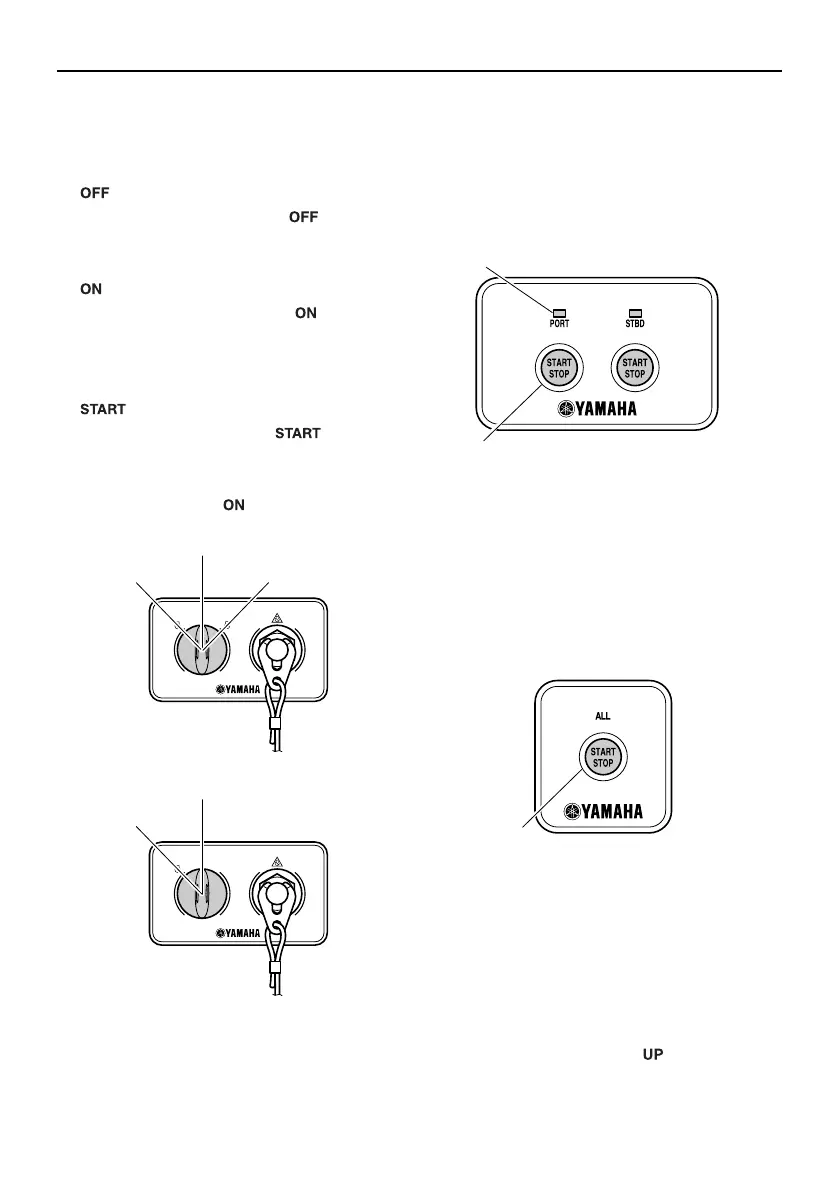
Main switch
The main switch controls the ignition system;
its operation is described below.
“” (off)
With the main switch in the “ ” (off) posi-
tion, the electrical circuits are off, and the key
can be removed.
“” (on)
With the main switch in the “ ” (on) posi-
tion, the electrical circuits are on, and the key
cannot be removed. The engine can be start-
ed by pressing the Start/Stop button.
“” (start)
With the main switch in the “ ” (start) po-
sition, the starter motor turns to start the en-
gine. When the key is released, it returns
automatically to the “ ” (on) position.
EMU41622
Start/Stop switch panel
The engine can be started or turned off by
pressing the Start/Stop button. For twin type,
it is possible to start or turn off individual en-
gine. The indicator for the corresponding en-
gine will come on.
PORT:Port side engine
STBD:Starboard side engine
EMU41632
All Start/Stop switch panel
The Start/Stop button allows all engines to
start or turn off.
EMU35154
Power trim and tilt switch on digital
electronic control
The power trim and tilt system adjusts the
outboard motor angle in relation to the tran-
som. Pressing the switch “ ” (up) trims the
1. Indicator
2. Start/Stop button
1. All Start/Stop button
6CE-9-74-1E0.book 28 ページ 2014年12月4日 木曜日 午前9時30分



 To Next Page