GB
EMU00998
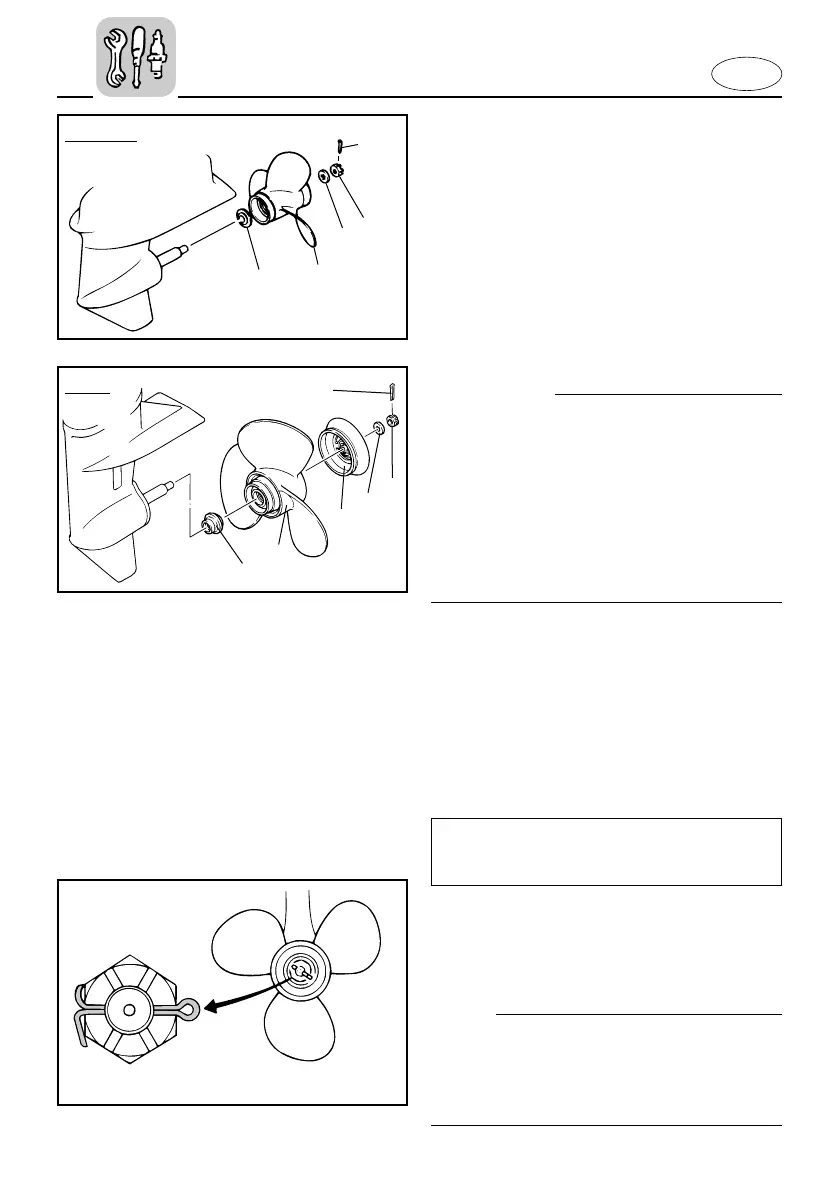
Installing the Propeller
cC
8 Be sure to install the thrust washer
before installing propeller, otherwise,
lower case and propeller boss may be
damaged.
8 Be sure to use a new cotter pin and
bend the ends over securely. Other-
wise, the propeller could come off dur-
ing operation and be lost.
1) Apply Yamaha Marine grease or a
corrosion resistant grease to the pro-
peller-shaft.
2) Install the thrust washer and propeller
on the propeller shaft. Install the
deflector (for FT9.9) on the propeller.
3) Install the washer and tighten the pro-
peller nut to the specified torque.
4) Align the propeller nut with the pro-
peller shaft hole. Insert a new cotter
pin in the hole and bend the cotter pin
ends.
NOTE:
When the propeller nut does not align
with the propeller shaft hole after tighten-
ing to the specified torque, then tighten
the nut further to align it with the hole.
4-28
EMU00997
Removing the Propeller
1) Straighten the cotter-pin 1 and pull it
out using a pair of pliers.
2) Remove the propeller nut 2 and
washer 3
3) Remove the deflector 4 (for FT9.9),
propeller 5 and thrust washer 6.
602053
Tightening torque:
Refer to "SPECIFICATIONS" on page 4-
1.
F9.9/F15
FT9.9
66M-9-77-A0-4b 3/5/03 10:54 AM Page 18



 To Next Page