
 To Next Page
C
Connor RyanSep 23, 2025
What to do if radio wave reception is weak even with an outdoor antenna on Yamaha ISX-B820?
- MMr. Alexander CordovaSep 23, 2025
Change the height, direction, or placement of the antenna.

What to do if radio wave reception is weak even with an outdoor antenna on Yamaha ISX-B820?
Change the height, direction, or placement of the antenna.
How to fix too much noise during stereo broadcast on Yamaha Stereo System?
Try manual tuning to improve the signal quality or use a commercially available outdoor antenna.
Why is there no sound coming from my Yamaha Stereo System?
If your Yamaha Stereo System isn't producing sound, first, check the volume level and adjust it if it's set too low. Also, make sure you've selected the correct source for your audio.
What to do if the Yamaha Stereo System remote control does not work?
If your Yamaha Stereo System remote control isn't working, ensure you're within the remote's operational range. Check for any obstructions between the remote and the unit. Also, verify that the batteries aren't depleted, and replace them if necessary. Finally, avoid direct sunlight or lighting on the unit's remote control signal receiver; adjust the lighting or unit orientation if needed.
Why is the sound cracked or distorted on my Yamaha ISX-B820?
If your Yamaha Stereo System is producing cracked, distorted, or abnormal noise, the input source volume or the unit's volume (especially Bass) may be too high. Adjust the volume using the VOLUME control, or adjust the Bass using the EQ.
Why doesn't playback start immediately on my Yamaha ISX-B820 Stereo System?
If playback does not start immediately after pressing / on your Yamaha Stereo System, the disc may be dirty. Wipe the disc clean. Alternatively, the disc loaded into the unit may not be compatible; use a disc supported by the unit. If the unit was moved from a cold to warm place, condensation may have formed on the disc reading lens. Wait for an hour or two until the unit adjusts to the room temperature, and try again.
Why are some button operations not working on my Yamaha ISX-B820?
If some button operations do not work on your Yamaha Stereo System, the disc loaded into the unit may not be compatible. Use a disc supported by the unit.
Why can't I insert a disc into my Yamaha ISX-B820 Stereo System?
If you are unable to insert a disc into your Yamaha Stereo System, the system might be set to power save mode. Press to cancel the power save mode.
Why has the clock setting been cleared on my Yamaha Stereo System?
If your Yamaha Stereo System clock setting has been cleared, and the unit was left unplugged for more than one week, plug the power cable into the wall outlet firmly, and set the clock again.
Why is there no sound or interrupted sound during Bluetooth playback on my Yamaha ISX-B820 Stereo System?
If you are experiencing no sound or interrupted sound during playback on your Yamaha Stereo System via Bluetooth, the Bluetooth connection between the unit and the other component may have been disconnected. Perform Bluetooth connection operations again. Ensure that the devices are not too far apart and move them closer if needed. Keep the unit away from devices emitting radio-frequency signals. Make sure the other component’s Bluetooth function is on and set properly to send audio signals to this unit. Ensure the pairing setting of the other component is set to this unit, and the other component’s volume is not set to the minimum.
Identification and function of controls on the top surface.
Step-by-step guide for connecting an iPod device.
Explains the indicators and information shown on the front display.
Identifies connectors and switches on the back of the unit.
Details the buttons and functions of the remote control.
Specific buttons on the unit for iPod operation.
Procedure for setting the current time on the unit.
How to change between different clock display modes.
Instructions for playing music from a connected iPod.
How to enable repeat and shuffle modes for iPod playback.
Guide for playing standard audio CDs.
Instructions for playing data CDs with music files.
Steps for playing music files from a USB storage device.
How to enable repeat and shuffle modes for USB playback.
Process for establishing a Bluetooth connection.
How to play music wirelessly from a Bluetooth device.
Steps to reconnect previously paired Bluetooth devices.
Procedures for ending an active Bluetooth session.
How to tune into FM radio stations.
Method for saving favorite FM stations for quick access.
Explanation of the three available alarm sound modes.
Options for selecting music sources for alarm playback.
Guide for configuring alarm time and selecting the alarm mode.
How to activate or deactivate the alarm function.
Actions available during alarm playback, including snooze.
Solutions for common operational problems and unit issues.
Troubleshooting specific issues related to iPod connection and playback.
Solutions for problems encountered during CD playback.
Troubleshooting tips for USB device connectivity and playback.
Solutions for issues related to Bluetooth pairing and connection.
Tips for improving FM signal quality and reducing noise.
Troubleshooting common problems with the remote control.
Details on compatible CD types and handling precautions.
Information on compatible USB devices and file formats.
Specifications for playing MP3 and WMA audio file formats.
Guidelines for safely handling and cleaning discs.
Details specifications for iPod, CD, USB, and AUX playback.
Covers the FM tuning range of the unit.
Includes power supply, power consumption, and physical dimensions.
Details Bluetooth version, protocols, output, and communication distance.
Provides compatibility and usage notes for iPod and iPhone.
 General
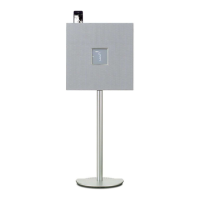
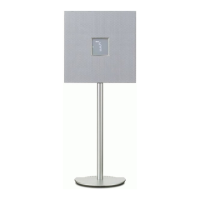
| Product color | White |
|---|---|
| Housing material | - |
| Recommended usage | Speaker set unit |
| Suitable for outdoor use | No |
| Tweeter | Yes |
| Woofer diameter | 100 mm |
| Tweeter diameter | 30 mm |
| Number of drivers | 2 |
| Speaker placement | Floor |
| Audio output channels | 1.0 channels |
| Impedance | - Ω |
| Frequency range | - Hz |
| RMS rated power | - W |
| Audio formats supported | MP3, WMA |
| Bluetooth range | 10 m |
| USB 2.0 ports quantity | 1 |
| Connectivity technology | Wired & Wireless |
| Power source type | AC |
 Weight and Dimensions
| Depth | 85.7 mm |
|---|---|
| Width | 410 mm |
| Height | 997 mm |
| Cord length | 2.1 m |
| Depth (with stand) | 295 mm |