EasyManua.ls Logo

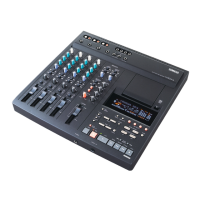
Yamaha MD8 - User Manual

Yamaha MD8
115 pages
Print Icon
To Next Page IconTo Next Page
Loading...
MULTITRACK MD RECORDER
Owner’s Manual
E
MULTITRACK MD RECORDER
GROUP 1
CH 1 CH 2 CH 3 CH 4 CH 5 CH 6 CH 7 CH 8
2345678
REC SELECT
DISPLAY
REPEAT MARK SEARCH MARK
AUTO
PUNCH I/O SONG SEARCH PAUSE
REHE REC PLAY STOP
A B LAST REC SEARCH SET EXIT
ADJUSTPITCH EDIT UTILITY
ENTER
PHONES PUNCH I/O
DATA
+ –
CURSOR
1
1
2
3
4
2 1 2
3 4 3 4
GROUP ASSIGN GROUP ASSIGN
1 3
2 4
GROUP
2TR IN
MONITOR
SELECT
CUE MIX
TO STEREO
CUE
MASTER
GROUP
MASTER
STEREO
CUE
010 010
010
010
010
010
010
MONITOR
LEVEL
MIN MAX
9-10
LINE
GAIN
HIGH
MID
LOW
AUX
PAN
MIC
LR
8
8 STEREO
11-12
10
9
8
7
6
5
4
3
2
1
0
10
9
8
7
6
5
4
3
2
1
0
10
9
8
7
6
5
4
3
2
1
0
–15 +15
–15 +15
–15 +15
250 5k
FLIP
CUE
010
F
G
1
010
2
010
1 2
3 4
GROUP ASSIGN
L
ODD
R
EVEN
LINE
GAIN
HIGH
MID
LOW
AUX
PAN
MIC
LR
7
7
10
9
8
7
6
5
4
3
2
1
0
–15 +15
–15 +15
–15 +15
250 5k
FLIP
CUE
010
F
G
1
010
2
010
1 2
3 4
GROUP ASSIGN
L
ODD
R
EVEN
LINE
GAIN
HIGH
MID
LOW
AUX
PAN
MIC
LR
6
6
10
9
8
7
6
5
4
3
2
1
0
–15 +15
–15 +15
–15 +15
250 5k
FLIP
CUE
010
F
G
1
010
2
010
1 2
3 4
GROUP ASSIGN
L
ODD
R
EVEN
LINE
GAIN
HIGH
MID
LOW
AUX
PAN
MIC
LR
5
5
10
9
8
7
6
5
4
3
2
1
0
–15 +15
–15 +15
–15 +15
250 5k
FLIP
CUE
010
F
G
1
010
2
010
1 2
3 4
GROUP ASSIGN
L
ODD
R
EVEN
LINE
GAIN
HIGH
MID
LOW
AUX
PAN
MIC
LR
4
4
10
9
8
7
6
5
4
3
2
1
0
–15 +15
–15 +15
–15 +15
250 5k
FLIP
CUE
010
F
G
1
010
2
010
1 2
3 4
GROUP ASSIGN
L
ODD
R
EVEN
LINE
GAIN
HIGH
MID
LOW
AUX
PAN
MIC
LR
3
3
10
9
8
7
6
5
4
3
2
1
0
–15 +15
–15 +15
–15 +15
250 5k
FLIP
CUE
010
F
G
1
010
2
010
1 2
3 4
GROUP ASSIGN
L
ODD
R
EVEN
LINE
GAIN
HIGH
MID
LOW
AUX
PAN
MIC
LR
2
2
10
9
8
7
6
5
4
3
2
1
0
–15 +15
–15 +15
–15 +15
250 5k
FLIP
CUE
010
F
G
1
010
2
010
1 2
3 4
GROUP ASSIGN
L
ODD
R
EVEN
LINE
GAIN
HIGH
MID
LOW
AUX
PAN
MIC
LR
1
1
10
9
8
7
6
5
4
3
2
1
0
–15 +15
–15 +15
–15 +15
250 5k
FLIP
PB MIC/
LINE
CUE
010
F
G
1
010
2
010
1 2
3 4
GROUP ASSIGN
L
ODD
R
EVEN
P
A
N
L
E
V
E
L
PB MIC/
LINE
P
A
N
L
E
V
E
L
PB MIC/
LINE
P
A
N
L
E
V
E
L
PB MIC/
LINE
P
A
N
L
E
V
E
L
PB MIC/
LINE
P
A
N
L
E
V
E
L
PB MIC/
LINE
P
A
N
L
E
V
E
L
PB MIC/
LINE
P
A
N
L
E
V
E
L
PB MIC/
LINE
P
A
N
L
E
V
E
L
MIC/LINE INPUT LINE INPUT AUX SEND
1 2 345678 9101112 1 2INSERT I/O INSERT I/O
12341234
TOC WRITE
IN OUT

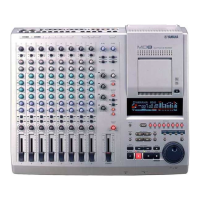
Table of Contents

Questions and Answers

  • T
    Tracy ThompsonAug 17, 2025
    What to do if my Yamaha MD8 cannot record?
    • L
      Lisa PenaAug 18, 2025
      If your Yamaha Minidisc Recorder isn't recording, ensure the disc's write protect tab is set to unprotect. Press a [REC SELECT] button to choose a track for recording. Also, verify if you've selected DIR or GRP recording mode. If using GRP mode, assign the input signal to the group accessible by the track you're recording to. Use the CUE monitor controls to confirm the signal is being sent to the track.
  • D
    Donna CaseyAug 20, 2025
    How to turn on Yamaha MD8 Minidisc Recorder?
    • D
      davisdanaAug 20, 2025
      If your Yamaha Minidisc Recorder (MD8) won't turn on, check that the power cord is connected to a suitable AC wall outlet and plugged into the AC IN connector at the rear of the unit. Also, ensure the MD8 POWER switch is set to the ON position.
  • C
    Catherine MeyerAug 22, 2025
    Why I cannot listen to a connected music source on Yamaha MD8 Minidisc Recorder?
    • M
      mlinAug 22, 2025
      If you cannot hear a connected music source on your Yamaha Minidisc Recorder, ensure the [FLIP] switch is set to MIC/LINE. Raise the input channel fader, assign the input channel to a track using the GROUP ASSIGN switches, press the corresponding MONITOR SELECT GROUP switch, and turn up the MONITOR LEVEL control.
  • B
    Bobby ThomasAug 25, 2025
    What to do if level meters do not indicate signal levels on Yamaha MD8 Minidisc Recorder?
    • L
      lauramaciasAug 26, 2025
      Normally, the level meters indicate disc signal levels. To see the recording level on your Yamaha Minidisc Recorder, press the [REC] button to engage Record Pause mode and press the corresponding [REC SELECT] button. With no disc loaded, the meters indicate group signal levels.
  • A
    Amy RomeroAug 27, 2025
    Why do recordings play back at the wrong pitch on Yamaha MD8?
    • F
      fordrickyAug 27, 2025
      If recordings play back at the wrong pitch on your Yamaha Minidisc Recorder, you may have adjusted the pitch prior to recording a track. Reset the pitch as required.
  • D
    diazjamesAug 30, 2025
    How to eject a disc from Yamaha MD8 Minidisc Recorder?
    • J
      Jennifer LawsonAug 30, 2025
      If you cannot eject a disc from your Yamaha Minidisc Recorder, press [TOC WRITE] to write the TOC data to disc, then eject the disc.
  • S
    Sandra PowersSep 2, 2025
    How to send a channel signal to the desired AUX SEND on Yamaha MD8?
    • C
      carlolsonSep 2, 2025
      To send a channel signal to the desired AUX SEND on your Yamaha Minidisc Recorder, turn up the AUX control and raise the channel fader. The AUX SEND signal is sourced post-fader (after the fader).
  • C
    Candace BlakeSep 4, 2025
    Why can't I record eight tracks on my Yamaha Minidisc Recorder?
    • S
      Sean CollinsSep 4, 2025
      If you cannot record eight tracks on your Yamaha Minidisc Recorder, make sure that you are using an MD DATA disc, not a MiniDisc.
  • J
    Jared WallsSep 7, 2025
    Why Yamaha MD8 Minidisc Recorder cannot rehearse?
    • N
      nkramerSep 7, 2025
      You cannot rehearse the first recording on a blank disc or blank area of your Yamaha Minidisc Recorder. Record something first, then use the Rehearse function.
  • B
    Benjamin JacksonSep 9, 2025
    Why Yamaha MD8 cannot use the Punch In/Out or Ping-Pong functions?
    • D
      Diana HorneSep 9, 2025
      If a song was edited on another MD device, the Yamaha Minidisc Recorder may not be able to use these functions. In this case, try copying the song with the Song Copy function and then try and edit the copy. Songs recorded on other MD equipment may be protected by the SCMS protection system, in which case, editing is not allowed.

Summary

4 Recording & Mixing Techniques

Recording a New Song

Guides the user through the process of recording the first song on a disc.

7 Editing Songs & Tracks

9 The MD8 & MIDI

Using the MD8 in a Synchronized MIDI System

Explains how to connect and configure the MD8 for MIDI synchronization.

12 Q&A Section

Troubleshooting

Provides solutions for common operational problems and symptoms encountered with the MD8.

Appendix

Recorder

Lists the technical specifications for the MD8's recording capabilities.

Mixer

Lists the technical specifications for the MD8's mixing section.

Yamaha MD8 Specifications

General IconGeneral
BrandYamaha
ModelMD8
CategoryMinidisc Recorder
LanguageEnglish

Related product manuals