Manual Punch In/Out 31
MD8—Owner’s Manual
Using a Footswitch
1. Connect an optional footswitch to the PUNCH I/O jack (front panel).
2. Locate to a position before the point at which you want to punch in.
3. Press the [REC SELECT] button (or [GROUP] + [REC SELECT]) of the track
that you want to record.
A dot flashes above the corresponding track indicator.
4. Press the [REC] button.
The REC indicators flash, indicating Record Pause mode is engaged.
5. Press the footswitch to start playback.
Playback starts and the PLAY indicators light up. The REC indicators continue to flash.
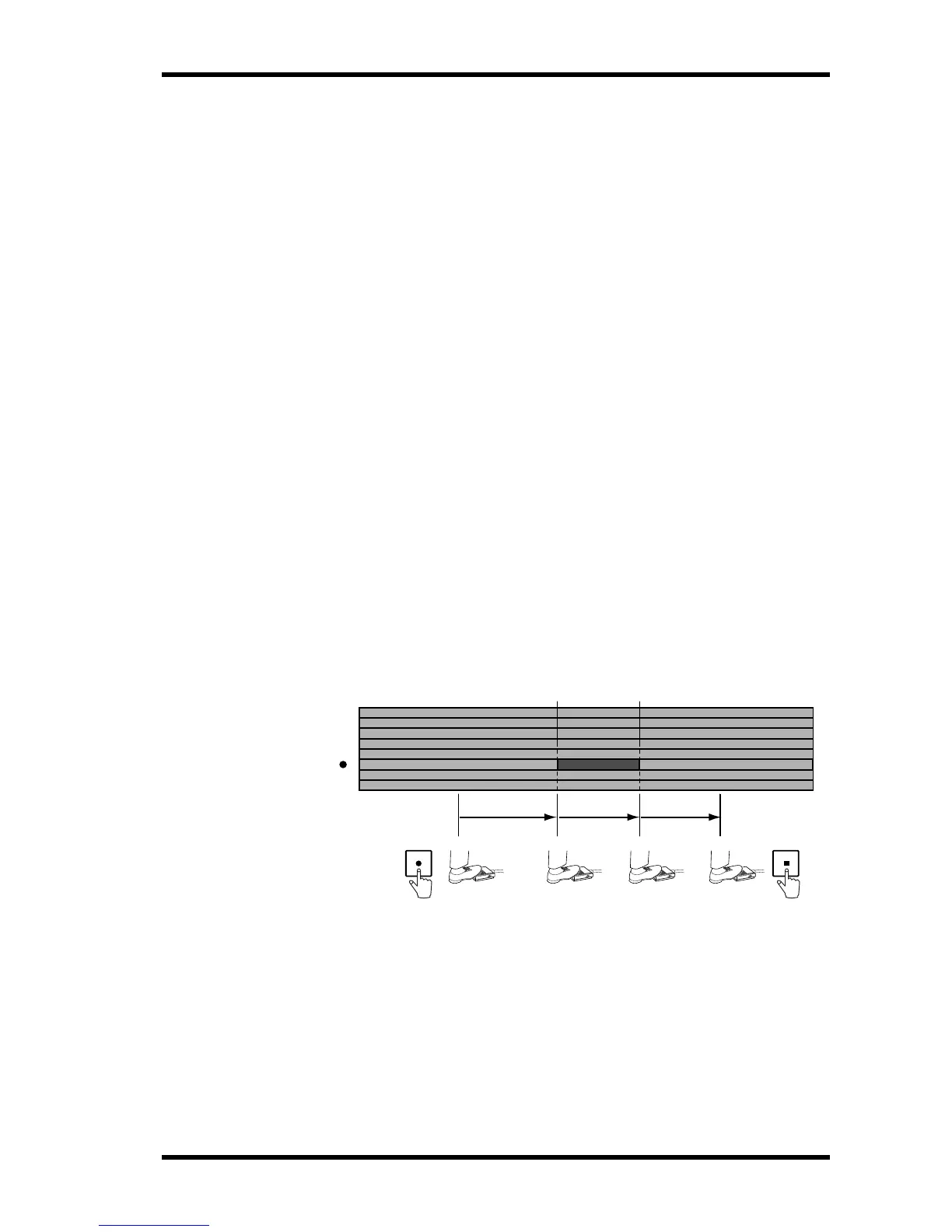
6. At the point where you want to punch in, press the footswitch again.
Recording starts. The REC indicators light up. The dot above the track indicator stops flash-
ing and lights up continuously. And the LAST REC IN indicator lights up, indicating that
the IN point has been stored.
If you’re monitoring the track via CUE, you’ll hear the existing sounds playback until the
footswitch is pressed. After which you’ll hear the new sound that’s being recorded.
7. At the point where you want to punch out, press the footswitch again.
Recording stops. The REC indicators go off. The dot above the track indicator flashes. And
the LAST REC OUT indicator lights up, indicating that the OUT point has been stored.
Through the CUE monitor you’ll hear the existing sounds playback.
8. Press the footswitch again to enter Pause mode.
9. Press the [STOP] button to finish.
The following illustration shows how punch in/out works with a footswitch.
A footswitch can also be used to control other MD8 functions. See Using a Footswitch on
page 47 for more information.
In Point
3
4
5
6
7
8
2
1
Play
REC
SELECT
PlayRecord
Out Point
STOPREC


 To Next Page