24
The MIDI channel settings for all assigned memories can be set to the same MIDI chan-
nel, setting all MIDI channels to the same channel can be convenient in some situations.
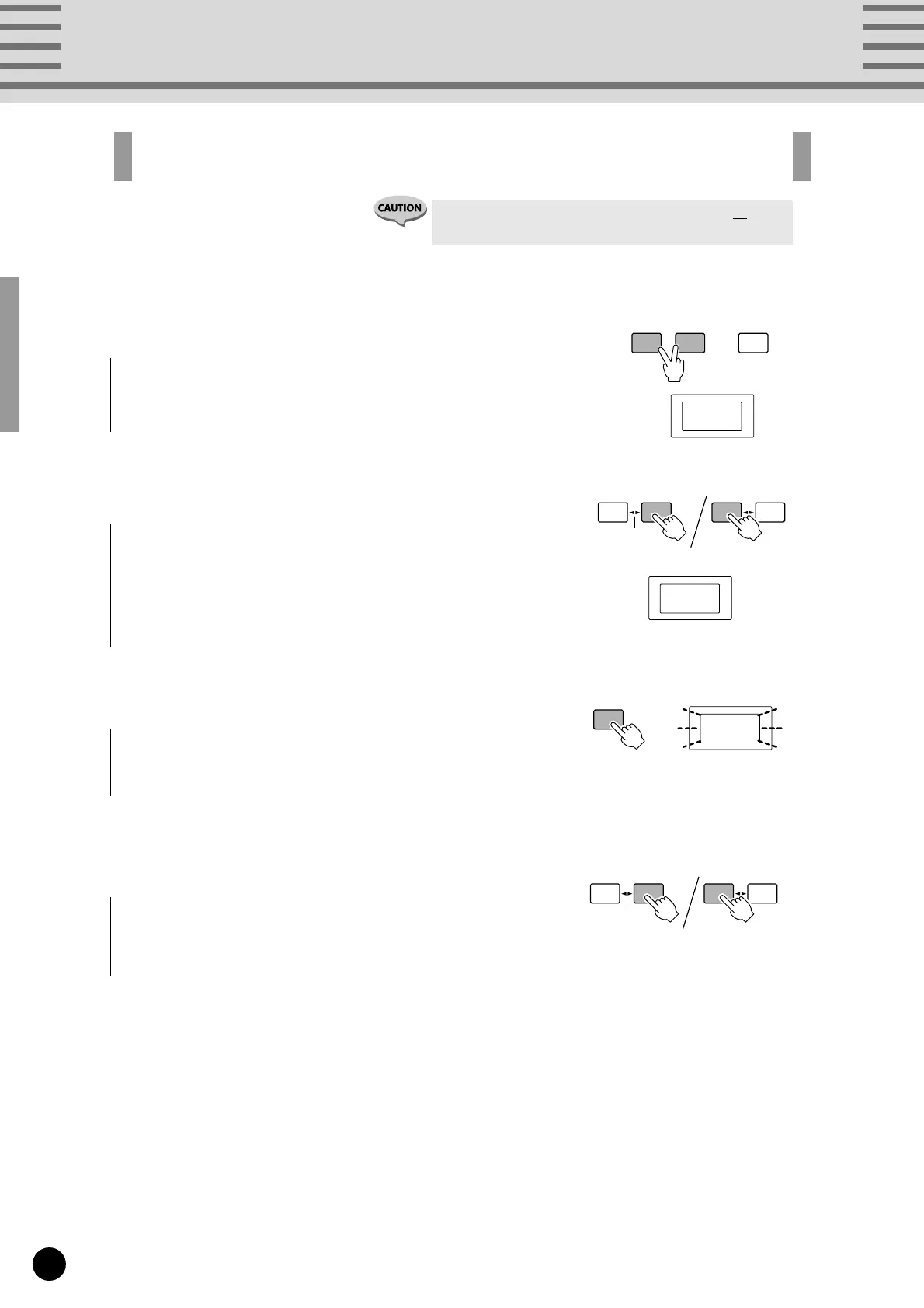
All Memory MIDI Channel Assign
1
For both Normal and MIX mode operation, simultaneously
press both [MEMORY EDIT] and [FC EDIT].
The MIDI channel number will be shown in the LED display
2
Press [INC/YES] or [DEC/NO] to select the new channel
number (C01-C16) for all memories.
DEC
/NO
INC
/YES
±10
DEC
/NO
INC
/YES
±10
C09
3
Press [WRITE/EXIT].
The channel number in the LED display will flash.
C09
4
Press [INC/YES] to confirm the setting of all channels, or
[DEC/NO] to cancel the operation.
DEC
/NO
INC
/YES
±10
DEC
/NO
INC
/YES
±10
WRITE
/EXIT
• Pressing [INC/YES] in the operation will change all
memory MIDI channel assignments!
MEMORY
EDIT
FC
EDIT
WRITE
/EXIT
C01


 To Next Page