EasyManua.ls Logo

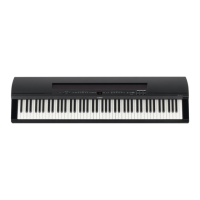
Yamaha P-255 - User Manual

Yamaha P-255
60 pages
Print Icon
To Next Page IconTo Next Page
Loading...
Manual de instrucciones
Mode d'emploi
Owners Manual
Before using the instrument, be sure to read “PRECAUTIONS” on pages 4–5.
Avant d’utiliser l’instrument, lisez attentivement la section « PRÉCAUTIONS D'USAGE » aux pages 4 et 5.
Antes de utilizar el instrumento, lea las “PRECAUCIONES”, en las páginas 4–5.
ES
FR
EN
P
255
PIANO NUMÉRIQUE
DIGITAL PIANO
PIANO DIGITAL
ENGLISHFRANÇAIS
ESPAÑOL

Table of Contents

Questions and Answers

  • F
    Frederick McculloughJul 26, 2025
    What to do if the Yamaha P-255 Musical Instrument volume is low or there is no sound?
    • P
      patricia67Jul 26, 2025
      If the overall volume of your Yamaha Musical Instrument is low or you can't hear anything, try the following: * Move the [MASTER VOLUME] slider to the right. * Unplug the headphones if they are connected. * Turn the speakers back on if they are off. * Turn local control back on if it has been turned off.
  • B
    baileydorothyJul 30, 2025
    How to fix distorted sound on a Yamaha P-255?
    • T
      Trevor CampbellJul 30, 2025
      If the sound from your Yamaha Musical Instrument is distorted, here are a few things you can try: 1. Turn down the volume using the [MASTER VOLUME] slider. 2. Move the [EQ] sliders downward. 3. Turn off the Sound Boost function.
  • T
    Tammy MooreAug 4, 2025
    Why is there noise coming from my Yamaha Musical Instrument?
    • B
      Brendan IngramAug 4, 2025
      If you hear noise coming from the Yamaha Musical Instrument, it might be due to interference from a nearby mobile phone. Try turning off any mobile phones that are close to the instrument.
  • H
    howardjavierAug 8, 2025
    What to do if my Yamaha Musical Instrument digital piano will not turn on?
    • D
      David HortonAug 8, 2025
      If your Yamaha Musical Instrument digital piano won't turn on, make sure the power adapter is securely connected to both the digital piano and a working AC wall socket.
  • J
    Joshua HallAug 12, 2025
    What to do if I hear noise from Yamaha P-255 speakers when using an iPad, iPhone, or iPod touch app?
    • E
      eric50Aug 12, 2025
      If you're hearing noise from your Yamaha Musical Instrument’s built-in speakers or headphones when using it with an iPad, iPhone, or iPod touch app, it's recommended to turn on the device’s Airplane Mode.
  • S
    Stephanie YoungAug 17, 2025
    Why do the pedals have no effect on my Yamaha P-255?
    • A
      Andrew ReyesAug 17, 2025
      If the pedals on your Yamaha Musical Instrument aren't working, ensure that the pedal cord is securely connected to the [SUSTAIN PEDAL] jack or the [PEDAL UNIT] terminal. With the digital piano turned off, insert the cord’s plug securely into the correct jack or terminal until no metal section of the plug is visible.
  • W
    William MendozaAug 21, 2025
    What to do if Yamaha Musical Instrument USB flash drive freezes?
    • R
      Robert GloverAug 21, 2025
      If the USB flash drive plugged into your Yamaha Musical Instrument freezes or stops working, check the display for a message and refer to the Display Messages section (page 49) for more information. If no message is displayed, the USB flash drive may be broken.

Summary

Special Message Section

General Safety Warnings

Important safety precautions regarding electrical shock, fire, and damage to the unit.

Precautions

Critical Safety Warnings

Essential warnings for electrical shock, water exposure, and fire hazards.

Handling and Placement Safety

Safety measures for instrument location, connections, and physical handling.

Panel Controls & Functions

Power and Volume Controls

Explanation of the power switch and master volume slider.

Voice and Effect Controls

Controls for Split, Reverb, Effects, Sound Boost, and EQ.

Performance and Playback Controls

Details on buttons for demo, transpose, recording, and playback.

Audio and Headphone Connections

Details on headphone jacks and AUX audio outputs.

Display and Function Buttons

Overview of the display panel and general function buttons.

Pedal and MIDI Connections

Information on sustain pedal, pedal unit, and MIDI terminals.

Data and Computer Connections

Covers USB TO DEVICE, USB TO HOST, and DC IN connection ports.

Setting Up

Main Operations

Selecting & Playing Voices

Using the Metronome

Playing Rhythm Tracks

Playing Songs

Playing a Song

Procedure for selecting and initiating song playback.

Recording Keyboard Performances

Recording Process Steps

Details on button lights, starting, stopping, and playback of recordings.

Recording Individual Parts (MIDI)

Step-by-step guide for recording MIDI parts separately.

Saving Changes to Recorded Songs

Procedures for activating record mode and saving modifications.

Simple Recording Procedure

Step-by-step guide for basic recording of performances.

Using USB Flash Drives

USB Drive Precautions and Usage

Important safety and operational guidelines for USB flash drives.

Copying User Songs to USB Drive

Transferring recorded songs from the piano to a USB drive.

Connecting Other Equipment

Performing Live

Performing On-Stage in a Band

Setup and connections for band performances via PA mixer.

Sound Setup and Volume Balancing

Adjusting volume levels and checking settings for live performance.

Singing and Playing Solo

Setup for solo performances with keyboard amp and microphone.

Customizing with Function Parameters

Basic Function Parameter Operations

How to navigate and set function parameters.

Dual Mode Settings

Adjusting balance, detune, octave shift, and effects for Dual mode.

Split Mode Settings

Adjusting split point, balance, octave shift, effect depth, and pedal range.

Restoring Factory Settings

Resetting the instrument to its original default state.

Function Parameter Descriptions: Tuning

Details on Tuning and Tuning System Settings.

Pedal and Special Sound Settings

Configuring pedal functions, resonance, and special sound effects.

Volume Settings

Adjusting volumes for metronome, rhythms, songs, speakers, and AUX OUT.

MIDI Function Settings

Configuring MIDI send/receive channels and local control.

Troubleshooting

Limited 3-Year Warranty

Yamaha P-255 Specifications

General IconGeneral
Sound effectsChorus, Phaser, Resonators
Pedals quantity1
RMS rated power30 W
Number of speakers2
Maximum polyphony (notes)256
Music memory capacity (songs)10
Reverberation effects quantity4
Keys quantity88 keys
Demo songs quantity74
Equalizer bands quantity3
Product colorBlack
AC input voltage16 V
Weight and Dimensions IconWeight and Dimensions
Depth351 mm
Width1333 mm
Height148 mm
Weight17300 g

Related product manuals