Connection
Owner’s Manual
32
Audio input/output
connections
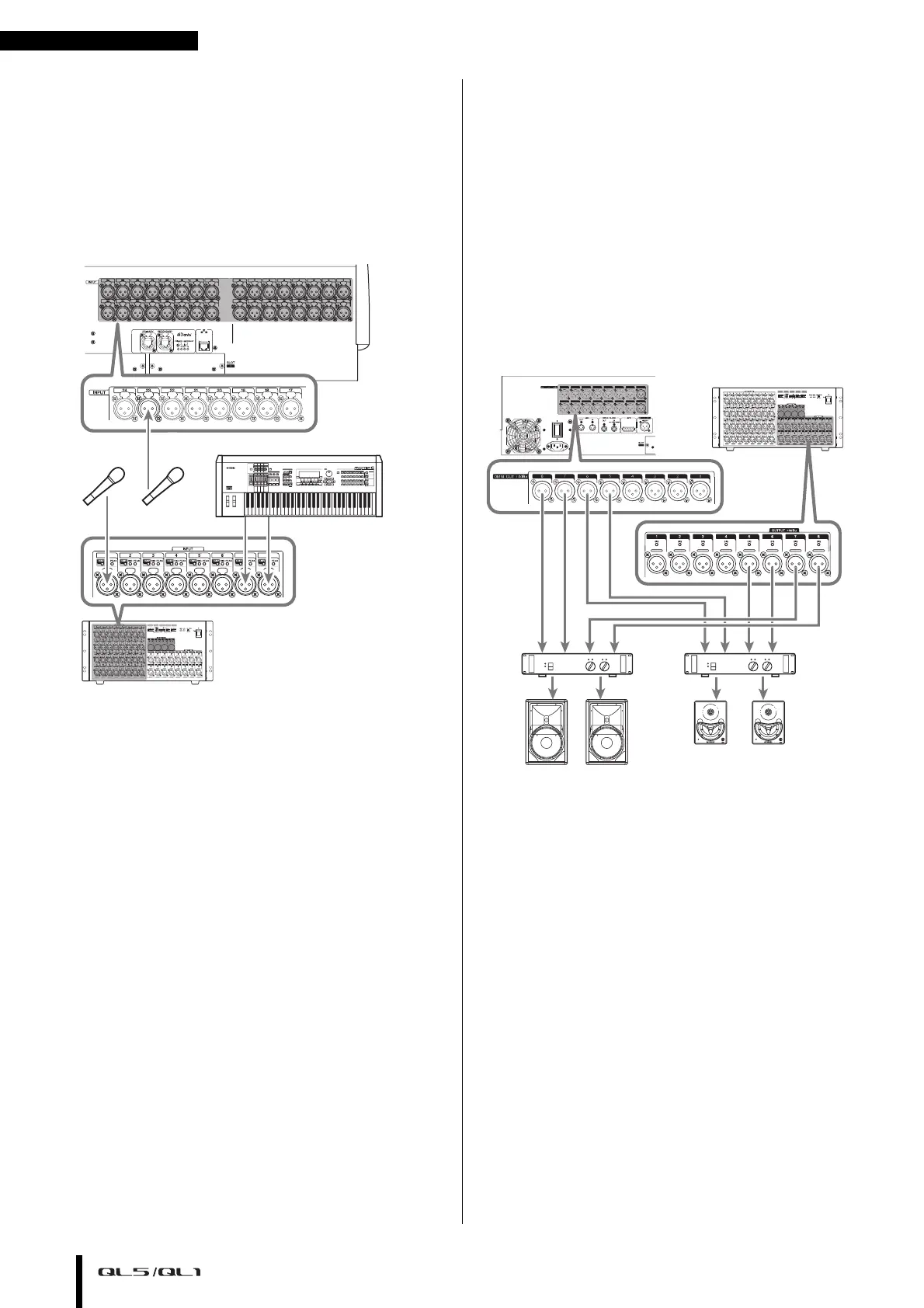
Analog input connections
INPUT jacks on the console and I/O devices are used
mainly to connect microphones or monaural line-level
devices.
Analog output connections
To the OMNI OUT jacks on the QL series and the
OUTPUT jacks on I/O devices, you can patch the output
signals from output channels [MIX, MATRIX, STEREO
(L/R), MONO (C)], monitor signals (MONITOR OUT
L/R/C channels), and the direct out signals of the input
channels. For information about patches, refer to
“Patching the mixer output to the I/O device” (see
page 35) in the Quick Guide section.
The console’s front panel has a PHONES OUT jack for
monitoring, and this jack always lets you monitor the
signal that is selected as the monitoring source. By
assigning the MONITOR OUT L/R/C channels to the
desired output jacks, you can also monitor the same
signal through external speakers.
0
1
2
3
4
5
6
7
8
9
A
B
C
D
E
F
Rio3224-D
0
1
2
3
4
5
6
7
8
9
A
B
C
D
E
F
Rio3224-D
Main speakers
Monitor speakers
QL series


 To Next Page
 Loading...