●
Recording Samples, and Creating Songs
●
33
RECORDING PARAMETERS
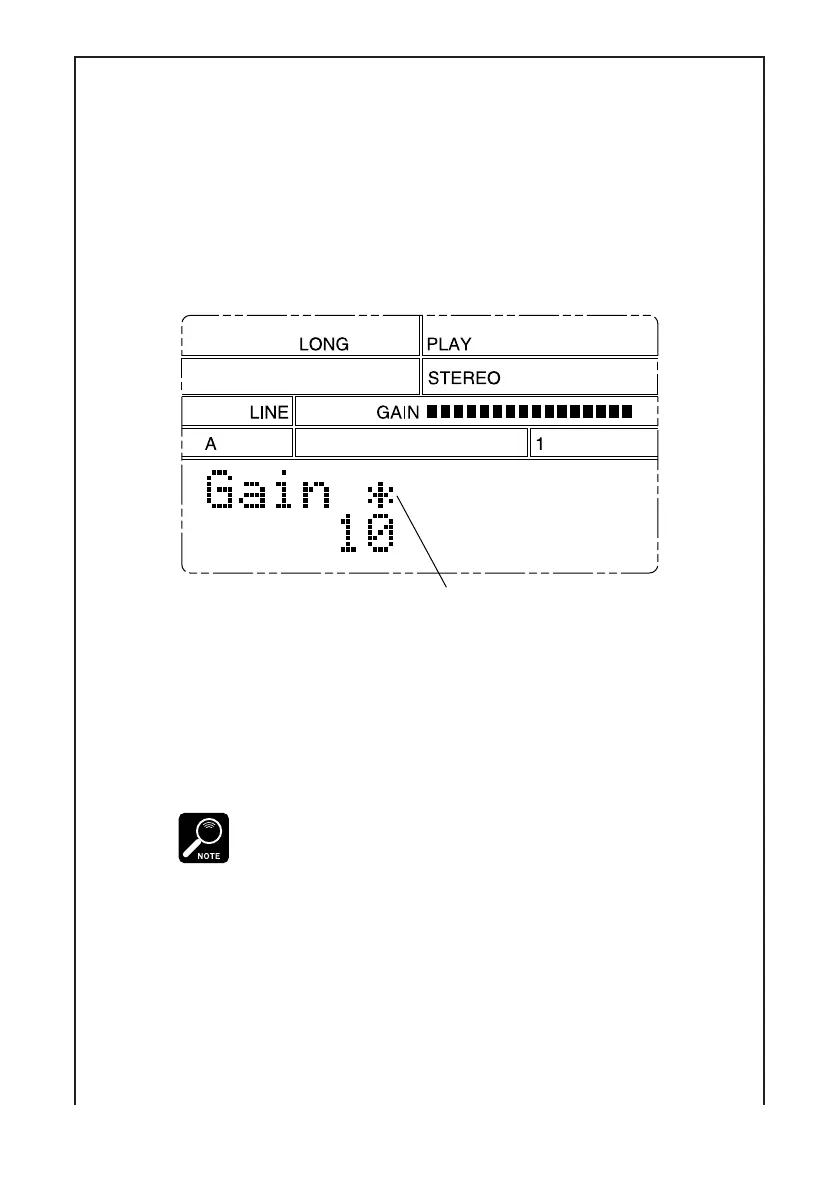
Gain: Sets the gain applied to the input signal. Press [–1] or [+1] to adjust the
gain setting while inputting a signal similar to the signal you plan to
record. (You may first need to change the setting of the Input param-
eter to match your input source; see explanation below.) You can set the
gain to any value between 1 to 16; in general, you want to set the gain as
high as you can without causing clipping. If the setting is too high, a
∗
mark appears to the right of Gain. If you see this mark, reduce the set-
ting.
Gain is too high!
Grade: Selects the sampling grade at which the sample is recorded. You have
four choices: High, Standard, Long, and Extra Long (Hi, Std, Long,
Exlg). The tradeoff is between quality and recordable length: “High”
gives the best quality but is very memory-intensive and limits the avail-
able recording time. “Extra Long” provides much longer recording time
at a significant cost in quality.
• A sample recorded at a given sampling grade will change its pitch if played
at a different grade. You may therefore find it best to record all related samples
at the same grade.
• Playback at “High” grade reduces the available polyphony. If you plan to
play your recorded sample in combination with other samples, you may
want to avoid the “High” setting.
• Total maximum recording time (for all 48 samples) at High grade is limited
to approximately 19 seconds. A sampling grade of High combined with a
pitch setting of +10% will provide a true sampling rate of 44.1kHz — the
same as used on a conventional CD recording.


 To Next Page