17
TF-RACK Quick Guide
Displaying the configuration screens
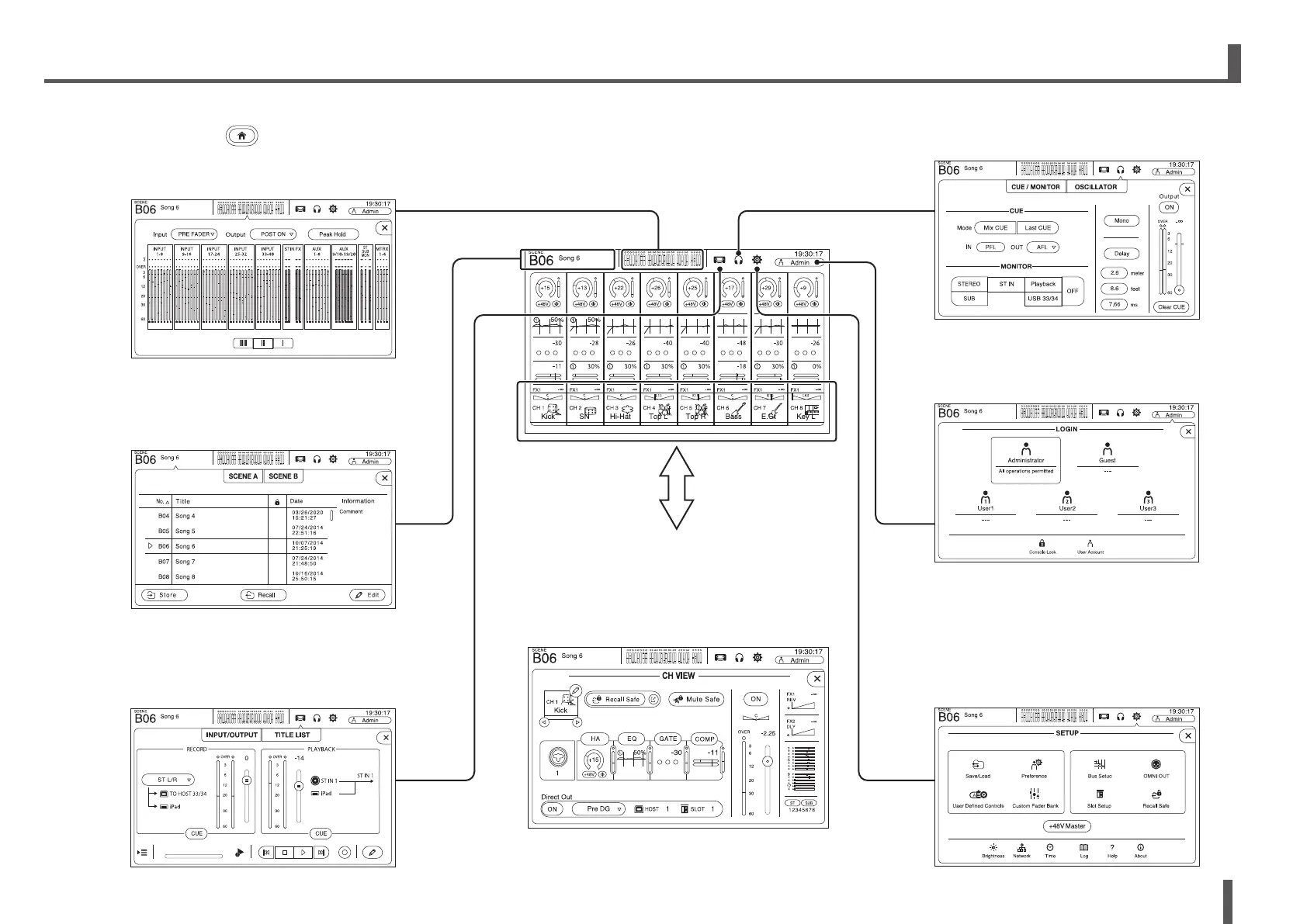
You can view the following screens by touching the buttons in the OVERVIEW screen. To return to the OVERVIEW screen,
press the Home key (
) below the display.
SCENE
Used to recall previously saved mixer
setups.
OVERVIEW
LOGIN
Allows you to select the user, change
account settings, and use the console
lock feature.
CH VIEW
Provides an overall view of a channel's settings.
You can adjust settings on this screen or switch
to the dedicated screen for each setting. You
can also edit the Channel Name on this screen.
For information about each screen, see page
16.
METER
Displays the input and output level.
INPUT/OUTPUT/TITLE LIST
Allows you to record directly to a
computer or USB storage device, play
back audio files, manage titles, etc.
CUE/MONITOR/OSCILLATOR
Used to manage CUE/monitor source and
control oscillators.
SETUP
Used to configure general mixer settings, OMNI
OUT settings, recall safe settings, assign user-
defined keys and knobs, configure custom fader
banks, and set up other preferences.
If a Tio1608-D is connected to the NY64-D, settings
for the Tio1608-D are also available on this screen.



 To Next Page