Playing Voices
Quick Guide
28
Tyros2 Owner’s Manual
Organ Flutes
The Tyros2 uses advanced digital modeling technology to recreate the legendary sound of vintage
organs. Just as on a traditional organ, you can create your own sound by increasing and decreas-
ing the levels of the flute footages.
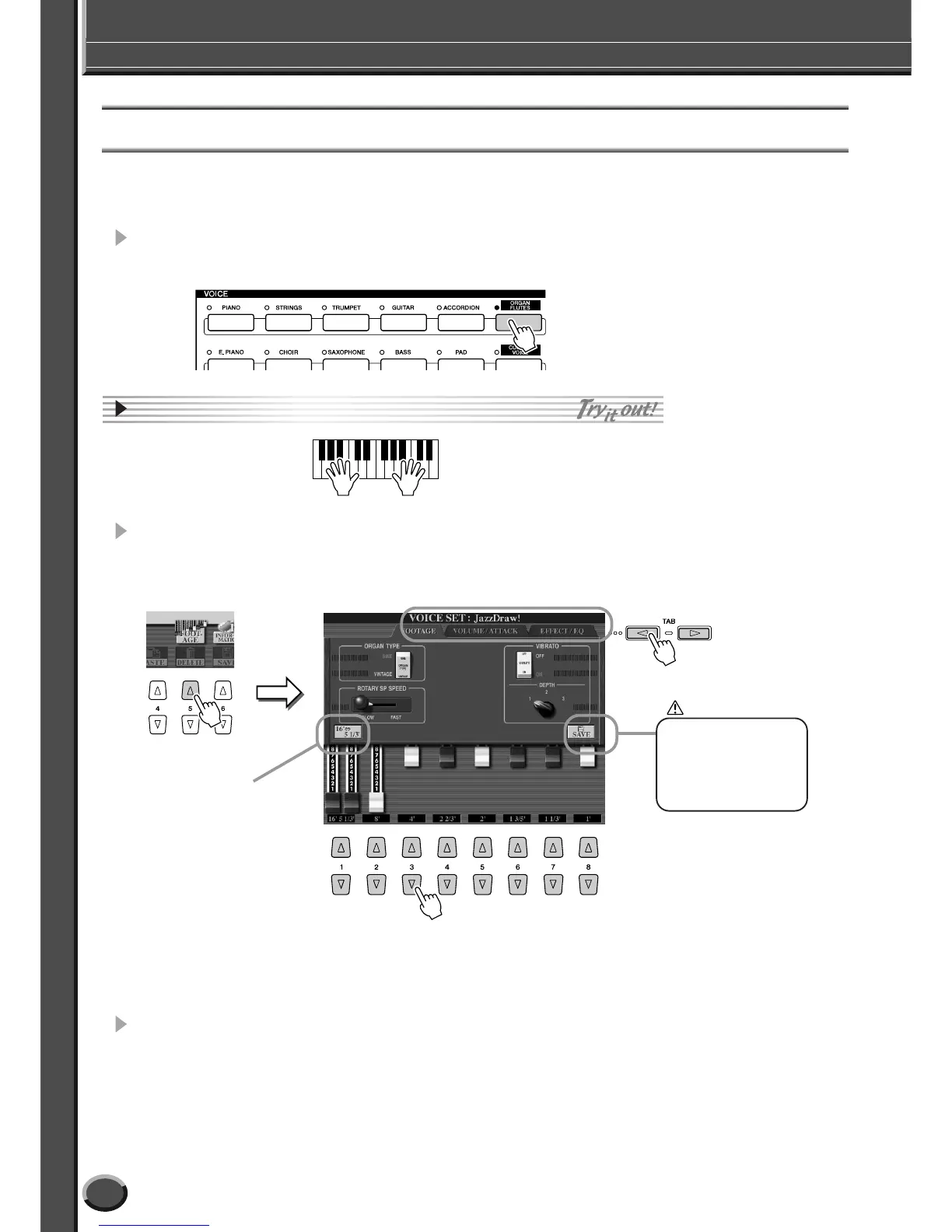
1 Press the [ORGAN FLUTES] button to call up the Organ Flutes
voice selection display.
2 Select the desired Organ voice and play the keyboard.
3 Press the upper [5] button to call up the display for adjusting vari-
ous parameters of the Organ Flutes voice. Use the LCD [1]–[8] but-
tons to adjust the footage settings.
4 Try out some of the other Organ Flutes voices.
CAUTION
You can select the
desired footage (16' or
5 1/3') with the [D] but-
ton. Use LCD [1] but-
ton to adjust the 16' or
5 1/3' footage.
Use these to select
the desired page of
parameters.
The footage settings determine the basic sound of the
organ flutes.
The term “footage” is a reference to the sound generation
of traditional pipe organs, in which the sound is produced
by pipes of different lengths (in feet).
If you wish to store the set-
tings here, make sure to
save the settings as a User
Voice before selecting
another voice or turning
the power off (page 75).



 To Next Page