Selecting and Playing a Style—Auto Accompaniment (ACMP)
Quick Guide
33
Tyros2 Owner’s Manual
■ Repertoire function
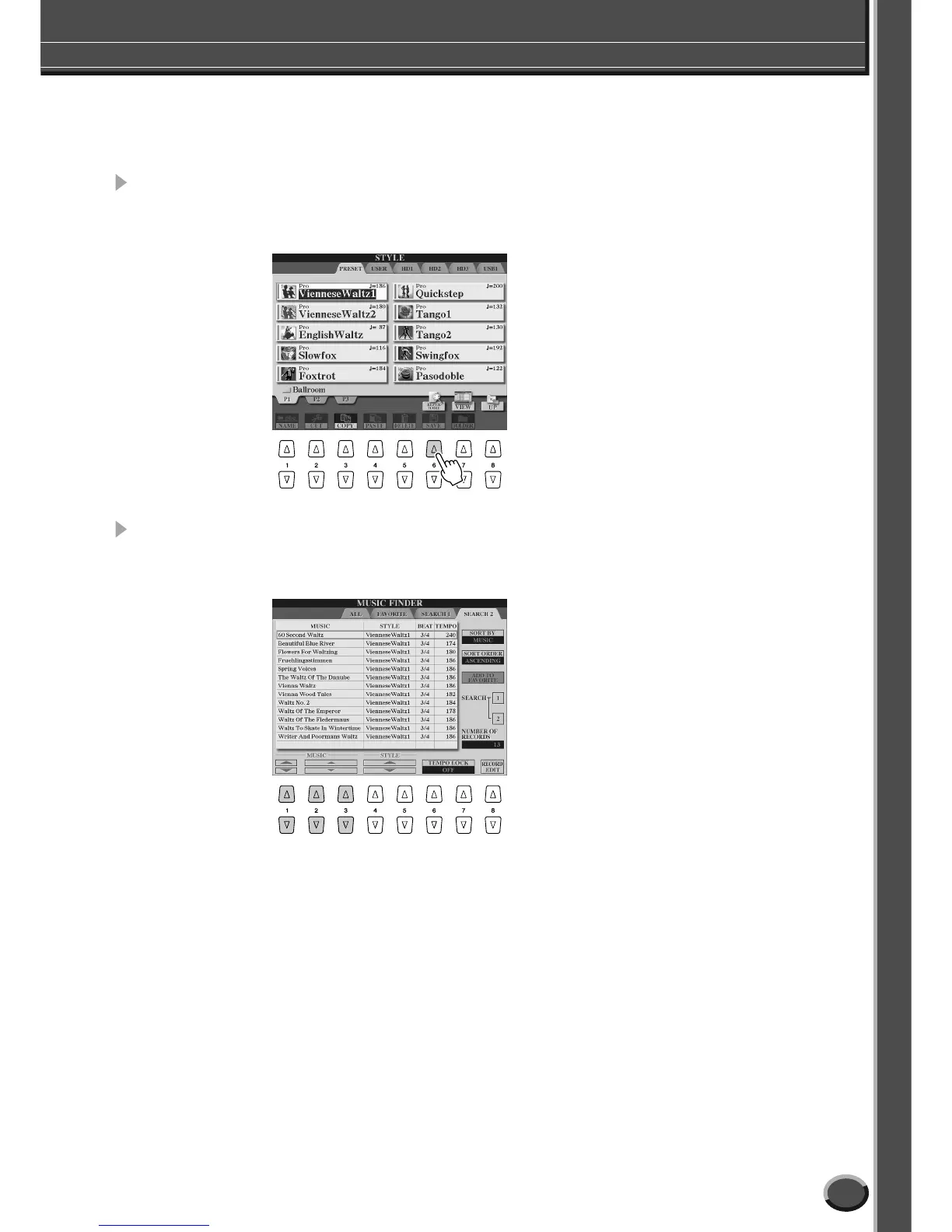
The convenient, easy-to-use Repertoire function automatically calls up appropriate panel settings
designed to match the selected style.
1 Press the [REPERTOIRE] LCD button (upper [6] button) in the style
Open/Save display.
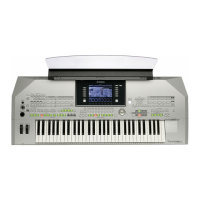
Various appropriate panel settings matching the selected style will be shown in the display.
2 Use the [1]–[3] buttons to select a setting.
The settings shown here are Music Finder Records. You can choose additional settings by using the
Music Finder feature (page 41).
■ Stop Accompaniment function
When auto accompaniment is turned on and Synchro Start is off, you can play chords in the left-hand
(accompaniment) section of the keyboard with the style stopped, and still hear the accompaniment
chord. In this condition—called “Stop Accompaniment”—any valid chord fingerings (page 152) are
recognized and the chord root/type are shown in the LCD. Since the Tyros2 properly recognizes the
chord, you can also use the Chord Match function (page 38) with the Multi Pads or the Harmony effect
(page 39) without having to play back a style.



 To Next Page