Voices
Reference
85
Tyros2 Owner’s Manual
Voice Types
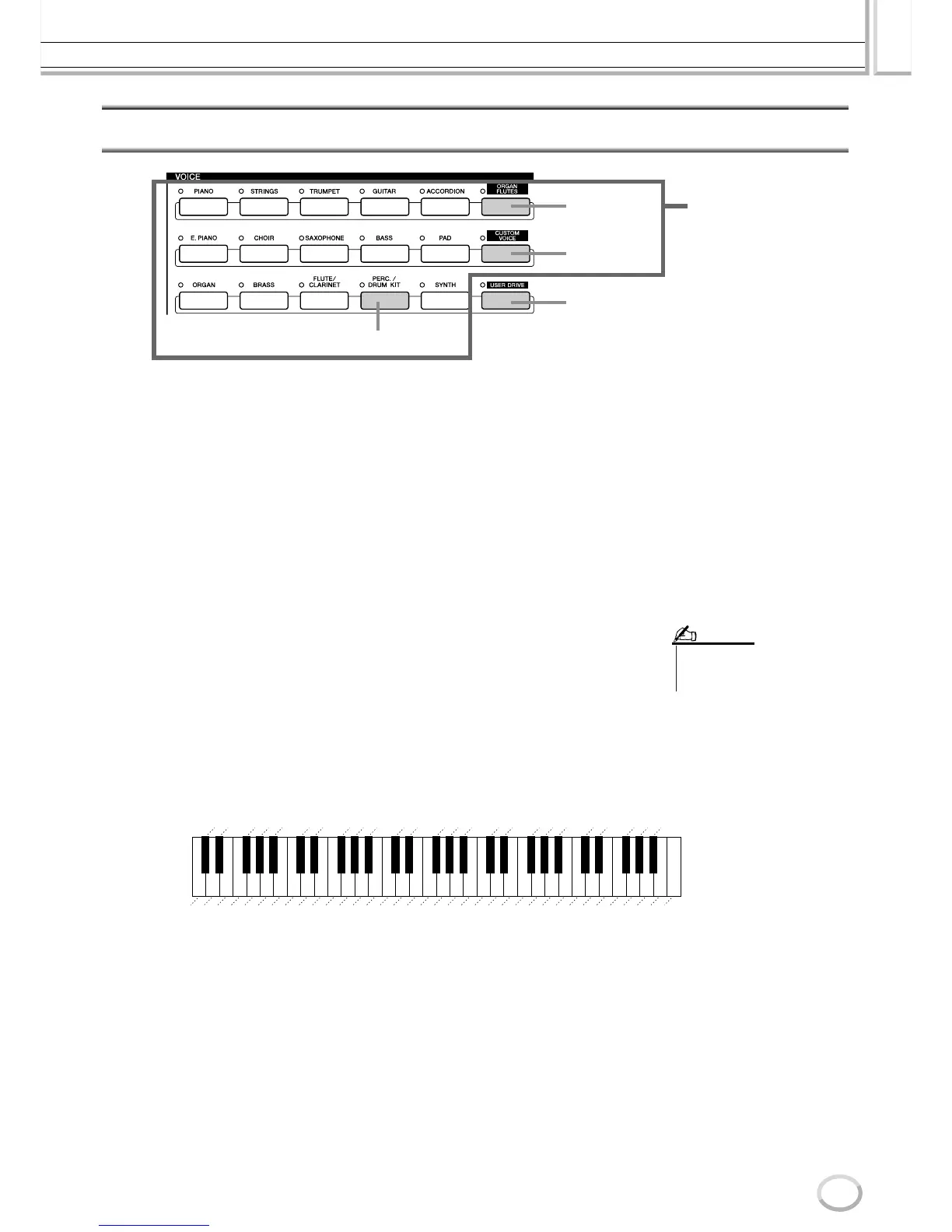
The buttons of the VOICE section (excepting USER DRIVE) are used to call up the relevant voice selection (Open/Save) display
for the Preset drive. Pressing one of the buttons calls up the voice selection display corresponding to the selected category, and
the last selected voice in the category is automatically called up. Five of these voice categories (below) are slightly different from
the others and deserve special explanation.
■ Organ Flutes Voices............................................................................................
Press the [ORGAN FLUTES] button to call up the Open/Save display for selecting among
the special organ voices. You can also use the Voice Set features (displayed as FOOTAGE)
to create your own original organ sounds.
Just as on a traditional organ, you can create your own sounds by adjusting the levels of
the flute footages.
■ Percussion/Drum Kit Voices............................................................................
When one of the Drum Kit or SFX Kit voices in the [PERC./DRUM KIT] group is
selected, you can play various drums and percussion instruments or SFX (sound effects)
sounds on the keyboard. The drum and percussion instruments played by the various keys
are marked by symbols below the keys. Some of the instruments in the different drum kit
voices sound different even though they have the same name, while others are essentially
the same.
See the separate Data List for a complete listing of the Drum Kit and SFX Kit assign-
ments.
■ GM&XG Voices and GM2 Voices ....................................................................
You can select the GM/XG/GM2 voices (page 212) directly via panel operations. Press
one of the VOICE buttons to call up the Open/Save display for voices, then press the [UP]
LCD button (upper [8] button) and call up the P2 page containing the “GM&XG” folder
and the “GM2” folder.
■ Custom Voices ......................................................................................................
Your original voices created by using the Voice Creator function (page 94) or with the
Voice Editor software (pages 66, 111) can be saved to the Preset drive as Custom voice
data. Custom Voices saved to the Preset drive can be called up via the [CUSTOM VOICE]
button.
The [USER DRIVE] button lets you directly
access those voices saved to drives other
than the Preset drive. Press this button and
the voice last selected from the User drive or
disk drive will be called up, along with the
appropriate Open/Save display.
Custom Voices
Organ Flutes
Voices
Percussion/Drum Voices
Preset Voices
• The Transpose functions (page
88) do not affect the Drum Kit or
SFX Kit voices.
NOTE
Seq Click H
Bell Tree
Jingle Bell
Tr iangle Open
Cuica Open
Wood Block L
Wood Block H
Guiro Long
Samba Whistle L
Samba Whistle H
Cabasa
Agogo H
Timbale H
Conga L
Conga H Mute
Bongo H
Ride Cymbal 2
Crash Cymbal 2
Splash Cymbal
Ride Cymbal Cup
Chinese Cymbal
High Tom
Mid Tom H
Mid Tom L
Low Tom
Floor Tom H
Floor Tom L
Snare Tight
Snare
Kick
Kick Tight
Kick Soft
Snare Soft
Snare Roll
Brush Tap Swirl
Brush Swirl
Brush Tap
Shaker
Tr iangle Mute
Cuica Mute
Claves
Guiro Short
Maracas
Agogo L
Timbale L
Conga H Open
Bongo L
Vibraslap
Cowbell
Tambourine
Ride Cymbal 1
Crash Cymbal 1
Hi-Hat Open
Hi-Hat Pedal
Hi-Hat Closed
Hand Clap
Side Stick
Open Rim Shot
Sticks
Castanet
Brush Slap
C1 C2 C3 C4 C5 C6
When “Standard Kit 1” is selected:



 To Next Page