Song Playback
Quick Guide
46
Tyros2 Owner’s Manual
4 Turn the [LOOP] button on again before reaching the [SP3] point.
Turning the [LOOP] button on again here starts a new loop—this time between the
[SP2] and [SP3] points (as shown).
5 Continue looping the remaining “sections” of the song ([SP2]–
[SP3] and [SP3]–end) in the same way, repeating steps #3 and #4
above.
6 Stop song playback.
Adjusting the Volume Balance between the Song and the Keyboard
Press the [BALANCE] button so that the mixer window (pop-up) appears at the bottom of the
LCD display (page 36). You can adjust the volume balance between song playback and your
right-hand keyboard performance by using LCD buttons [1], [5], [6], [7], and [8].
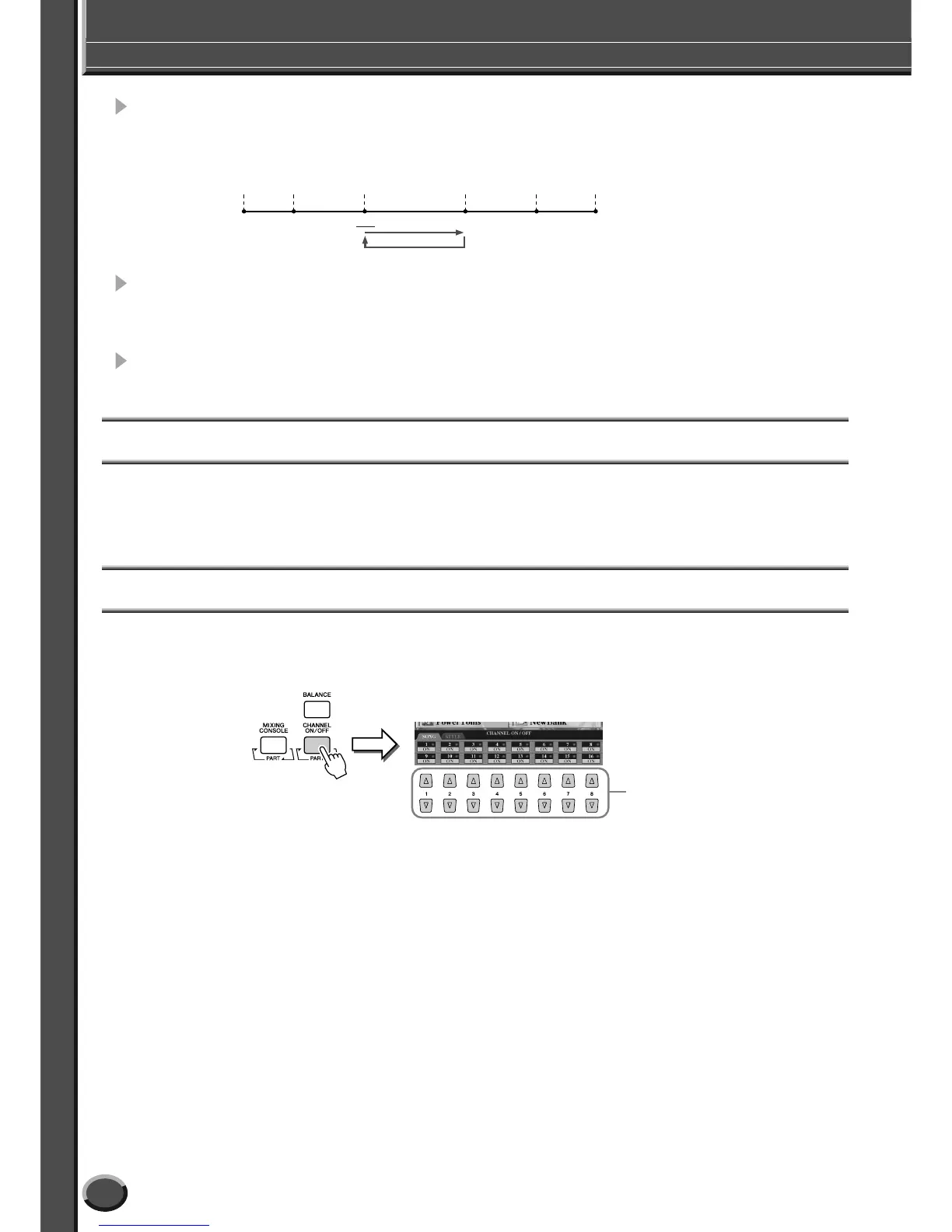
Turning Song Parts On/Off
Press the [CHANNEL ON/OFF] button so that the pop-up window appears at the bottom of the
LCD display. You can turn each part (channel) on or off by using the lower LCD [1]–[8] buttons
during song playback.
Green Red
Top of
the song
[SP1] [SP2] [SP3] [SP4]
End of
the song
Green Green
Pressing the [CHANNEL ON/OFF]
button repeatedly switches among
the style parts (channels) and song
channels.
Press the LCD button cor-
responding to the part
(channel) you wish to turn
on or off.



 To Next Page