Song Playback
Quick Guide
45
Tyros2 Owner’s Manual
3 Stop song playback.
4 Now that you’ve entered markers in step #2 above,
try using them to jump around in the song and navigate among the
song positions.
5 Stop song playback.
■ Using markers in loop playback....................................................................
Try using the markers you registered in step #2 above to play back the separate “sections” of the
song in loops.
1 Go to the top of the song to which you’ve entered the markers and
start it.
The [SP1] button changes from green to red after the [SP1] point has played back.
2 Turn the [LOOP] button on after passing the [SP1] point.
The song plays back up to the [SP2] point, then goes back to [SP1] and loops between
the two points (as shown).
3 Turn the [LOOP] button off by pressing it again.
The loop in step #2 above continues indefinitely until you turn the [LOOP] button off.
When you turn it off, playback continues past the [SP2] point and on to [SP3]. (The
[SP2] button changes from green to red after the [SP2] point is passed.)
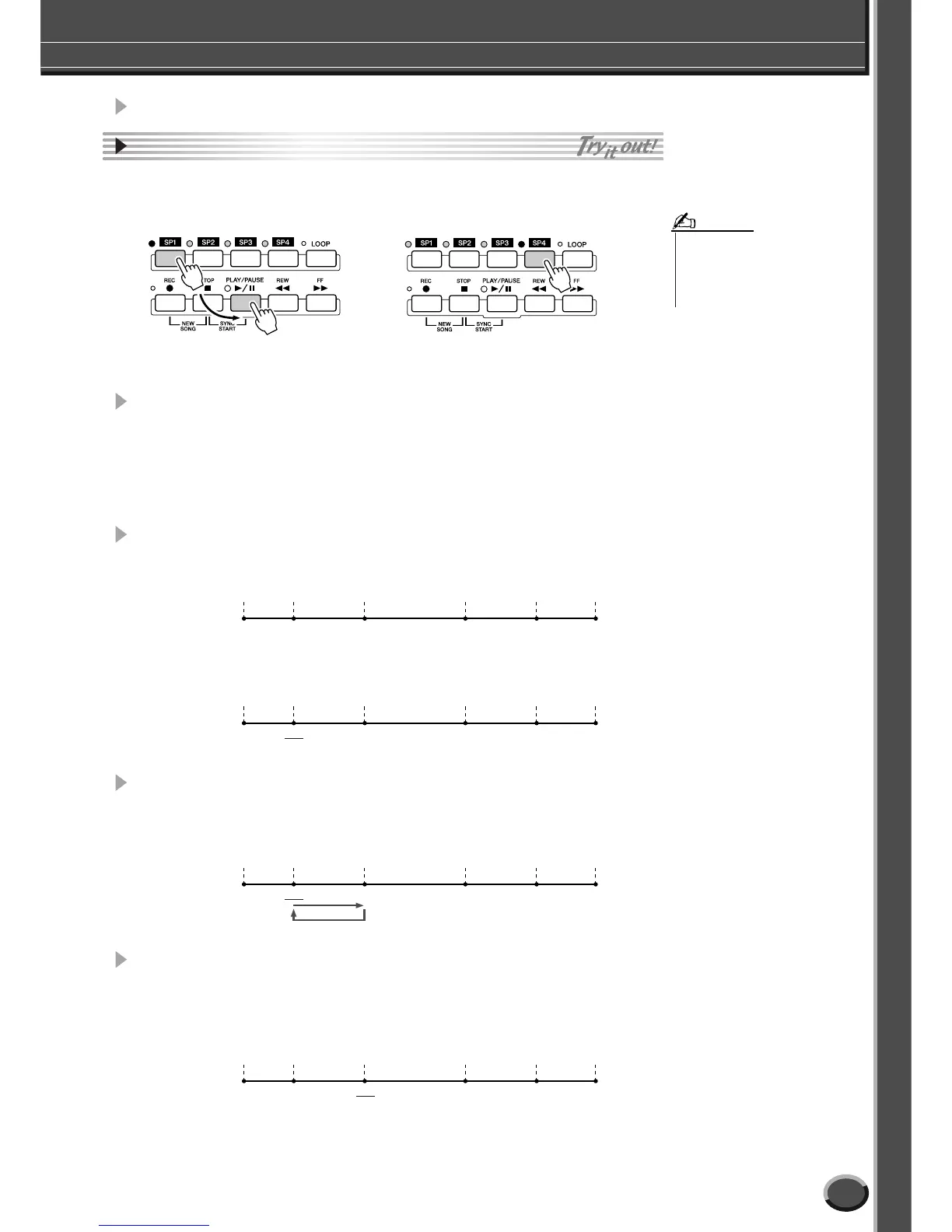
● Jumping to a marker, then starting playback ● Jumping to a marker during playback
In this example, song playback starts from the top of the
measure assigned to the [SP1] button (in step #2 above).
In this example, song playback continues to the end of the current measure, then
jumps to the selected marker—the top of the measure assigned to the [SP4] but-
ton (in step #2 above). You can cancel the jump by pressing the same button
([SP4]) again before the actual jump. (Be careful not to double-click the button.)
• Be careful to press the [SP1]–
[SP4] button only once when
jumping among markers. Pressing
a button twice (double-clicking)
will change the marker position.
NOTE
Top of
the song
[SP1] [SP2] [SP3] [SP4]
End of
the song
Green Green Green Green
Top of
the song
[SP1] [SP2] [SP3] [SP4]
End of
the song
Red Green Green Green
Top of
the song
[SP1] [SP2] [SP3] [SP4]
End of
the song
Red Green Green Green
Green Red
Top of
the song
[SP1] [SP2] [SP3] [SP4]
End of
the song
Green Green



 To Next Page