5-7
5
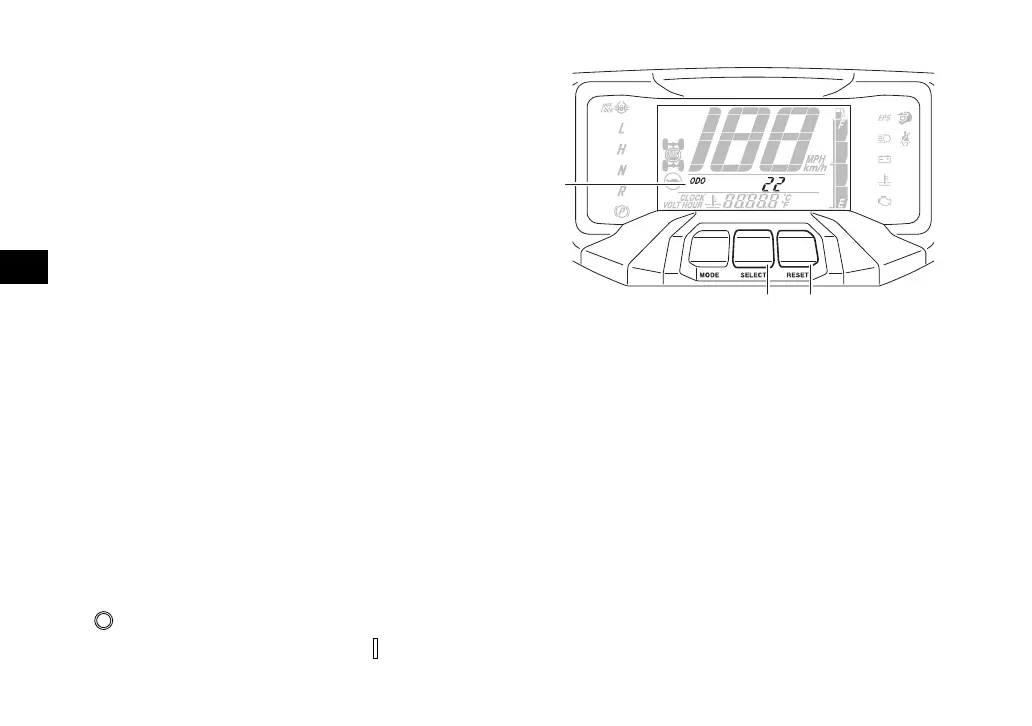
The multi-function meter unit is equipped with
the following:
speedometer
odometer
tripmeters
clock
hour meter
voltage display
coolant temperature display
speed management icon
fuel gauge
brightness control mode
error code display
Speedometer
The speedometer shows the vehicle’s travel-
ing speed. The speedometer can be set to
“MPH” or “km/h”. This also changes the
odometer and tripmeter units between miles
and kilometers. To change the display be-
tween “MPH” and “km/h”, turn the key
to “ ” (off), then while holding the “SELECT”
button pushed, turn the key to “ ” (on).
Odometer and tripmeters
The odometer shows the total distance trav-
eled by the vehicle.
The tripmeters show the distance traveled
since they were last reset. The tripmeters can
be used to record the distance traveled on a
single trip, or to estimate the distance that
can be traveled with a full tank of gas, etc. The
service tripmeter shows the distance traveled
since it was reset at the last maintenance.
1. Odometer/Tripmeter A/Tripmeter B/Service
tripmeter/Error code display
2. “SELECT” button
3. “RESET” button
UBAN12E0.book Page 7 Wednesday, June 30, 2021 2:17 PM







 To Next Page