5-8
5
Push the “SELECT” button to switch between
the odometer “ODO”, the tripmeters “TRIP A”
and “TRIP B”, and the service tripmeter “ ”
in the following order:
ODO → TRIP A → TRIP B → → ODO
To reset a tripmeter, set the display to the
tripmeter you want to reset, then push the
“RESET” button until it is reset.
The odometer will lock at 199999.
The tripmeters will reset and continue
counting after 9999.9 is reached.
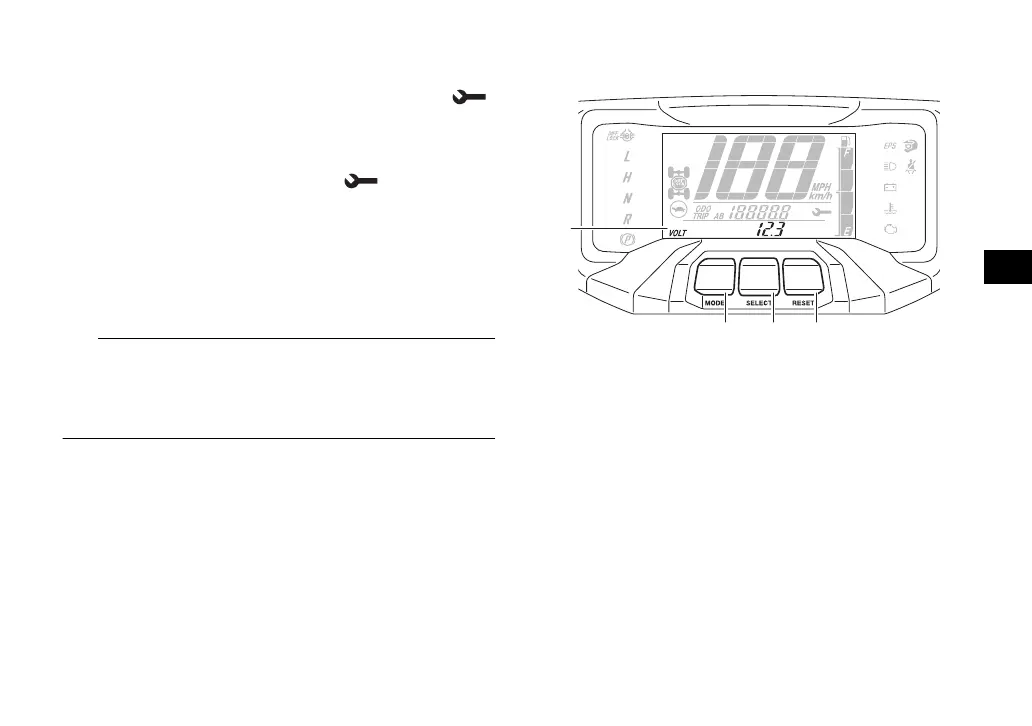
Clock, hour meter, voltage display and
coolant temperature display
The clock displays time in 12-hour format.
The hour meter shows the total time the en-
gine has been running. The voltage display
shows the battery voltage. The coolant tem-
perature display shows the temperature of
the coolant.
1. Clock/Hour meter/Voltage display/Coolant temperature
display
2. “MODE” button
3. “SELECT” button
4. “RESET” button
UBAN12E0.book Page 8 Wednesday, June 30, 2021 2:17 PM








 To Next Page