5-14
5
To limit vehicle top speed
1. Turn the main switch to “ ” (off).
2. Remove the hood. (See page 9-9.)
3. Insert the system key into the Speed
Management System switch and turn it
to “ ”.
4. Remove the system key.
5. Install the hood.
6. Turn the main switch to “ ” (on) and
confirm that the speed management icon
comes on. (See page 5-10.)
The main switch must be turned to “ ” (off)
and then back to “ ” (on) before Speed
Management System changes are recog-
nized by the vehicle.
EWB04210
Before using the system key, stop the en-
gine.
Remove the system key immediately after
use, otherwise the switch may change po-
sitions when driving over bumpy roads or
fall out and be lost.
EBU31391
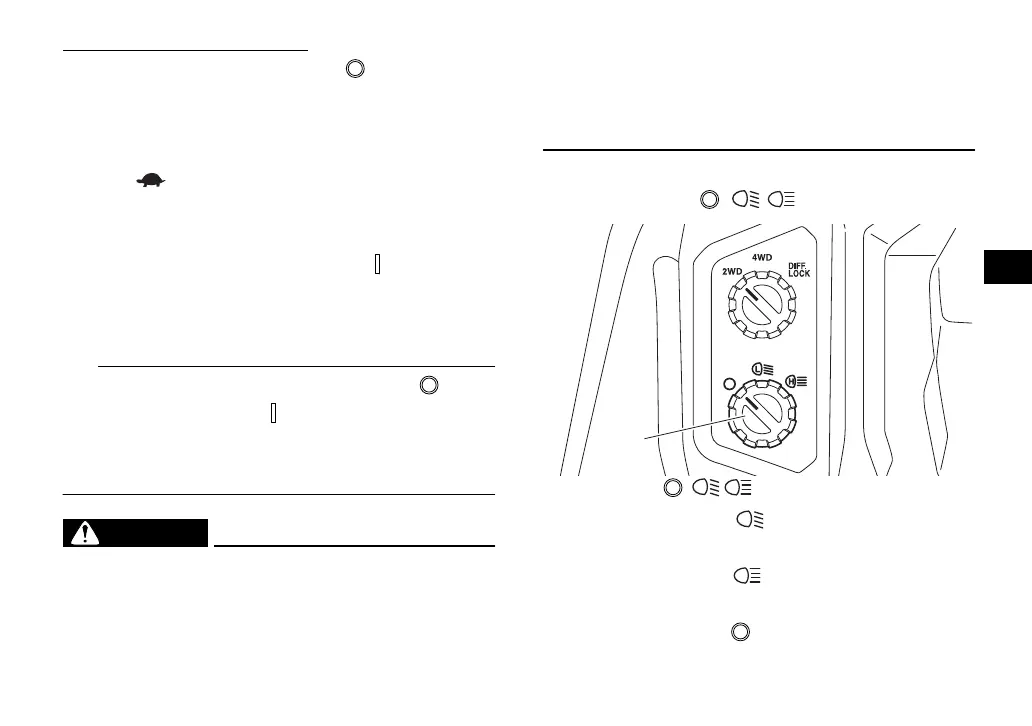
Light switch “ / / ”
Set the switch to “ ” to turn on the low
beam and the taillights.
Set the switch to “ ” to turn on the high
beam and the taillights.
Set the switch to “ ” to turn off the head-
lights and taillights.
1. Light switch “ / / ”
H
1
H
UBAN12E0.book Page 14 Wednesday, June 30, 2021 2:17 PM








 To Next Page