4NBSULFZTZTUFN
4-6
NOTICE
ECA15784
t 6TF B DMPUI XIFO PQFOJOH UIF
TNBSU LFZ DBTF XJUI B TDSFX
ESJWFS%JSFDUDPOUBDUXJUIIBSE
PCKFDUTNBZEBNBHFPSTDSBUDI
UIFTNBSULFZ
t 5BLFQSFDBVUJPOTUPQSFWFOUUIF
XBUFSQSPPG TFBM GSPN CFJOH
EBNBHFE PS DPOUBNJOBUFE CZ
EJSU
t %P OPU UPVDI UIF JOUFSOBM DJS
DVJUT BOE UFSNJOBMT 5IJT NBZ
DBVTFNBMGVODUJPOT
t %POPUBQQMZFYDFTTJWFGPSDFUP
UIF TNBSU LFZ XIFO SFQMBDJOH
UIFCBUUFSZ
t .BLF TVSF UIF CBUUFSZ JT JO
TUBMMFEDPSSFDUMZ$POãSNUIFEJ
SFDUJPO PG UIF QPTJUJWFiw TJEF
PGUIFCB
UUFSZ
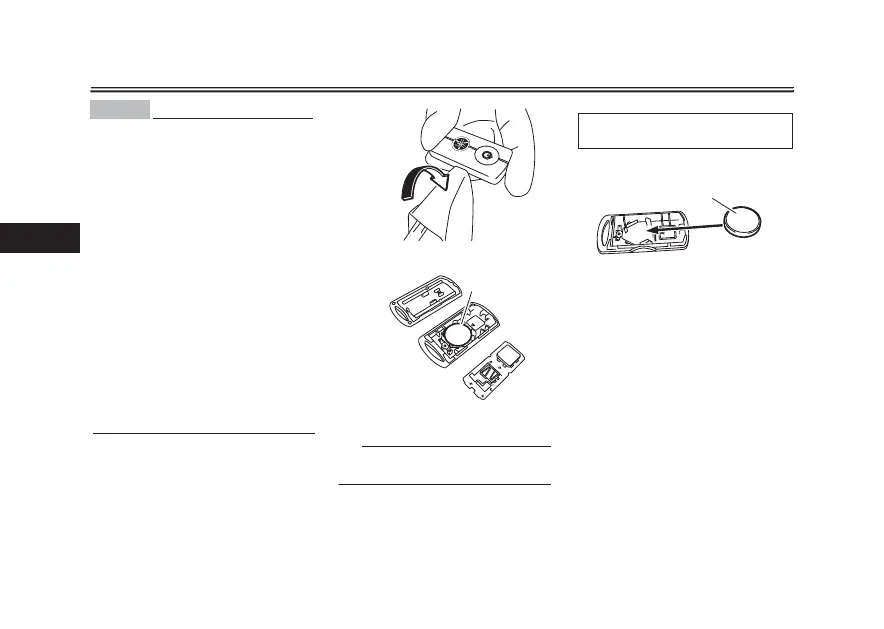
5PSFQMBDFUIFTNBSULFZCBUUFSZ
1. Open the smart key case as
shown.
2. Remove the battery.
5*1
Dispose of the removed battery in ac-
cordance with local regulations.
3. Install a new battery as shown.
Note the polarity of the battery.
4. Gently snap the smart key case
closed.
1. Battery
1
4QFDJãFECBUUFSZ
CR2032
1. Battery
1



 To Next Page