*OTUSVNFOUBOEDPOUSPMGVODUJPOT
5-10
To reset the average speed display,
select it by pushing the “INFO” switch,
and then push the “INFO” switch for
three seconds.
8BSOJOHNFTTBHFGVODUJPO
This function displays a warning mes-
sage corresponding to the current
warning.
“L FUEL”: Appears when the last seg-
ment of the fuel meter starts ashing. If
“L FUEL” is displayed, refuel as soon
as possible.
“H TEMP”: Appears when the top seg-
ment of the coolant temperature meter
starts ashing. If “H TEMP” is dis-
played, stop the vehicle, then stop
the
engine, and let the engine cool.
“ICE”: Appears when the icy road
warning indicator “ ” starts ashing. If
“ICE” is displayed, be careful of icy
roads.
“OIL SERV”: Appears when the oil
change indicator “OIL” starts ashing.
If “OIL SERV” is displayed, change the
engine oil, and then reset the oil chan-
ge indicator and oil change tripmeter.
“V-BELT SERV”: Appears when the V-
belt replacement indicator “V-Belt”
starts ashing. If “V-BELT SERV” is
displayed, replace the V-belt, and then
reset the V-
belt replacement indicator
and V-belt replacement tripmeter.
When there are two or more warnings,
the warning messages are displayed in
the following order:
L FUEL
H TEMP ICE OIL SERV
VBELT SERV L FUEL
EAU1234M
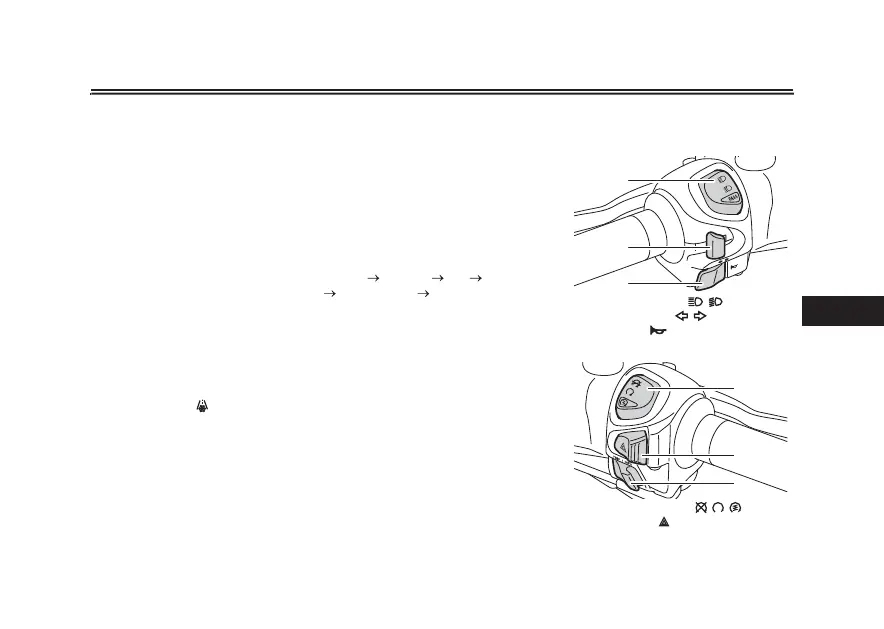
)BOEMFCBSTXJUDIFT
-FGU
3JHIU
1. Dimmer/Pass switch “ / /PASS”
2. Turn signal switch “ / ”
3. Horn switch “ ”
1. Stop/Run/Start switch “ / / ”
2. Hazard switch “ ”
3. “TRIP/INFO” switch
1
2
3
1
2
3



 To Next Page