*OTUSVNFOUBOEDPOUSPMGVODUJPOT
5-14
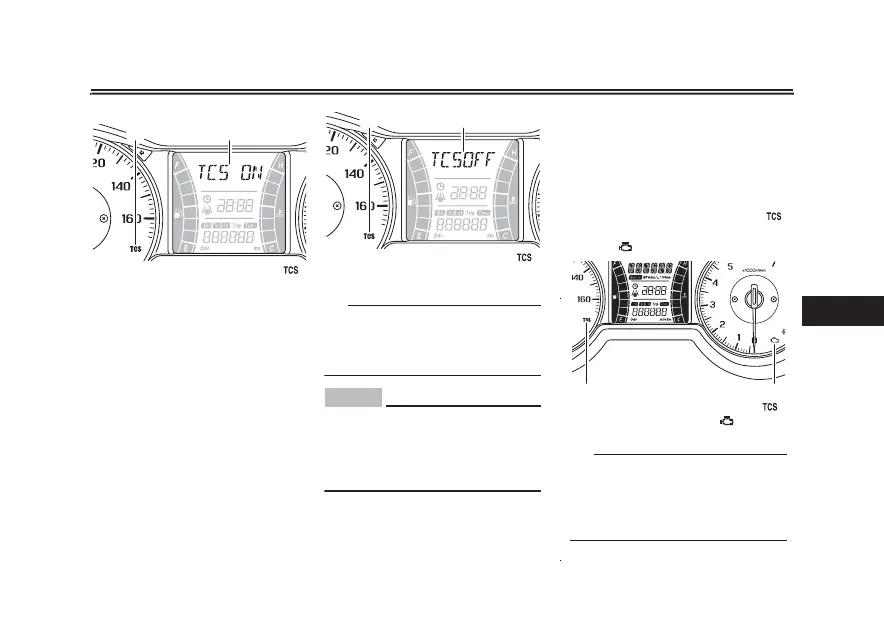
4FUUJOHUIFUSBDUJPODPOUSPMTZTUFN
1. Traction control system indicator light “ ”
2. Traction control system display
1 2
When the vehicle is turned on, traction
control is automatically turned on.
To turn the traction control system off,
use the “INFO” switch to change the
information display to the traction con-
trol system display. Then push the “IN-
FO” switch for three seconds. The
display will show “TCSOFF” , and the
“TCS” indicator light will come on.
3FTFUUJOH UIF USBDUJPO DPOUSPM TZT
UFN
The traction control system will auto-
matically disable under certain condi-
tions; such as when a sensor fault is
detec
ted, or when only one wheel is al-
lowed to rotate for more than a few
5*1
Turn the traction control system off to
help free the rear wheel if the vehicle
gets stuck in mud, sand, or other soft
surfaces.
NOTICE
ECA16801
6TF POMZ UIF TQFDJãFE UJSFT 4FF
QBHF 6TJOH EJGGFSFOU TJ[FE
UJSFTXJMMQSFWFOUUIFUSBDUJPODPOUSPM
TZTUFNGSPNDPOUSPMMJOHUJSFSPUBUJPO
BDDVSBUFMZ
1. Traction control system indicator light “ ”
2. Traction control system display
1 2
seconds. Should this happen, the “ ”
indicator light will come on, and possi-
bly the “ ” warning light, too.
5*1
When the vehicle is on the centerstand,
do not rev the engine for an extended
period of time. Otherwise, the traction
control system will automatically dis-
able and need to be reset.
1. Traction control system indicator light “ ”
2. Engine trouble warning light “ ”
21



 To Next Page