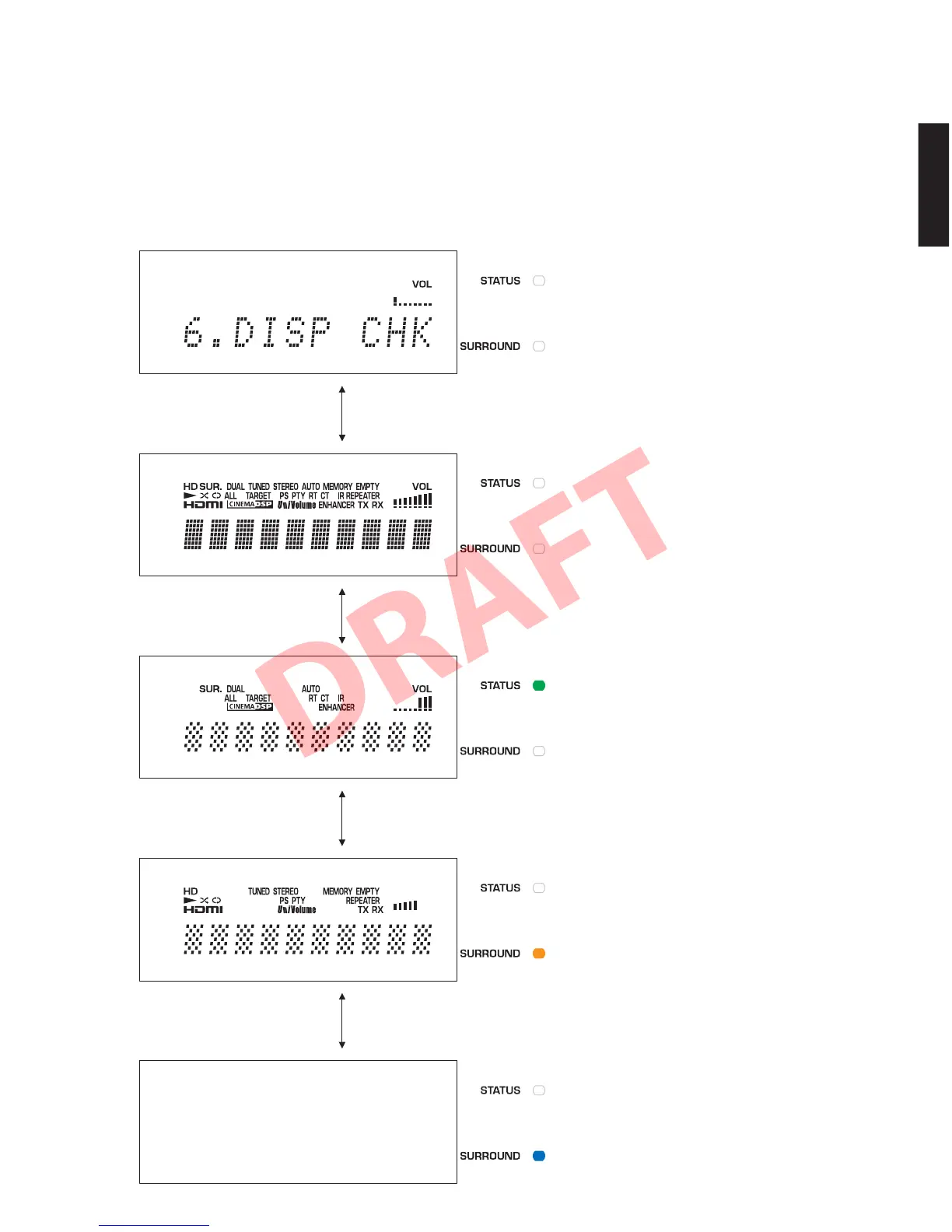
6. FLDISPLAYCHECK
FL 表示とインジケーターの動作を確認します。
サブメニュー操作により、表示状態が以下のように
変わります。
6. FL DISPLAY CHECK
This menu is used to check operations of the FL display
and indicators.
Using the sub-menu, the display condition changes
as shown below.
FL display and indicators /
FL 表示とインジケーター
6-1. ALL SEGMENTS ON / 全セグメント点灯
STATUS indicator: Off
STATUS インジケーター:消灯
* After check, change to next menu at once.
確認後、速やかに次のメニューに変えてください。
Initial display / 初期表示
6-2. LATTICE PATTERN 1 / 格子状点灯 1
STATUS indicator: Lights (Green)
STATUS インジケーター:点灯(緑)
6-3. LATTICE PATTERN 2 / 格子状点灯 2
SURROUND indicator: Lights (Orange)
SURROUND インジケーター:点灯(橙)
6-4. ALL SEGMENTS OFF / 全セグメント消灯
SURROUND indicator: Lights (Blue)
SURROUND インジケーター:点灯(青)
67
YSP-CU4300/YSP-CU3300/NS-WSW160
YSP-CU4300/YSP-CU3300/
NS-WSW160


 To Next Page