EasyManua.ls Logo

Yamato DL410 - User Manual

Yamato DL410
40 pages
Print Icon
To Next Page IconTo Next Page
Loading...
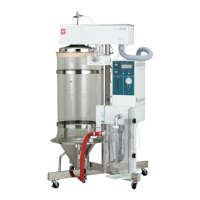
SPRAY DRYER
DL410
- Version 1.3 -
Thank you for purchasing "Spray Dryer, DL410" of
Yamato Scientific Co., Ltd.
To use this unit properly, read this "Instruction Manual"
thoroughly before using this unit.
Keep this instruction manual around this unit for referring
at anytime.
:
WARNING!
Carefully read and thoroughly understand the important
warning items described in this manual before using this
unit.
Yamato Scientific America Inc.

Questions and Answers

  • S
    Scott JensenAug 3, 2025
    How to fix Yamato DL410 when the power won't turn on?
    • E
      elizabeth75Aug 3, 2025
      If the power on your Yamato Laboratory Equipment isn't turning on, try the following: First, ensure the ELB is turned on. If that doesn't work, check the power supply circuit. If problems persist, consider replacing the power cord or the power switch.
  • C
    christina14Aug 13, 2025
    What to do if the blower does not activate on my Yamato DL410 Laboratory Equipment?
    • M
      Michael NelsonAug 13, 2025
      If the blower in your Yamato Laboratory Equipment isn't activating, try these steps: Ensure it's correctly connected. If that doesn't solve the issue, you may need to replace the cart, touch panel, sequencer, thermo regulator, motor, motor substrate, or brush. Alternatively, try maintaining or replacing the part.
  • M
    mloweryAug 25, 2025
    Why does the heater not activate on my Yamato Laboratory Equipment?
    • G
      Gregory WrightAug 25, 2025
      If the heater on your Yamato Laboratory Equipment isn't activating, try these solutions: First, ensure it's correctly connected. Resolve any underlying issues and turn the switch on. Make sure the blower is on before turning on the heater switch. If problems continue, consider replacing the part, touch panel, or sequencer. Alternatively, maintain the part or replace the thermo regulator.

Summary

Safety Precautions

Explanation of Symbols

Describes various symbols used in the manual to ensure safe operation and understanding.

List of symbols

Illustrates and explains various warning, prohibition, and compulsion symbols used in the manual.

Warning Cautions

Details critical warnings regarding flammable gases, grounding, power source, power cord handling, and modifications.

Before using this unit

Precautions when installing the unit

Outlines essential precautions for safely installing the spray dryer unit.

Temperature output terminal

Explains the 4-20mA temperature output signals for outlet and inlet temperatures.

Names and Function of each part

Unit body

Identifies and explains the main components of the spray dryer unit's body.

Operation Panel

Details the functions and controls of the spray dryer's operation panel.

Upper frame and control box

Describes the components and connections on the upper frame and control box.

Operation procedures

Preparations before operation

Lists the steps required to prepare the spray dryer unit before starting operation.

Operation method- Setting of drying chamber

Guides on how to set up the drying chamber for operation.

Operation method- Setting of cycles

Details the procedure for setting operation cycles and timer settings.

Operation Method- Spraying Operation

Explains the steps for the spraying operation, including blower and heater settings.

KEY PANEL Indicator light instruction

Explains the meaning of indicator lights on the KEY PANEL for operational confirmation.

Handling Precautions

Substances that cannot be used

Warns against using explosive, flammable, or hazardous substances with the unit.

Maintenance method

Provides step-by-step instructions for disassembling and cleaning the unit.

Drying method under proper condition

Discusses suitable drying conditions and methods for different samples.

Matters to consider during operation

Lists important operational considerations and potential issues like nozzle clogging.

Maintenance Method

Daily Inspection and Maintenance

Outlines daily checks and maintenance tasks to ensure proper unit function.

Filter Cleaning

Provides instructions for cleaning the blower filter and suction filter periodically.

Monthly maintenance

Details monthly maintenance tasks, specifically checking the earth leakage breaker function.

Long storage and disposal

When the unit is not used for long term; When disposing

Advises on precautions for long-term storage and proper disposal of the unit.

When a trouble occurs

Safety unit and error indications

Explains error indicators and safety unit activations with possible causes and solutions.

Trouble Shooting

Lists common symptoms, their possible causes, and recommended countermeasures.

After Service and Warranty

When Requesting a Repair

Provides information required and steps to follow when requesting a repair service.

Specification

Machine specification

Details the technical specifications of the DL410 Spray Dryer, including dimensions and weight.

Wiring diagram

DL410 Wiring diagram

Presents the electrical wiring diagram for the DL410 model.

System Chart

System Chart

Illustrates the overall system flow and component connections of the spray dryer.

Operating principle

Operating principle

Explains the fundamental operating principles and processes of the spray dryer.

List of replaced parts

List of replaced parts

Provides a comprehensive list of replaceable parts, their specifications, manufacturers, and codes.

List of Dangerous Substances

List of Dangerous Substances

Enlists explosive, oxidizing, flammable, and combustible substances that should not be used.

Yamato DL410 Specifications

General IconGeneral
BrandYamato
ModelDL410
CategoryLaboratory Equipment
LanguageEnglish

Related product manuals