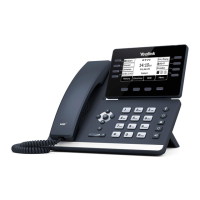
The Yealink T58W is a sophisticated IP phone designed for business communication, offering a blend of traditional phone functionalities with advanced features suitable for modern office environments. It integrates seamlessly with Webex by Cisco, providing a comprehensive communication solution.
Function Description:
The Yealink T58W serves as a primary communication device, enabling users to make and receive calls, manage voicemails, and access various communication features. It supports both internal and external calls, call transfers, conferencing, and call parking. The phone is equipped with a touch-sensitive screen for intuitive navigation and display of call status, messages, time, date, and other relevant data. It also features a speakerphone for hands-free communication and supports headsets for private conversations. The device is designed to be user-friendly, with clear indicators for call status, message status, and system status. It can be integrated with a PC and supports USB devices, including an optional USB camera for video functionalities (though video activation is currently not available). The phone's design allows for both desktop placement and wall mounting, with a reversible tab to secure the handset.
Important Technical Specifications:
- Power LED Indicator: Indicates call status, message status, and phone's system status.
- Solid red: Phone initializing.
- Fast-flashing red: Phone ringing.
- Slow-flashing red: New voicemail messages.
- Solid red for 0.5 seconds and off for 0.3 seconds: Phone entered power-saver mode.
- Touch Screen: Displays information and allows menu navigation.
- Connectivity:
- Headset Port: For connecting a headset.
- PC Port: For connecting a PC through the phone.
- Internet Port: For connecting to the network.
- Handset Port: For connecting the handset.
- DC5V Port: For power supply if Power Over Ethernet (PoE) is not available.
- USB Ports (2): One on top for optional USB camera or other USB devices, one on the back of the phone.
- Keys: Headset Key, Mute Key, Redial Key, Speakerphone Key, Forward/Transfer Key, Hold Key, Message Key, Volume Key, Keypad.
- Speaker: Provides hands-free audio output.
- Hookswitch: Connects/disconnects the phone from a line when the handset is lifted/placed.
- Busy Lamp Field (BLF) Status:
- No Light: User available.
- Fast Flashing RED: User's line ringing.
- Solid RED: User on a call.
- Voicemail PIN Requirements: 6-30 digits, must not contain repeated patterns, last 10 voicemail PINs, reverse of old PIN, phone number or extension, same digit 3 times in a row, 3 ascending or descending digits, or reverse of phone number or extension.
Usage Features:
- Call Handling:
- Placing Calls: Internal (extension number) or external (10-digit number) calls using the active keypad or speaker key.
- Answering Calls: Lift handset, press speaker key, or tap ANSWER on display.
- Forwarding Calls: Tap FORWARD, enter extension, tap FORWARD again.
- Rejecting Calls: Tap REJECT to send ringing call to voicemail.
- Multiple Calls: Place a second call (MORE > NEW CALL), answer a second call (ANSWER, first call holds automatically). Toggle between calls using RESUME or MERGE CALLS.
- Call Transfer: Announced (attended) or Blind transfer. Can transfer from directory or directly to voicemail.
- Adhoc Conference: Add up to four parties to a multi-call conference. Manage participants by muting, disconnecting, or placing on hold.
- Call Park: Place a call on hold in the system and assign it to a Call Park Slot (typically 01, 02, or 03) for retrieval from any telephone in the system. Park Slot Monitor keys (optional) show availability.
- Navigation: Touch screen for viewing items and navigating menus. Swipe left for additional idle screens, tap EXPAND for additional buttons on the HOME Screen. Swipe down from the top for Control and Notification Center.
- Call History: Displays lists of recent incoming (answered/missed), outgoing, and forwarded calls. Users can view call information (date, time, duration) and edit before calling or adding to contacts.
- Directory and Contacts: Access local and remote directories, and blocklist. Local directory for user-programmed numbers, remote phone book for system administrator-programmed numbers.
- Convenience Features:
- Do Not Disturb (DND): Stops all tones and ringing, sends calls to voicemail. Activated by swiping down and tapping DND.
- Paging: Accesses telephone or overhead speakers for announcements.
- Group Pick Up: Pick up a ringing phone in a pre-programmed group.
- Directed Pick Up: Pick up a ringing phone from a "specific" extension.
- Call Forward: Forwards calls to a different number (Always, Busy, No Answer).
- Rings and Indicators: Adjust ring volume while idle or ringing. Select from preprogrammed ring tones.
- Voicemail: Set up voicemail PIN, personalize greetings (Busy, No Answer, Extended Absence), receive voicemail notifications via email or text, and manage message storage. Log in to voicemail from own phone, any company phone, or any external phone. Mailbox commands available for listening, saving, erasing messages, and more.
Maintenance Features:
- Settings and Features: Access various settings including Status Information (IP/MAC addresses, firmware, hardware info, account info, storage, QR code) and Basic Settings (language, time/date, display, sound, PIN, Bluetooth, Wi-Fi, APP accounts, update configuration, analog headset mode, reboot).
- Update Configuration: Apply changes to system settings without restarting the device (when requested by System Administrator).
- Reboot: Performs a complete restart of the device.
- Voicemail PIN Reset: If PIN is incorrectly entered three times, it can be reset via Webex User Hub.
- Email Account Integration (Currently Not Supported): The manual mentions a feature to set up an email account, but explicitly states it is "currently not supported."

 Need help?

 To Next Page
 General