KEY
FEATURE
NAVIGATING A CONNECTED CALL
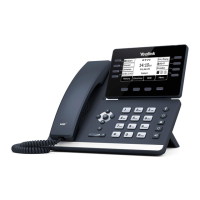
SPEAKER: Press to make or answer any call without lifting the Handset.
+ TO SWITCH TO SPEAKER FROM HEADSET/HANDSET: Press the SPEAKER Key, replace handset in cradle.
+ TO RESUME PRIVACY: Lift the Handset or Press the HEADSET Key.
+ TO END SPEAKERPHONE CALL: Tap the END CALL Key.
MUTE: Turns off your Microphone (Speaker, Handset + Headset) to allow you to speak privately. The caller cannot overhear
office/background noise or conversations.
+ TO USE: Press the MUTE Key. A mute symbol appears on the display, speak privately.
+ TO RESUME CONVERSATION: Press the MUTE Key again.
HOLD: This is an exclusive hold to your telephone. No one else can retrieve it. Refer to Call Park for how to perform a system hold.
++ TO HOLD A CALL: Tap HOLD on the display or the HOLD fixed key.
++ TO RETURN TO CALLER: Tap the LINE Key or Tap the RESUME Key or Press the HOLD fixed key again.
IN CALL SCREEN
1 2 3 4 5 6
1 Invite: Adds another party to the call.
2 Mute: Mutes the active call.
3 Hold: Places the active call on and exclusive HOLD.
4 DSSKey: Returns to the expanded HOME page.
5 More: Displays additional actions:
New Call: puts active call on hold/provides dial tone
Dialpad: Shows the active dialpad
DND: Places the phone on Do Not Disturb
Transfer: Begins the transfer process
Home Page: Returns to the HOME page.
6. End Call: Ends the active call.
IN CALL ACTIONS
Need support? Connect with us at www.northland.net/get-support or
Dial 4357 (HELP) or 315-671-6262 to speak to a Northland Representative
Page 8



 To Next Page
 Loading...